 Atlas
AtlasTimmy Trades
The largest aggressive trades on the major CME futures, marked on the chart at their price, sized by lots and coloured by side.
Timmy Trades marks the biggest aggressive trades on the futures tape right on your candles. Each mark sits at the price it traded, grows with its size in lots, and prints that size on the mark. Buys take your up-candle colour, sells your down-candle colour, and trades whose side couldn't be read show grey.
A mark is one exchange match event: all the fills that share one exchange timestamp on one side. It is not one order. When several same-side events land close together on one bar, they draw as a single burst showing the combined size. Tap or hover any mark for its size, side, price and time.
It covers ES, NQ, MES, MNQ, CL, GC, RTY, YM and SI.
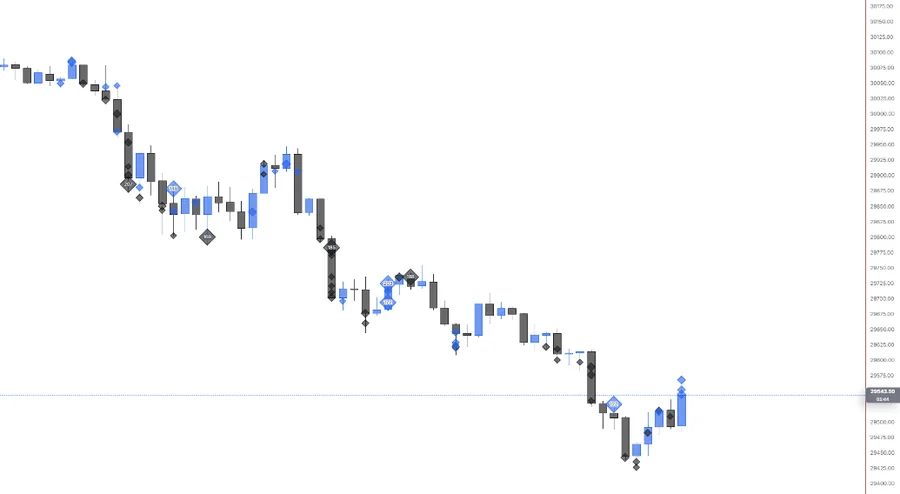
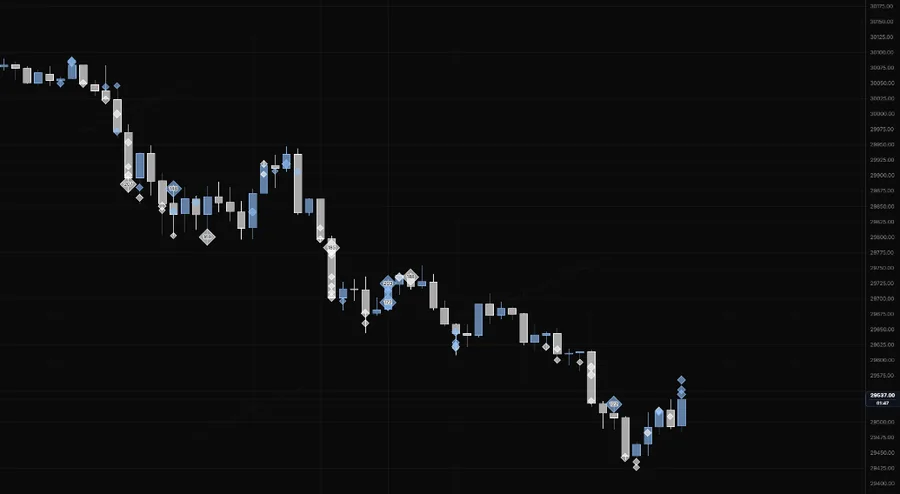
NQ 5m, Oct 16, 2026 · Atlas
Adding the indicator
Open the chart settings panel and use the Add button in the Indicators section. Timmy Trades sits in the Overlay group next to Footprint. One instance per chart pane.
Settings
| Setting | Options | What it controls |
|---|---|---|
| Minimum | Auto (default), Custom | Auto shows only each session's largest events, so a quiet day and a busy one both stay readable. Custom shows every event at or above the size you type, in lots. |
| Bursts | On (default), Off | Merges quick same-side events at nearly the same price on one bar into one mark. Display only: the events themselves never change. |
| Shape | Diamond (default), Square, Circle | The mark's shape. |
| Size | 25% to 200%, 70% by default | Scales every mark down for a quieter chart, or up. |
| Placement | On candle (default), By time | On candle centres each mark on its candle. By time slides it across the bar by when in that bar it traded. The height is the trade price either way. |
| Opacity | 10% to 100% (default) | How strong the marks draw. |
| Fill | Auto (default), Solid, Hollow | How the inside of a mark is painted. |
| Border | Side colour (default), Background, None | What the mark's outline uses. |
| Colors: Source | Candles (default), Custom | Candles follows your candle body and border colours. Custom lets you set fill and border colours per side. |
| Buy and sell fill, border, border width | Colours, opacity, None / 1 / 1.5 / 2 px | Fill opacity 60% and border 100% at 1 px by default. These apply under both sources. |
| Size labels | On (default), Off | Prints the lot size on each mark. |
| Label position | On mark (default), Beside | Where that size prints. |
Reading notes
- Intraday only: 1 minute up to 4 hours. It's not available on daily or wider charts, or on tick and second charts.
- Today streams live, past sessions load from history. If the live feed is down, past sessions still draw and the cog says so. Live marks also need access to the futures data the chart is using.
- A custom size below the instrument's smallest tracked trade shows the same marks as that smallest size. The cog tells you when that's the case.
- Big doesn't mean right. A large print shows where size hit the tape. It says nothing on its own about whether that trader was early, late or hedging something else.
Last updated