 Atlas
AtlasProjection
Sketch where price might go next: a forecast you can grade, a copy of past bars, hand-drawn candles and an angle sector.
Projection tools are for planning. You draw what you think could happen, then let the chart tell you whether it did. None of them predict anything on their own. They show your idea clearly, and the forecast also grades it. Every tool, grouped: Drawing tools overview.
Forecast
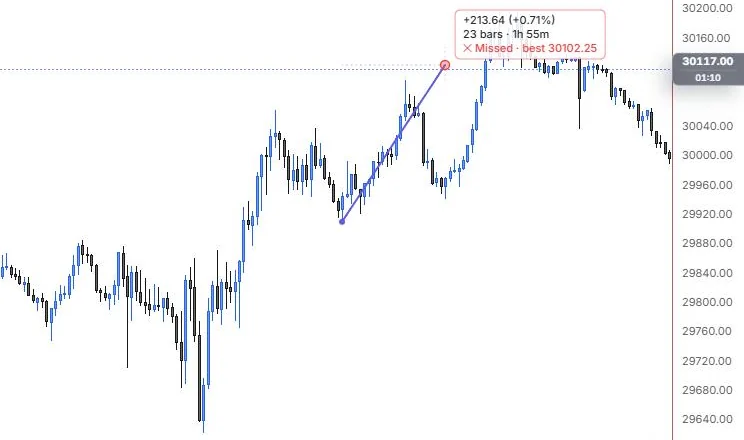
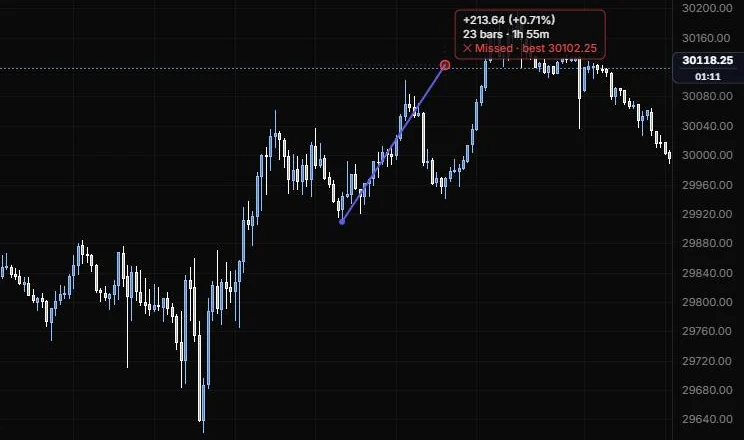
An arrow from a bar to a target price and time, marked as a hit or a miss once price gets there.
NQ 5m, Oct 15, 2026 · Atlas
How to place: two clicks. Click the source bar (by default the anchor snaps to that bar's nearest open, high, low or close), then click the target: the price you expect and the time you expect it by. Open Analysis from the drawing's toolbar to see the direction, the projected change, the horizon in bars and time, the best price reached so far or the hit, and the largest move against you.
Good for: writing your call down before the move, so you can grade yourself honestly afterwards instead of remembering it kindly.
Example: On NQ 5m (Oct 15, 2026), click the 12:25 low, then a target 23 bars later, around 14:20, about 30,123. The label reads +213.64 (+0.71%), 23 bars · 1h 55m, then turns red: "Missed · best 30102.25". The best price before the target time was the 13:40 high, about 21 points short, and the fact that price got there later in the afternoon doesn't count, which is the honest grading this tool is for.
Settings
| Setting | Options | What it does |
|---|---|---|
| Snap source | Nearest OHLC, Close, Off | Where the source anchor lands on its bar while placing. |
| Price change | On or off, default on | Shows the projected move in the label. |
| Bars and Time | On or off, both default on | Shows the horizon in bars and in clock time. |
| Hit / miss | On or off, default on | Hit: price traded through the target before the target time. Miss: a bar closed past the target time without it. |
| Hit colour and Miss colour | Default green and red | The label colours for each outcome. |
| Target price | Line role: show or hide, solid/dashed/dotted, width, opacity (default dotted, 1 px, 50%) | A guide from the source bar to the target price. |
| Target time | Line role (default dotted, 1 px, 35%) | A guide at the target time. |
| Other options | Label size (8 to 28 px, default 11), bold, text colour, background (default on), background colour and opacity, border | How the label looks. |
Bars pattern
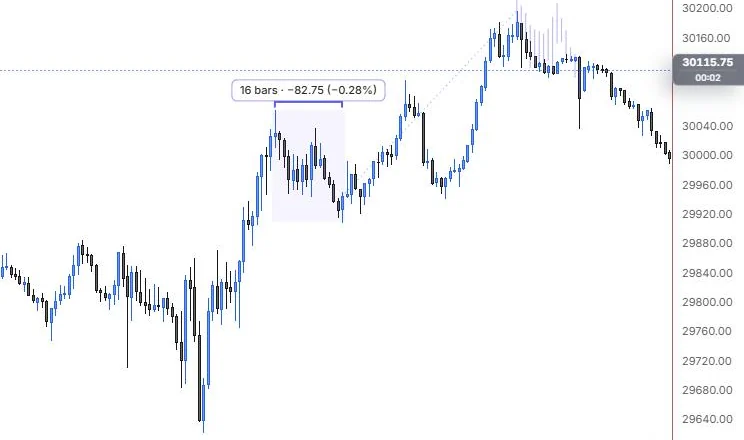
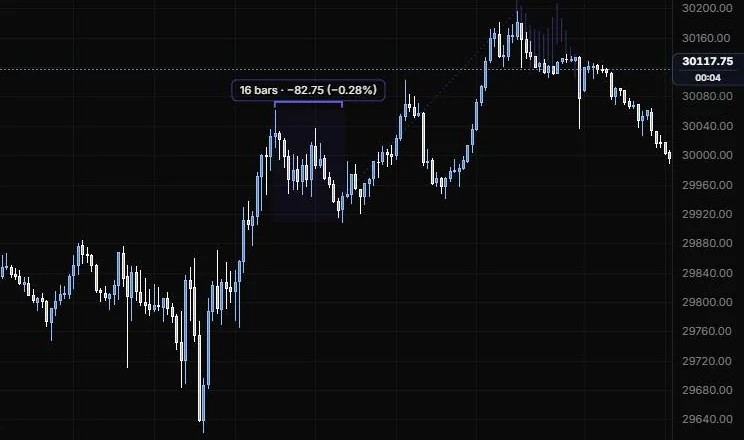
A copy of a run of real bars, pasted somewhere else on the chart.
NQ 5m, Oct 15, 2026 · Atlas
How to place: two or three clicks. Click the first bar of the pattern, then the last bar. Then click where the copy should start (its first open sits there), or press Enter to place it right after the range.
Good for: asking "what if today does what Tuesday did?" Paste last week's opening drive onto today's open and see whether the levels line up.
Example: On NQ 5m (Oct 15, 2026), click the 11:15 bar, then the 12:25 bar, then the 15:45 high to place the copy. The source is shaded and labelled 16 bars · -82.75 (-0.28%), and the same 16 bars appear as faded ghost candles starting at the top. It's a way to ask "what if the afternoon pulls back like the midday did?" and see where that would land, without pretending it will.
Settings
| Setting | Options | What it does |
|---|---|---|
| Draw as | Candles, HL bars, Line (close) | How the copy is drawn. |
| Flip vertically | On or off, default off | Inverts the moves, so rallies become declines. |
| Mirror | On or off, default off | Reverses time, so the last bar comes first. |
| Scale moves | By points, By percent | Percent keeps the proportions when the copy sits at a different price level. |
| Up colour and Down colour | Default auto | Candle colours for the copy. |
| Copy opacity | 5% to 100%, default 45% | How faint the copy is, so you don't mistake it for real bars. |
| Close line | Line role (default solid, 1.5 px) | The line in Line (close) mode. |
| Shade range | On or off, default on; opacity 0 to 50%, default 6% | Shades the source bars you copied. |
| Labels | On or off, default on | Bars and change of the source and of the copy. |
| Link | Line role (default dotted, 1 px, 50%) | A guide from the range's last close to the copy's first open. |
| Other options | Label size (8 to 28 px, default 11), bold, text colour, background (default off), border | How the labels look. |
Ghost feed
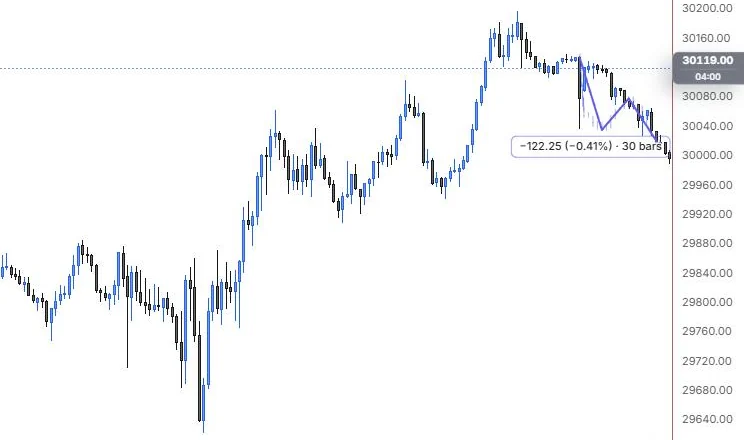
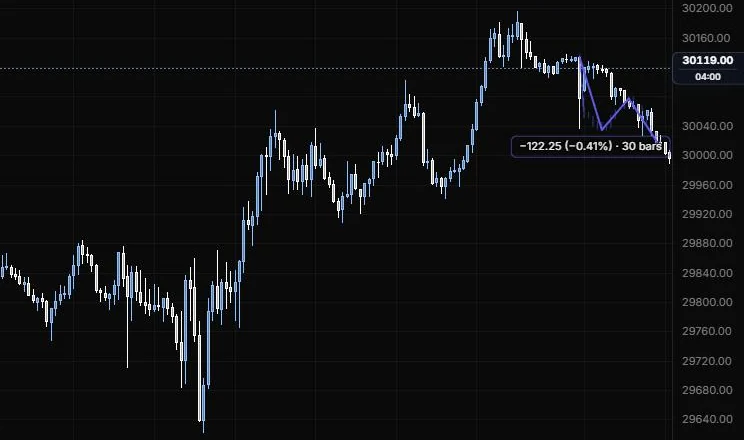
Hand-drawn candles: click a path and the tool fills it with made-up bars.
NQ 5m, Oct 15, 2026 · Atlas
How to place: two to 20 clicks. Click where the path starts, then each turning point. To finish, press Enter, double-click or tap the last point again. The tool draws candles along the path, one per chart bar between your points by default.
Good for: sketching a scenario so it looks like a chart, for a trade plan or a teaching example. The candles are invented, not data, and the faint opacity keeps them from passing for real bars.
Example: On NQ 5m (Oct 15, 2026), click the evening high, then a dip, a bounce and a lower low, and press Enter. The faint ghost candles walk that four-point path down with wicks and some wobble, and the label reads -122.25 (-0.41%) · 30 bars. They're invented bars for a plan you're sketching, so change Variation if you want a different shuffle of the same path.
The candles are seeded, so the same drawing paints the same bars every time and on every device.
Settings
| Setting | Options | What it does |
|---|---|---|
| Draw as | Candles, HL bars, Line (close) | How the ghost bars are drawn. |
| Bars per leg | Match the chart, Fixed count | Match the chart draws one candle per chart bar between the points. |
| Fixed count | 1 to 100, default 8 | Candles per leg when Bars per leg is Fixed count. |
| Wicks | 0 to 3×, default 0.5× | Wick size, in multiples of this chart's typical bar range. |
| Noise | 0 to 2×, default 0.35× | Close-to-close wobble around the path. 0 is a straight walk. |
| Variation | 1 to 999, default 1 | Change it to reshuffle the candles. |
| Up colour and Down colour | Default auto | Candle colours. |
| Opacity | 5% to 100%, default 50% | How faint the ghost bars are. |
| Close line | Line role (default solid, 1.5 px) | The line in Line (close) mode. |
| Path line | On or off, default on | The path through your points, in the style bar's line. |
| Label | On or off, default on | The readout label. |
| Other options | Label size (8 to 28 px, default 11), bold, text colour, background (default off), border | How the label looks. |
Sector
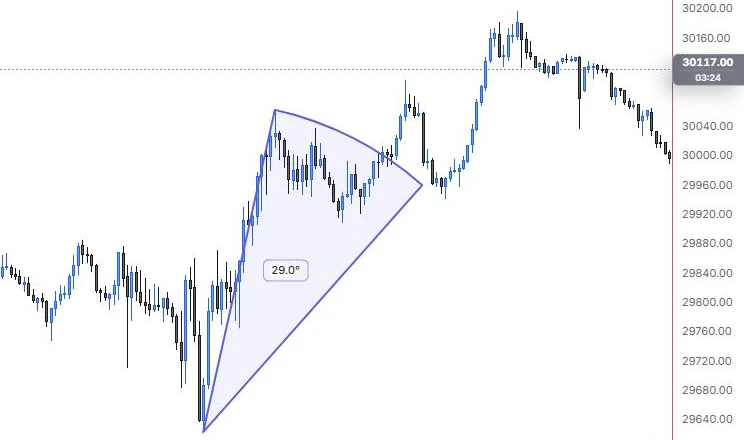
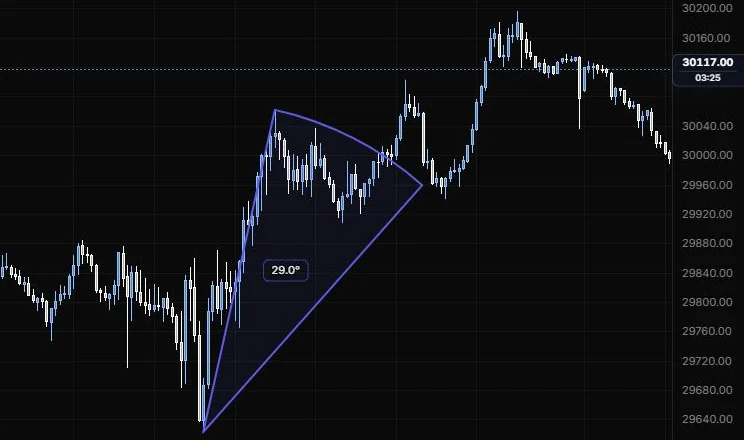
A pie slice from a centre point, for marking an angle or a fan of possible paths.
NQ 5m, Oct 15, 2026 · Atlas
How to place: three clicks. Click the centre, then the first radius (this sets the size), then the second radius. The slice fills the angle between them.
Good for: framing the range of slopes you'd accept for a move, for example "anything between a slow grind and a straight shot".
Example: On NQ 5m (Oct 15, 2026), click the 9:55 low as the centre, then the 11:15 high for the first radius, then aim the second at the 12:25 pullback. The slice opens 29.0° between the steep run to the high and the gentler line through the pullback, so it frames the range of slopes the morning traded in. The angle is measured on screen, and Radius moves adds the price change and bars to each edge.
Settings
| Setting | Options | What it does |
|---|---|---|
| Sweep | Minor (less than 180°), Major (more than 180°) | Which side of the two radii is filled. |
| Fill | On or off, default on; opacity 0 to 50%, default 8% | Shades the slice. |
| Full circle | Line role, default off (dotted) | The rest of the circle, as a guide. |
| Angle | On or off, default on | Shows the angle. It's measured on screen, so it changes when you rescale the chart. |
| Radius moves | On or off, default off | Price change and bars from the centre to each radius. |
| Other options | Label size (8 to 28 px, default 11), bold, text colour, background (default off), border | How the label looks. |
Last updated