 Atlas
AtlasMeasure
Rulers for how far price moved, how long it took, or both at once.
The measure tools answer the two questions you ask all day: how many points was that move, and how long did it take. Drag one across a leg and read the box. Every tool, grouped: Drawing tools overview.
Price range
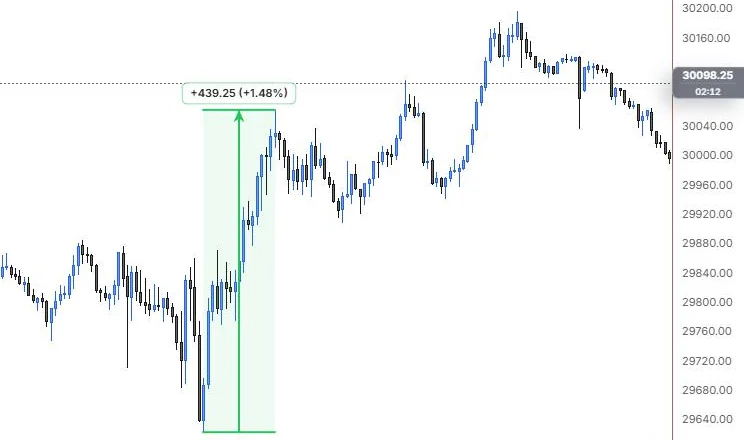
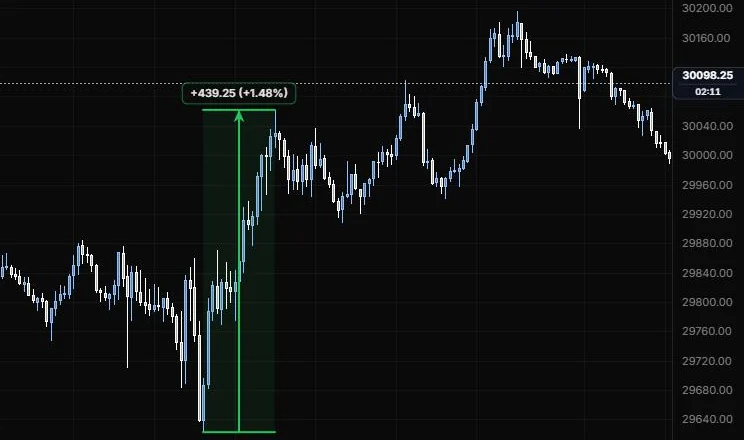
A vertical ruler between two prices that reads the move in points and percent.
NQ 5m, Oct 15, 2026 · Atlas
How to place: two clicks. Click the price you're measuring from, then the price you're measuring to. The band and the arrow run between them, and the label shows the change.
Good for: sizing a leg before you set a target, or checking how big the overnight range was compared with yesterday's.
Example: On NQ 5m (Oct 15, 2026), click the 9:55 low, then the 11:15 high. The label reads +439.25 (+1.48%), green because the move is up, and the band shades the whole leg. If you think in ticks, turn on Ticks and the same move reads in quarter-point ticks too.
Settings
| Setting | Options | What it does |
|---|---|---|
| Colour by direction | On or off, default on | Green when the second price is higher, red when it's lower. Off uses the line colour. |
| Fill | On or off, default on | Shades the band between the two prices. |
| Fill opacity | 0 to 50%, default 8% | How strong the shading is. |
| Arrow | Line role: show or hide, solid/dashed/dotted, width, opacity (default solid, 2 px) | The measurement arrow and its tip. |
| Percent change | On or off, default on | Adds the move as a percent of the starting price. |
| Ticks | On or off, default off | Adds the move in ticks. |
| Tick size | 0 to 1000, default 0 | The tick used for that count. 0 uses the chart's price precision. |
| Label background | On or off, default on | Puts the readout on a small chip. |
| Label border | Line role (default solid, 1 px, 50%) | The hairline round the chip. |
| Size and Opacity | 8 to 24 px, default 11; 10% to 100%, default 100% | Label text size and how see-through it is. |
Date range
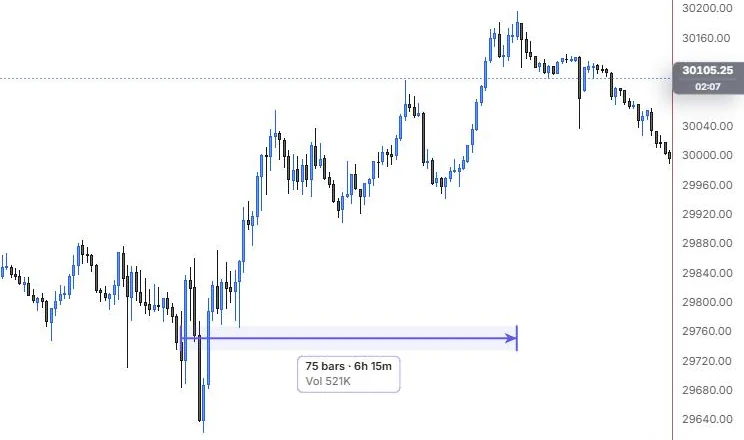
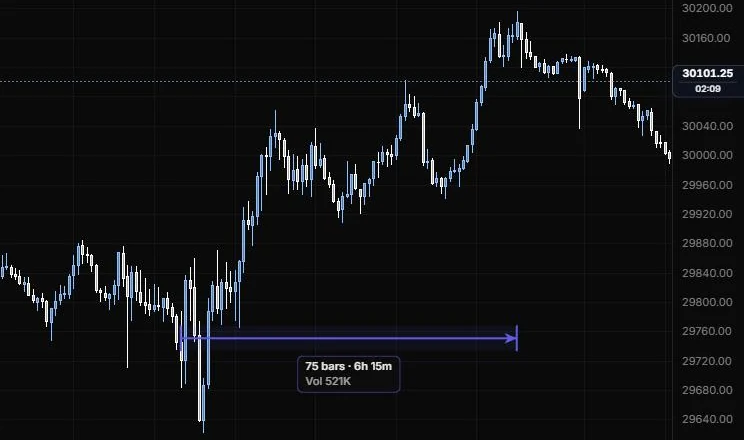
A horizontal ruler between two times that reads bars, duration and volume.
NQ 5m, Oct 15, 2026 · Atlas
How to place: two clicks. Click the time you're measuring from, then the time you're measuring to.
Good for: timing a consolidation, or seeing how much volume went through during a window like the first 30 minutes.
Example: On NQ 5m (Oct 15, 2026), click the 9:30 open, then the 15:45 high. The label reads 75 bars · 6h 15m with Vol 521K, the summed volume of every bar in between. Measure a shorter window, like the 11:15 to 13:30 chop, and you can compare how much traded there against the whole day.
Settings
| Setting | Options | What it does |
|---|---|---|
| Fill | On or off, default on | Shades the band between the two times. |
| Fill opacity | 0 to 50%, default 8% | How strong the shading is. |
| Arrow | Line role: show or hide, solid/dashed/dotted, width, opacity (default solid, 2 px) | The measurement arrow and its tip. |
| Bar count | On or off, default on | How many bars the range covers. |
| Duration | On or off, default on | The clock time between the two points. |
| Volume | On or off, default on | The summed bar volume across the range. |
| Label background | On or off, default on | Puts the readout on a small chip. |
| Label border | Line role (default solid, 1 px, 50%) | The hairline round the chip. |
| Size and Opacity | 8 to 24 px, default 11; 10% to 100%, default 100% | Label text size and how see-through it is. |
Date & price range
One box that reads the price move and the time it took together.
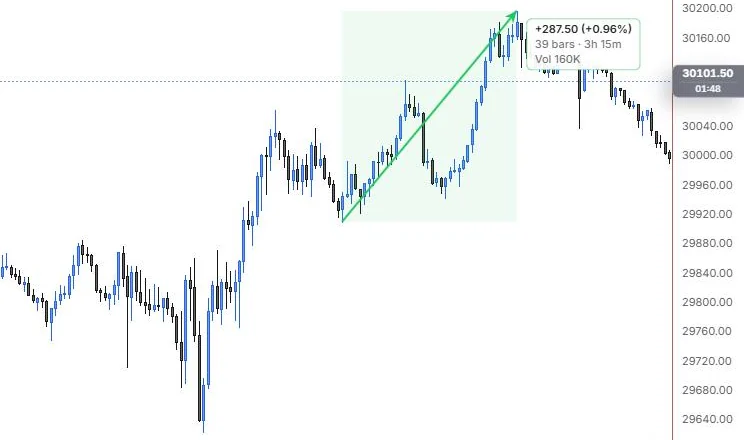
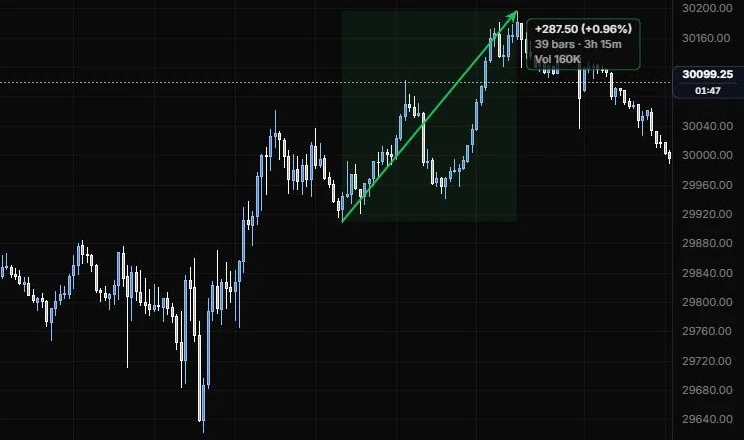
NQ 5m, Oct 15, 2026 · Atlas
How to place: two clicks. Click where the move starts, then where it ends. The box covers both the price and the time between them.
Good for: the quick "how far, how fast" check on a single leg, so you can compare this morning's drive with yesterday's.
Example: On NQ 5m (Oct 15, 2026), click the 12:25 low, then the 15:45 high. One label reads +287.50 (+0.96%), 39 bars · 3h 15m and Vol 160K, so the afternoon leg is measured in price, time and volume at once. Switch Arrows to Price & time if you'd rather see two straight arrows than the one diagonal.
Settings
| Setting | Options | What it does |
|---|---|---|
| Colour by direction | On or off, default on | Green for an up move, red for a down move. Off uses the line colour. |
| Fill | On or off, default on; opacity 0 to 50%, default 8% | Shades the box. |
| Arrows | Diagonal, Price & time, Both, None | Which measurement arrows are drawn: one corner to corner, one for price and one for time, all of them, or none. |
| Arrow style | Line role: show or hide, solid/dashed/dotted, width, opacity (default solid, 2 px) | The arrows and their tips. |
| Percent change | On or off, default on | Adds the move as a percent. |
| Ticks | On or off, default off; tick size 0 to 1000, default 0 (price precision) | Adds the move in ticks. |
| Bar count | On or off, default on | How many bars the box covers. |
| Duration | On or off, default on | The clock time between the two points. |
| Volume | On or off, default on | The summed bar volume across the box. |
| Other options | Label background, label border, size (8 to 24 px, default 11), opacity | How the readout chip looks. |
Last updated