 Atlas
AtlasFutures & Sessions
Opening range, initial balance, prior-day and overnight levels, a tick and dollar ruler, and a session VWAP, all built from the session you click.
These tools know how a futures day is put together: the Globex session, the regular-hours open and close, the overnight. Click one bar and they work out the session it belongs to from the chart's own bars, then draw the levels for that day. Every tool, grouped: Drawing tools overview.
Opening range
The high, low and midpoint of the first minutes after the open, with optional extensions.
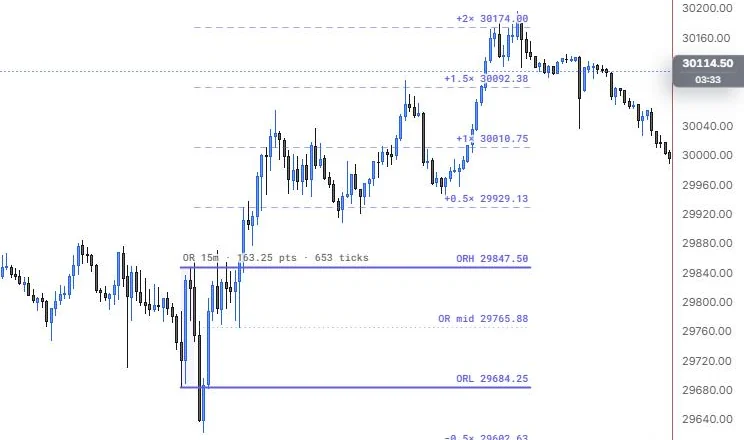
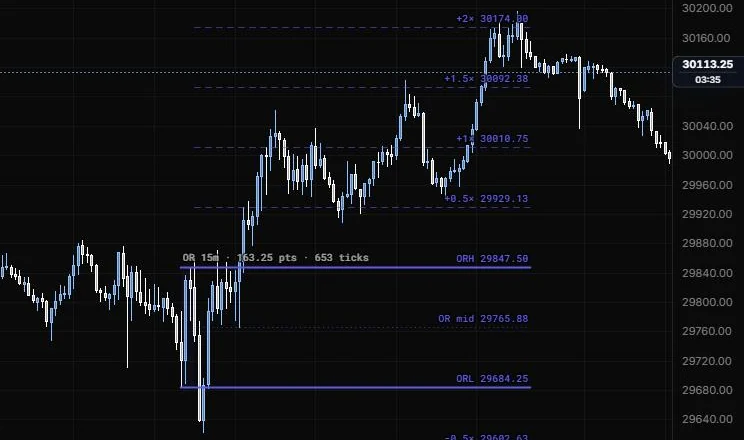
NQ 5m, Oct 15, 2026 · Atlas
How to place: one click, on any bar of the session you want. The tool finds that session's open, takes the high and low of every bar in the window (15 minutes by default) and extends them to the RTH close. Open Analysis from the drawing's toolbar to see the range in points and ticks, the bar count, the first close outside the range, how far price extended beyond it, and how this range's width compares with up to 10 earlier sessions' ranges on the chart.
Good for: framing the first move of the day. A lot of traders treat the opening range as the line between "still deciding" and "picked a direction".
Example: On NQ 5m (Oct 15, 2026), click any bar of the session. The default 15m window takes the 9:30, 9:35 and 9:40 bars: ORH 29,847.50, ORL 29,684.25 and a dotted midpoint at 29,765.88, with the readout OR 15m · 163.25 pts · 653 ticks. The dashed extensions stack up at +0.5× (29,929.13), +1× (30,010.75), +1.5× (30,092.38) and +2× (30,174.00), so you can see the 9:55 flush under ORL stopping short of the -0.5× and the afternoon rally running past +2×.
The window is built from whole bars. On a 5m chart a 5m or 15m range is exact. On a 30m chart, a 15m range covers the whole first bar, and the Analysis panel tells you so. Use a 1m chart when you need the exact range.
Settings
| Setting | Options | What it does |
|---|---|---|
| Length | 5m, 15m, 30m, 1h, Custom | How long the opening range runs from the open. |
| Custom length | 1 to 600 min, default 15 | The window when Length is Custom. |
| Starts at | RTH open, Session (Globex) open | Whether the range starts at the regular-hours open or the overnight open. |
| Extend to | RTH close, Session close, Chart edge | How far right the lines run. |
| Multiples | ×0.5, ×1, ×1.5, ×2 on; ×2.5, ×3 off by default | Extension levels, as multiples of the range beyond its high and low. |
| Side | Both, Above, Below | Which side the extensions draw on. |
| Extension lines and Colour | Line role (default dashed, 1 px, 55%); colour default auto | How the extensions look. |
| Midpoint | Line role (default dotted, 1 px, 60%) | The range's 50% line. The high and low use the style bar. |
| Range box | On or off, default on; box fill 0 to 30%, default 6% | Shades the opening window itself. |
| Market | CME equity index (ES NQ RTY YM), NYMEX energy (CL), COMEX metals (GC SI), CBOT Treasuries (ZN ZB), CME FX (6E), US equities and ETFs (09:30 to 16:00 ET), Custom hours | Sets the trading day and RTH hours. Custom hours adds a zone, day start, RTH open and RTH close. |
| Tick size | Auto (from the bars), or a contract (ES, MES, NQ, MNQ, YM, MYM, RTY, M2K, CL, MCL, GC, MGC, SI, ZN, ZB, 6E), Custom | Used for the range in ticks. |
| Other options | Chart clock (default Auto), level labels, prices, range readout, label side (default Right), text size and opacity | Timezone pinning and how the labels look. |
Initial balance
The high and low of the first hour of regular trading, with extensions.
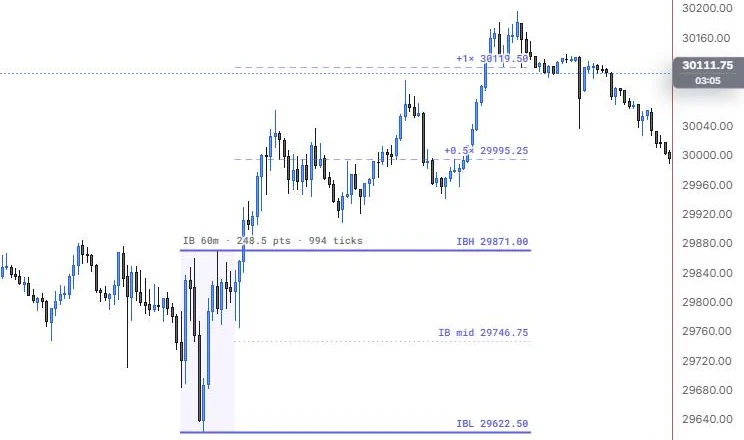
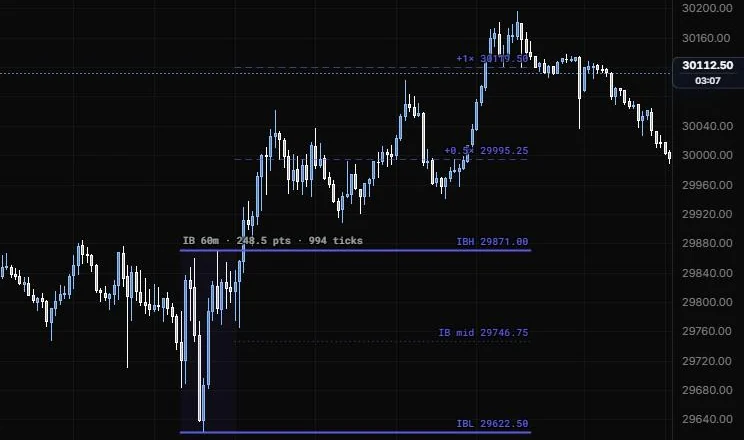
NQ 5m, Oct 15, 2026 · Atlas
How to place: one click, on any bar of the session. It draws the IB high, low and midpoint for that session and extends them to the RTH close. Open Analysis to see the range, the first close outside, how far price extended, whether range extension happened up, down, both sides or not at all, and the IB's width against up to 10 earlier sessions.
Good for: the classic market profile read of the day. Price that stays inside the IB, breaks one side, or breaks both tells you different things about the session you're in.
Example: On NQ 5m (Oct 15, 2026), click any bar of the session. The IB covers 9:30 to 10:30 ET and reads IB 60m · 248.5 pts · 994 ticks, with IBH 29,871.00, the midpoint at 29,746.75 and IBL 29,622.50 (the 9:55 day low sits inside the first hour). Price leaves through the top only, so the upside extensions at +0.5× (29,995.25) and +1× (30,119.50) are the reference levels for the rest of the day. Open Analysis for the first close outside and how far the extension ran.
This drawing marks one session, the one you click. The IB fib indicator is a separate tool under Indicators.
Settings
| Setting | Options | What it does |
|---|---|---|
| Length | 30m, 1h, 90m, 2h, Custom | How long the IB runs from the open. The first hour of RTH is the classic IB. |
| Custom length | 1 to 600 min, default 60 | The window when Length is Custom. |
| Starts at | RTH open, Session (Globex) open | Where the IB window starts. |
| Extend to | RTH close, Session close, Chart edge | How far right the lines run. |
| Multiples | ×0.5, ×1, ×1.5, ×2, ×3 on; ×4 off by default | Extension levels beyond the IB high and low. |
| Side | Both, Above, Below | Which side the extensions draw on. |
| Extension lines and Colour | Line role (default dashed, 1 px, 55%); colour default auto | How the extensions look. |
| Midpoint | Line role (default dotted, 1 px, 60%) | The IB's 50% line. The high and low use the style bar. |
| Range box | On or off, default on; box fill 0 to 30%, default 6% | Shades the IB window itself. |
| Market | CME equity index (ES NQ RTY YM), energy, metals, Treasuries, FX, US equities and ETFs, Custom hours | Sets the trading day and RTH hours. |
| Tick size | Auto (from the bars), a contract, or Custom | Used for the IB in ticks. |
| Other options | Chart clock (default Auto), level labels, prices, range readout, label side, text size and opacity | Timezone pinning and how the labels look. |
Session levels
Prior day high, low and close, the overnight high and low, and the RTH open, for the day you click.
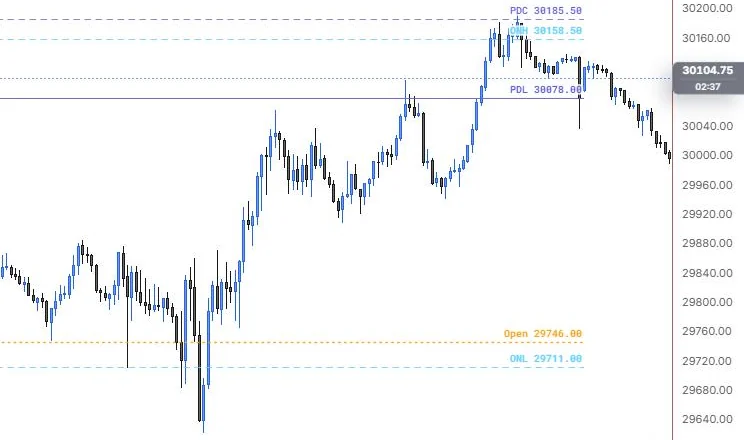
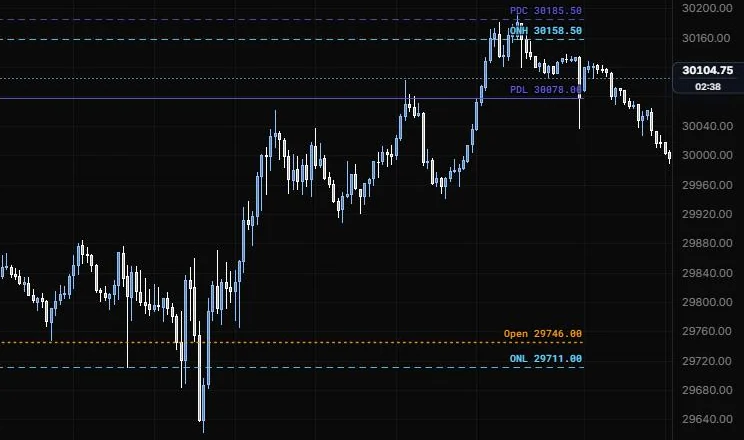
NQ 5m, Oct 15, 2026 · Atlas
How to place: one click, on any bar of the day. The tool finds the previous session in the loaded bars and draws PDH, PDL and PDC from its regular hours, ONH and ONL from the overnight, and today's RTH open. Open Analysis to see where the open sat against the prior day, the gap from PDC in points, and whether the overnight stayed inside the prior range or took out PDH or PDL.
Good for: your premarket map. These are the levels most futures traders have on screen before the bell, and having them from one click saves drawing six lines by hand.
Example: On NQ 5m (Oct 15, 2026), click any bar of the day. You get PDC dashed at 30,185.50, PDL solid at 30,078.00, ONH at 30,158.50 and ONL at 29,711.00 in light blue, and the 9:30 open in orange at 29,746.00 (PDH sits above this view). The open printed well under PDL, outside the prior day's range, and you can watch the afternoon rally climb back through PDL and ONH to just above PDC.
This drawing marks one day, the one you click. The Session Levels indicator is a separate tool under Indicators.
Settings
| Setting | Options | What it does |
|---|---|---|
| PDH, PDL | Line role, default solid, 1 px, 90% | Prior RTH high and low. |
| PDC | Line role, default dashed, 1 px, 75% | Prior RTH close (the last RTH bar's close). |
| Settle ≈ | Line role, default off (dotted) | The close of the last bar ending at the settlement time. The official settlement is a window VWAP, so this can differ by a tick or two. |
| Colour (prior day) | Default auto | Colour of the prior-day lines. |
| ONH, ONL | Line role, default dashed, 1 px, 85%; colour default light blue | Overnight high and low. |
| Overnight from | Session open, Prior RTH close | Session open counts from Globex 17:00 CT. Prior RTH close also counts the bars after yesterday's close. |
| RTH open | Line role, default dotted, 1.5 px; colour default orange | Today's regular-hours open. |
| Lines start | Session open, RTH open | Where the lines begin on the left. |
| Extend to | Session close, Chart edge | How far right the lines run. |
| Session divider | On or off, default on | A vertical line at the session open, in the style bar's style. |
| Market | CME equity index (ES NQ RTY YM), energy, metals, Treasuries, FX, US equities and ETFs, Custom hours | Sets the trading day and RTH hours. |
| Other options | Chart clock (default Auto), level labels, prices, label side, text size and opacity | Timezone pinning and how the labels look. |
Tick ruler
A ruler that reads a move in points, ticks and dollars for the contract you trade.
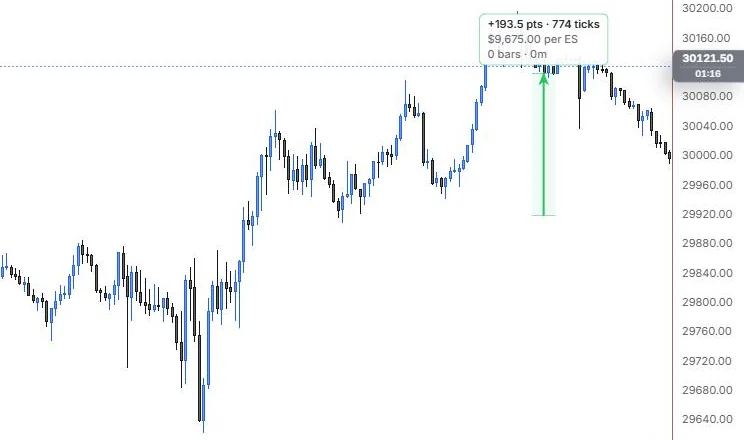
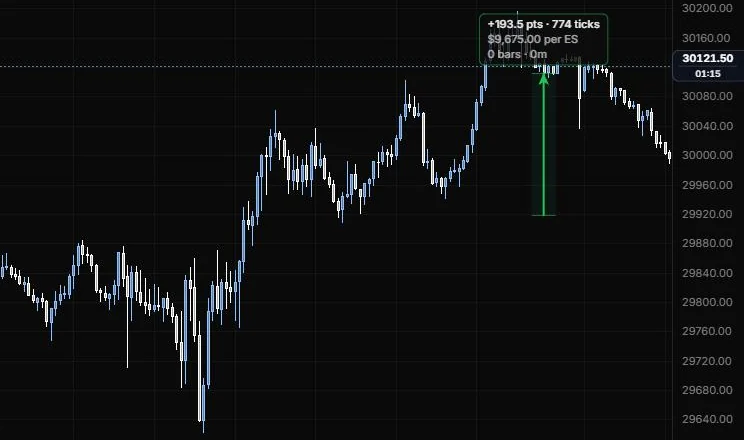
NQ 5m, Oct 15, 2026 · Atlas
How to place: two clicks. Click the price you're measuring from, then the price you're measuring to. With Snap to tick on (the default), both ends land on the contract's tick grid while you place or drag them, so the count is always whole ticks.
Good for: sizing a stop or a target in dollars before you take the trade. It's the "what does this cost me" ruler.
Example: On NQ 5m (Oct 15, 2026), click a price, then one 193.5 points higher on the same bar. The card reads +193.5 pts · 774 ticks and $9,675.00 per ES, with 0 bars · 0m because both ends sit on one bar. That dollar figure is wrong for this chart: the contract is still on the default ES, so switch Contract to NQ and the same 774 ticks read $3,870.00.
Settings
| Setting | Options | What it does |
|---|---|---|
| Contract | Auto tick (no $), ES (0.25 = $12.5), MES, NQ (0.25 = $5), MNQ, YM, MYM, RTY, M2K, CL, MCL, GC, MGC, SI, ZN, ZB, 6E, Custom | Tick size and dollar value per tick. Auto reads the tick from the bars but can't show dollars. |
| Custom tick and Custom $ / tick | Any tick size; 0 to 100,000 dollars, defaults 0.25 and $12.5 | Your own contract spec when Contract is Custom. |
| Contracts | 1 to 10,000, default 1 | Multiplies the dollar readout. |
| Snap to tick | On or off, default on | Anchors land on the tick grid while you place or drag them. |
| Dollars | On or off, default on | Shows the dollar value. |
| Percent change | On or off, default off | Adds the move as a percent. |
| Bar count and Duration | On or off, both default on | Adds the bars and clock time between the two points. |
| Colour by direction | On or off, default on | Green for up, red for down. Off uses the line colour. |
| Fill | On or off, default on; opacity 0 to 50%, default 7% | Shades the band between the prices. |
| Price edges | Line role, default solid, 1 px, 50% | The two price levels. The connector uses the style bar. |
| Other options | Label background, label border, size (8 to 24 px, default 11), opacity | How the readout card looks. |
Session VWAP
A VWAP for one session, from its open to its last bar, with up to three bands.
NQ 5m, Oct 15, 2026 · Atlas
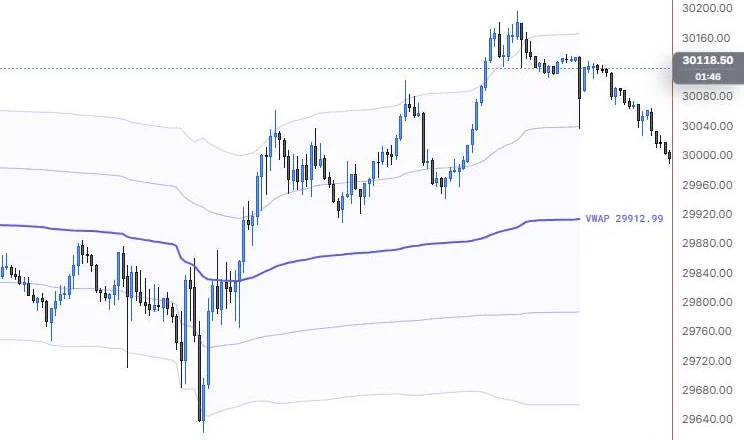
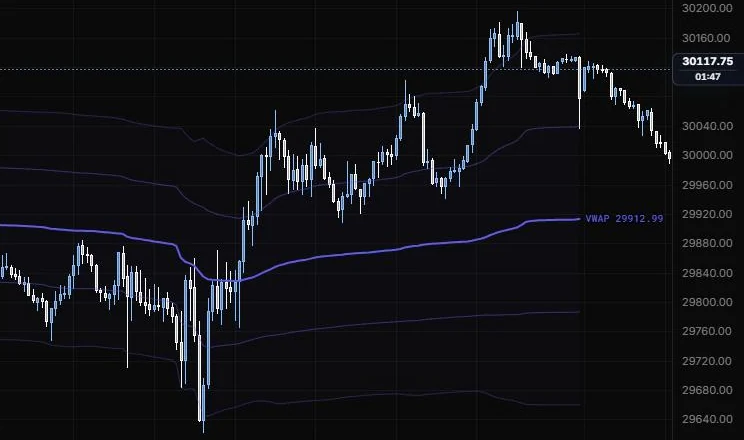
How to place: one click, on any bar of the session. The VWAP starts at that session's open (Globex by default, or RTH) and runs through the session. Open Analysis to see the session's date and bar count, the VWAP and its σ, and how many σ the last close sits above or below it. It also says so when the bars carry no volume.
Good for: the day's fair value line, when you want it on one particular session instead of on every day. Useful for marking up a past day you're reviewing.
Example: On NQ 5m (Oct 15, 2026), click any bar of the session. With the default Globex anchor, the line starts at the 18:00 open the evening before and runs through the day with ±1σ and ±2σ bands, ending at VWAP 29,912.99. You can see the 9:55 flush stab under the lower bands and price spend the rest of the regular session above the line; set Anchored at to RTH open if you only want the 9:30 start.
The weighting is the same as the Anchored VWAP: a bar with no volume gets the running average weight, and a chart with no volume at all becomes an equal-weighted average. The VWAP indicator is separate: it draws every session automatically.
Settings
| Setting | Options | What it does |
|---|---|---|
| Anchored at | Session open (Globex), RTH open | Session covers the whole trading day (CME: from 17:00 CT). RTH covers the regular session only. |
| Source | HLC/3, Close, OHLC/4 | The price each bar contributes. |
| VWAP line | On or off, default on | The main line. Its colour, width and stroke are in the style bar. |
| ±1σ | Line role, default on, solid, 1 px, 45% | The first band pair, from the volume-weighted standard deviation. |
| ±2σ | Line role, default on, solid, 1 px, 30% | The second band pair. |
| ±3σ | Line role, default off (dashed) | The third band pair. |
| Band fill | 0 to 30%, default 3% | Shading between the bands. |
| Market | CME equity index (ES NQ RTY YM), energy, metals, Treasuries, FX, US equities and ETFs, Custom hours | Sets the trading day and RTH hours. |
| Value label and Band labels | Default on and off | Price labels on the line and on the bands. |
| Other options | Chart clock (default Auto), text size (8 to 20 px, default 10), text opacity | Timezone pinning and how the labels look. |
Last updated