 Atlas
AtlasOrder Flow
An anchored VWAP and a fixed range volume profile you drop on the exact bars you care about.
These two tools put volume on the chart where you choose, not where an indicator's settings decide. Anchor a VWAP to the bar that started a move, or profile just the range you're trading inside. Every tool, grouped: Drawing tools overview.
Anchored VWAP
A volume-weighted average price that starts at the bar you click and runs to the latest bar.
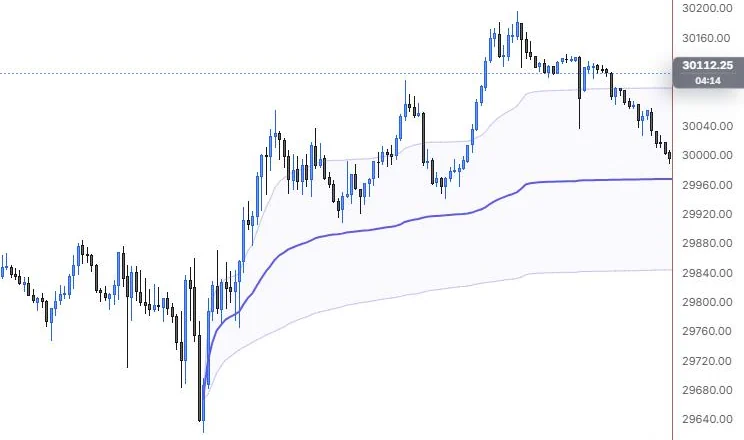
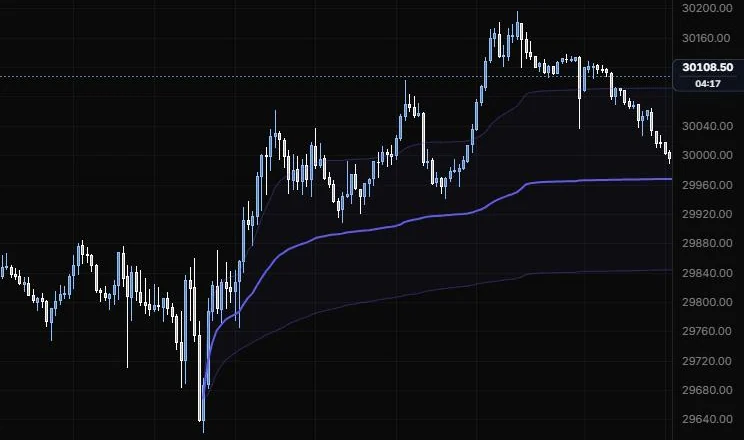
NQ 5m, Oct 15, 2026 · Atlas
How to place: one click, on the anchor bar. The line starts there and follows every bar after it, with optional standard deviation bands. Drag the anchor to another bar and it recalculates from there.
Good for: asking "where's the average buyer since that low?" It's the classic way to track a move from a swing, a news bar or the open of a big day.
Example: On NQ 5m (Oct 15, 2026), click the 9:55 low bar. The VWAP starts there with its ±1σ bands and climbs with the rally, showing the average price paid by everyone who's traded since the day low. Both the 12:25 and 14:20 pullbacks stay above the line, and by the right edge the evening drift has come back toward it, which is where you'd watch to see if buyers from the low still defend their average.
This is a drawing you anchor by hand. The VWAP indicator is separate: it resets on its own each session, week or longer period.
The line uses the chart's real per-bar volume. A bar with no volume gets the running average weight, so on a chart with no volume at all the line becomes an equal-weighted average rather than disappearing.
Settings
| Setting | Options | What it does |
|---|---|---|
| Source | HLC/3, Close, OHLC/4 | The price each bar contributes. |
| σ bands | None, ±1σ, ±1σ and ±2σ, ±1σ to ±3σ | How many band pairs to draw. They're the volume-weighted standard deviation around the VWAP. |
| Band fill | 0 to 30%, default 3.5% | Shading between the bands. |
| VWAP line | On or off, default on | The main line. Its colour, width and stroke are in the style bar. |
| Band lines | On or off, default on | The edges of each band. |
| Band line style | Line role: show or hide, solid/dashed/dotted, width, opacity (default solid, 1 px, 35%) | How the band edges look. |
| Value label | On or off, default on | The current VWAP price at the end of the line. |
| Text size and opacity | 8 to 20 px, default 10; 10% to 100%, default 100% | How the label looks. |
Fixed range volume profile
A volume-by-price histogram over just the bars you select, with POC and value area.
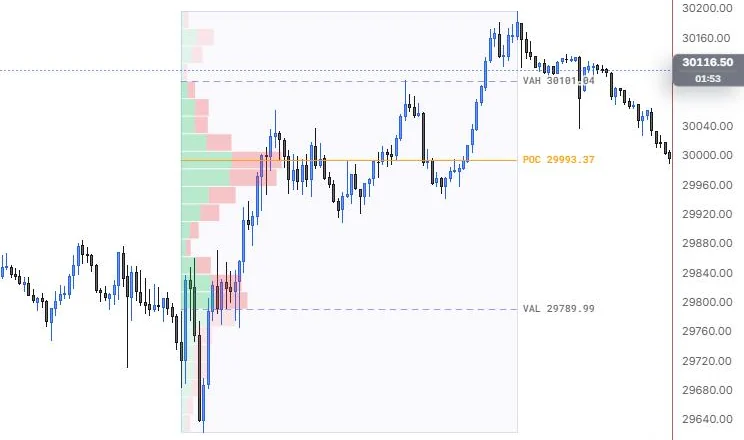
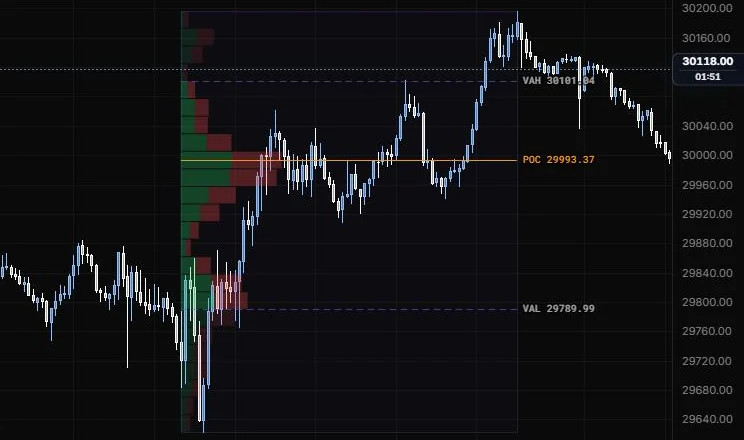
NQ 5m, Oct 15, 2026 · Atlas
How to place: two clicks. Click the first bar of the range, then the last. The profile builds from every bar between them.
Good for: finding where the volume actually sat inside a balance area, a single session or one leg, so you know which prices the market accepted and which it ran through.
Example: On NQ 5m (Oct 15, 2026), click the 9:30 bar, then the 15:45 bar. The histogram grows from the left with buy and sell volume split by colour, the POC lands at 29,993.37 and the value area runs from 29,789.99 (VAL) to 30,101.04 (VAH). The POC sits right in the middle of the 11:15 to 13:30 chop, so the day's busiest prices were in that midday balance, not at the highs or the lows.
How it's built: each bar's volume is spread evenly across that bar's high to low, then summed into the price rows. That's an estimate from bars, not a tick-by-tick profile, so more rows on a coarse chart don't add real detail. If the bars carry no volume, the tool says so instead of drawing an empty histogram. The Volume Profile indicator is separate: it runs over a lookback you set, not a range you pick.
Settings
| Setting | Options | What it does |
|---|---|---|
| Rows | 6 to 120, default 24 | How many price rows the range is split into. |
| Placement | Left, Right | Which side of the range the histogram grows from. |
| Width | 0.1 to 1, default 0.3 | The longest row, as a share of the range's width. |
| Value area | 0.5 to 0.95, default 0.7 | The share of volume the value area holds. |
| Buy / sell split | On or off, default on | Colours each row by buy and sell volume, where the feed has the aggressor side. |
| Value-area rows and Other rows | 5% to 80%, default 30%; 0 to 60%, default 12% | Opacity of rows inside and outside the value area. |
| Buy colour and Sell colour | Default green and red | The colours of the split. |
| POC | On or off, default on; line role (default solid, 1 px); colour default orange | The busiest price row and its line. |
| VAH / VAL | On or off, default on; line role (default dashed, 1 px, 60%) | The top and bottom of the value area. |
| Range outline | On or off, default on; line role (default solid, 1 px, 22%) | A faint box round the selected range. |
| Prices | On or off, default on | Price labels on the POC, VAH and VAL. |
| Other options | Text size (8 to 20 px, default 10) and text opacity | How the price labels look. |
Last updated