 Atlas
AtlasLines & Channels
Rays, extended lines, paths, curves, channels, pitchforks and the measuring lines that read slope, angle and distance.
When a plain trend line isn't enough, this group has the variations: lines that run forever, channels that hold a trend between two rails, pitchforks that project a median, and lines that read out the angle or the move for you. Every tool, grouped: Drawing tools overview.
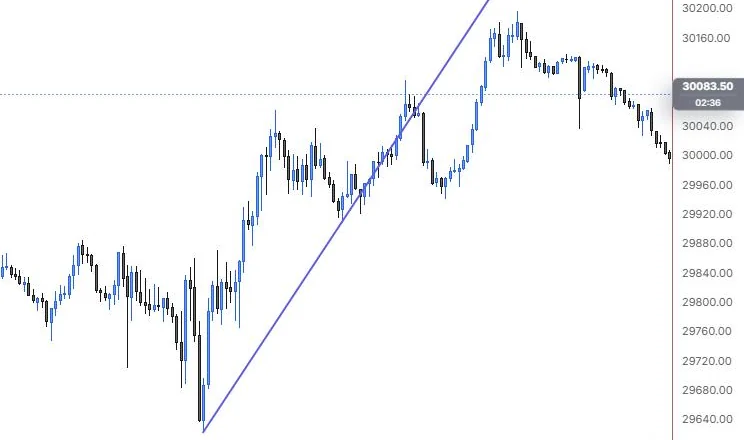
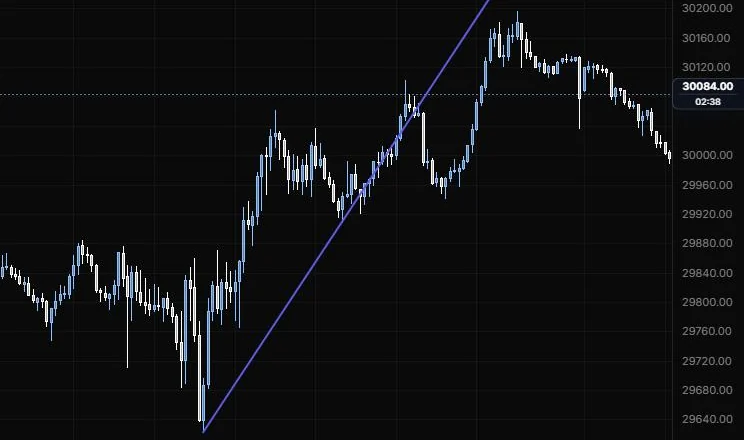
Ray
A line from a start point through a second point, running on to the edge of the chart.
NQ 5m, Oct 15, 2026 · Atlas
How to place: two clicks. Click the start, then a point that sets the direction.
Good for: a trend line you want projected forward without dragging it out by hand.
Example: On NQ 5m (Oct 15, 2026), click the 9:55 low, then the 12:25 low. The ray carries that slope on past both points, and you can see the 13:40 push tag it before price drops back under it. Everything after that trades below the line, so the afternoon climb ran at a gentler pace than the morning one.
Settings: just the shared style bar.
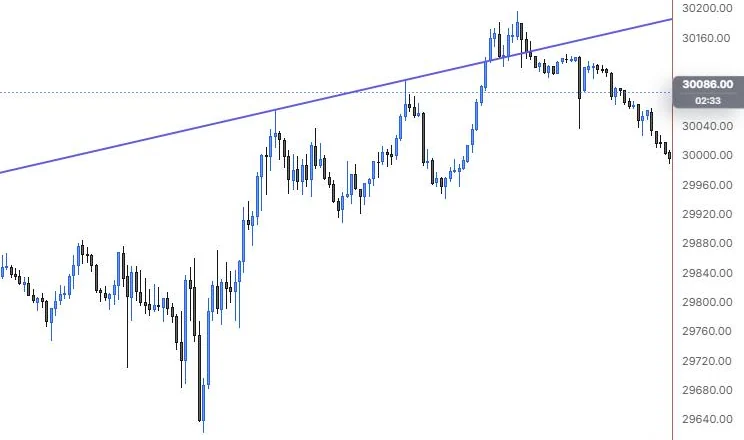
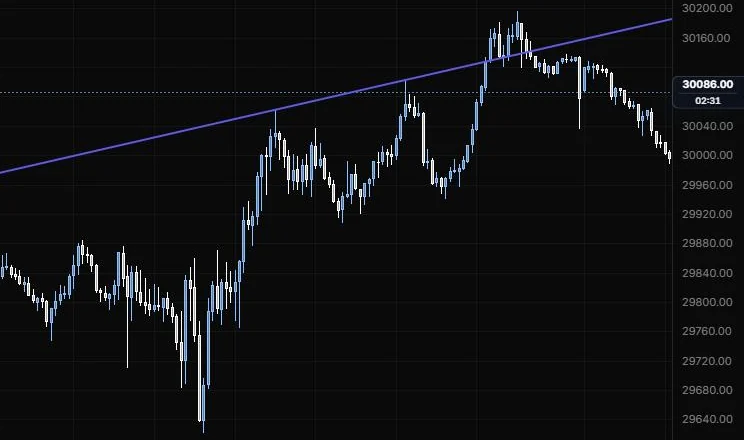
Extended line
A line through two points that runs to both edges of the chart.
NQ 5m, Oct 15, 2026 · Atlas
How to place: two clicks, one on each point the line passes through.
Good for: a slope that matters both before and after the two points, like a long-term trend line you want to see across the whole chart.
Example: On NQ 5m (Oct 15, 2026), click the 11:15 high, then the 13:40 high. The line runs across the whole chart, back into the morning and forward into the evening. You can see the 15:45 push poke above it and price slip back under it after the top, which is the kind of thing you'd want a line through those highs to show you.
Settings: just the shared style bar.
Path
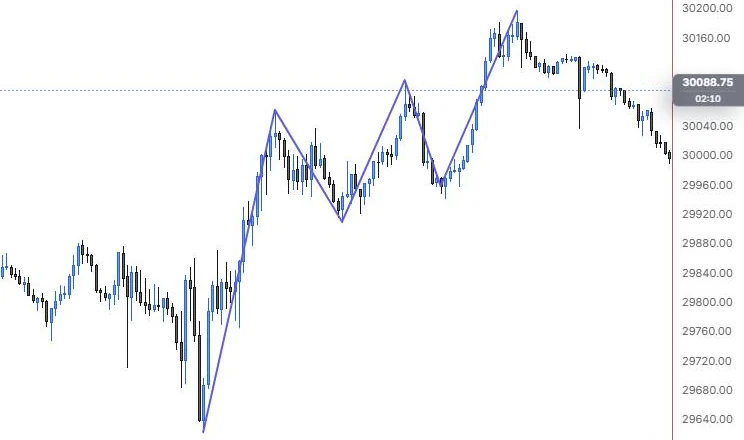
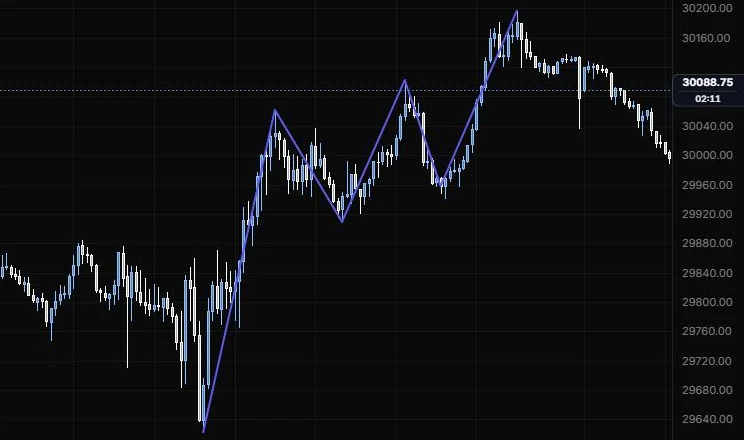
A line through as many points as you want.
NQ 5m, Oct 15, 2026 · Atlas
How to place: click the start, then click each next point. To finish, press Enter, double-click or tap the last point again.
Good for: sketching the swing path you expect, or tracing the zigzag of a move you want to study later.
Example: On NQ 5m (Oct 15, 2026), click the 9:55 low, then the 11:15 high, the 12:25 low, the 13:40 high, the 14:20 low and the 15:45 high, and press Enter. The zigzag shows the day's swing structure at a glance: three higher highs and two higher lows off the day low. Turn on Smooth if you'd rather it read as a curve.
Settings
| Setting | Options | What it does |
|---|---|---|
| Smooth | On or off, default off | Curves the line through every point instead of joining them with straight segments. |
Curve
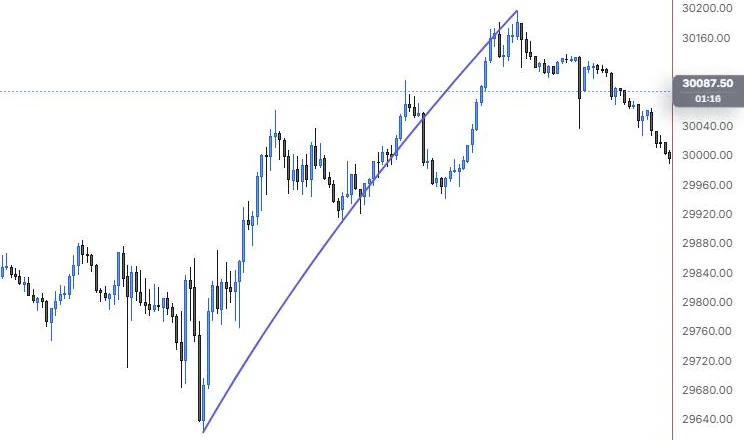
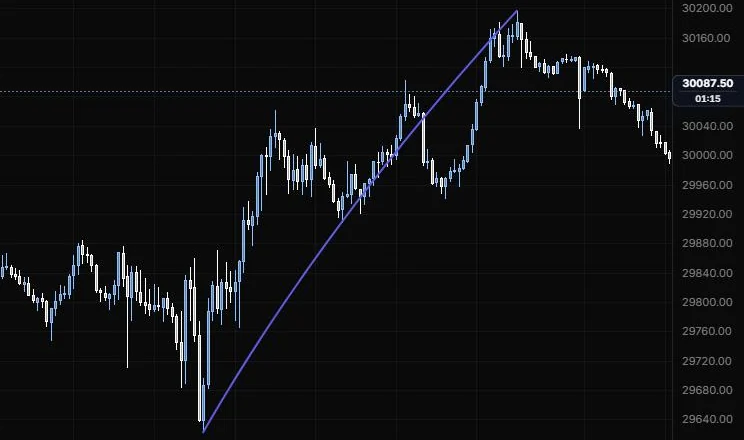
A curved line between two points that bends through a third.
NQ 5m, Oct 15, 2026 · Atlas
How to place: three clicks. Click the start, then the end, then the point the curve should bend through. The third handle sits on the curve itself, so dragging it reshapes the bend directly.
Good for: rounded tops and bottoms, or a move that's accelerating or slowing rather than going in a straight line.
Example: On NQ 5m (Oct 15, 2026), click the 9:55 low, then the 15:45 high, then the 12:25 low to set the bend. The curve bows under a straight line between the two ends, so it reads as a climb that got steeper into the afternoon. Drag the bend handle if you want it to hug a different swing.
Settings: just the shared style bar.
Parallel channel
Two parallel rails around a trend, with an optional midline.
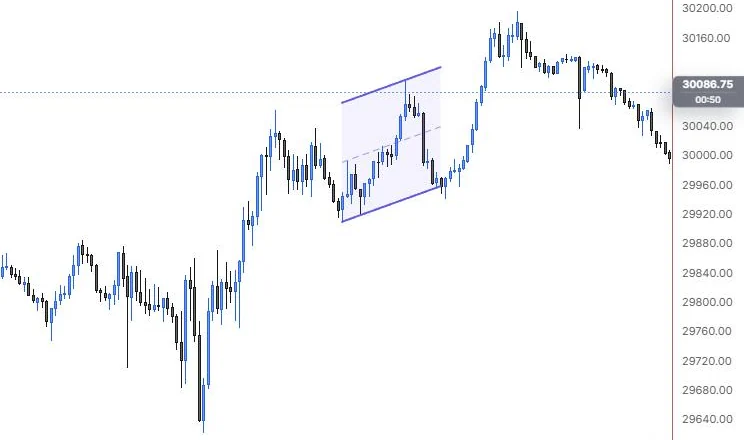
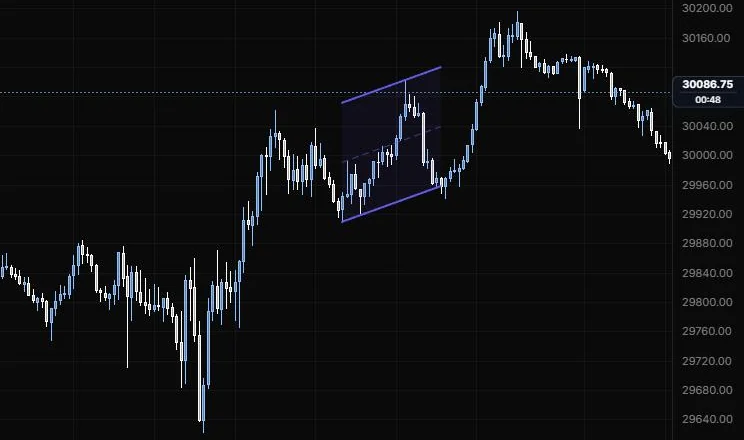
NQ 5m, Oct 15, 2026 · Atlas
How to place: three clicks. Click the start of the base line, then its end, then a point that sets the channel width. The width handle sits in the middle of the opposite rail.
Good for: a trend that's moving in a steady lane, so you can see where the top and bottom of the lane are right now.
Example: On NQ 5m (Oct 15, 2026), click the 12:25 low, then the 14:20 low for the base line, then the 13:40 high to set the width. The top rail lands on that high, the dashed midline sits halfway, and the shading shows the lane the early afternoon traded in. The classic read is the bottom rail as support and the midline as a first target, and turning on Extend right carries the lane on into the late afternoon.
Settings
| Setting | Options | What it does |
|---|---|---|
| Fill | On or off, default on | Shades between the rails. |
| Fill opacity | 0 to 50%, default 7% | How strong the shading is. |
| Midline | On or off, default on | Draws the line halfway between the rails. |
| Midline style | Line role: show or hide, solid/dashed/dotted, width, opacity (default dashed, 1 px, 60%) | How the midline looks. The rails use the style bar. |
| Extend left / Extend right | On or off, default off for both | Runs the channel to the chart edge. |
Pitchfork
A median line from a pivot through the middle of two reactions, with a tine on each side.
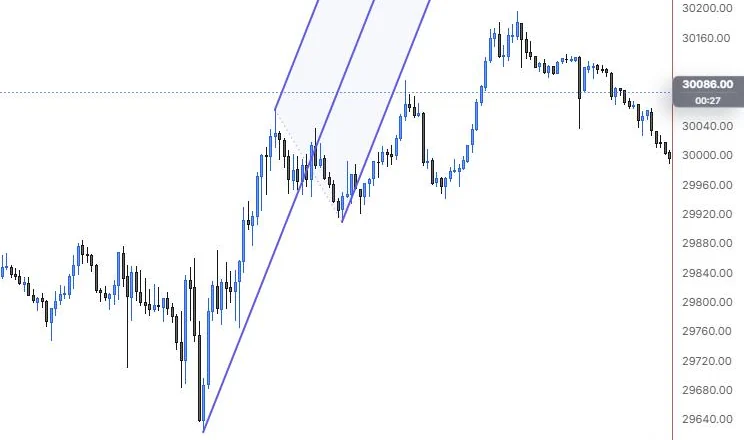
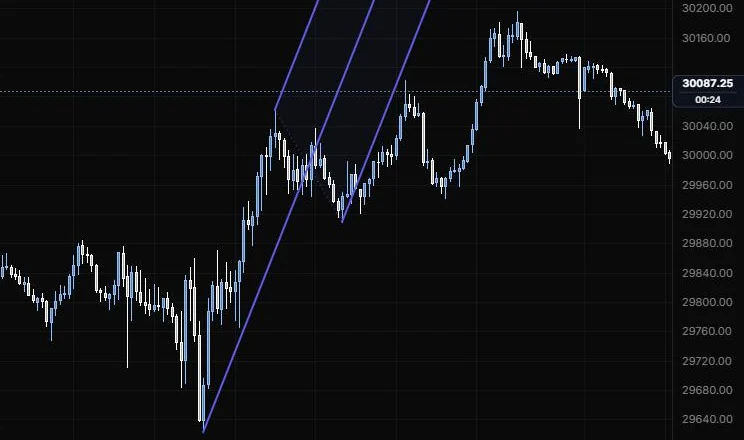
NQ 5m, Oct 15, 2026 · Atlas
How to place: three clicks. Click the pivot where the handle starts, then the first reaction, then the second reaction.
Good for: trends that swing around a center line, where price tends to come back to the median.
Example: On NQ 5m (Oct 15, 2026), click the 9:55 low as the pivot, then the 11:15 high and the 12:25 low as the reactions. The median runs from the low through the middle of that pullback, with the tines through each reaction and the fork shaded between them. Price slips out under the lower tine soon after 12:25, which tells you the afternoon wasn't keeping the morning's steep pace.
Settings
| Setting | Options | What it does |
|---|---|---|
| Type | Andrews, Schiff, Modified Schiff (default Andrews) | Where the median starts. Andrews runs it from the pivot; the Schiff types start it from a shifted origin. |
| Extra lines | 0.25, 0.5, 0.75, 1.5, 2 (all off) | More lines at multiples of the tine spacing. |
| Fill between tines | On or off, default on; opacity 0 to 30%, default 5% | Shades inside the fork. |
| Extend left | On or off, default off | Runs the lines back past the pivot. |
| Median line | On or off, default on | The center line. Median and tines use the style bar. |
| Handle | On or off, default on | The segment joining the two reactions. |
| Handle style | Line role (default dotted, 1 px, 60%) | How the handle looks. |
| Schiff shift | Line role (default dotted, 1 px, 45%) | The line from the pivot to the shifted origin, on the Schiff types. |
| Extra lines style | Line role (default dotted, 1 px, 60%) | How the extra lines look. |
Pitchfan
A fan of rays from a pivot, spread around the median of two reactions.
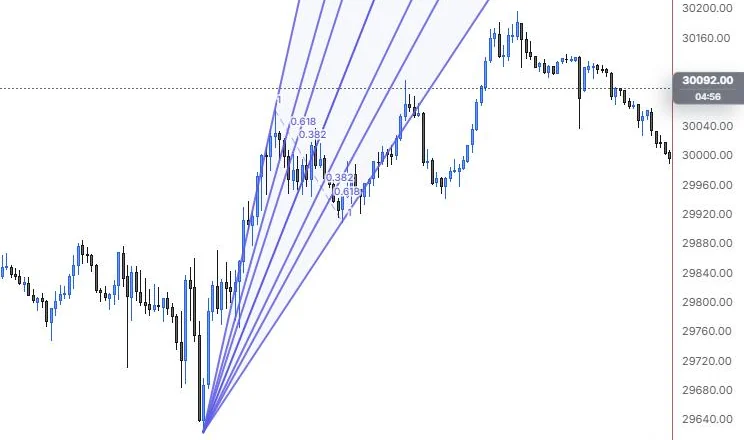
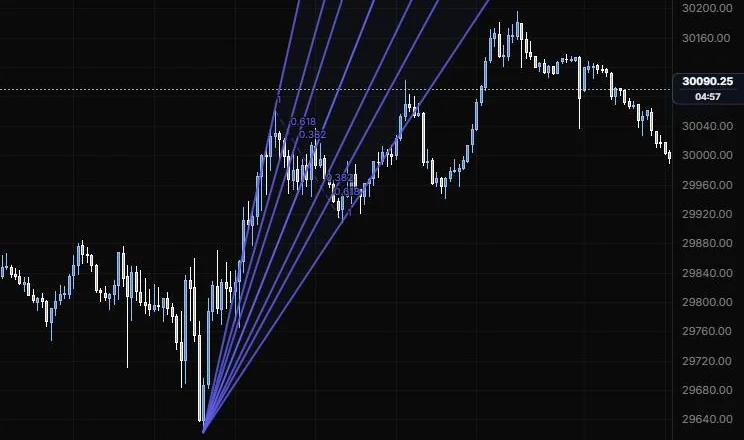
NQ 5m, Oct 15, 2026 · Atlas
How to place: three clicks. Click the pivot, then the first reaction, then the second reaction.
Good for: seeing several possible support and resistance slopes from one pivot at once.
Example: On NQ 5m (Oct 15, 2026), click the 9:55 low as the pivot, then the 11:15 high and the 12:25 low as the reactions. The fan spreads the 0.382, 0.618 and 1 rays on both sides of the median, each labelled with its ratio, and the outer ray on the low side runs through the 12:25 low. If price slips under one ray, the next one out is the slope you'd watch for it to catch.
Settings
| Setting | Options | What it does |
|---|---|---|
| Levels | 0.382, 0.618, 1 on; 0.25, 0.5, 0.75, 1.5, 1.75, 2 off | Each level draws a ray on both sides of the median. 1 passes through the reaction points. |
| Level rays | On or off, default on | Shows the rays. The median and rays use the style bar. |
| Ray opacity | 5% to 100%, default 85% | How strong the rays are. |
| Colours | One colour, Spectrum (default One colour) | One colour for everything, or a colour per level. |
| Extend rays | On or off, default on | Off stops the rays at the reaction line. |
| Fill | On or off, default on; opacity 0 to 30%, default 5% | Shades between the rays. |
| Reaction line | Line role (default dashed, 1 px, 50%) | The line joining the two reaction points. |
| Level labels | On or off, default on; size 8 to 20 px (default 11), opacity | The ratio on each ray. |
Flat top/bottom
A channel with one sloped side and one flat side.
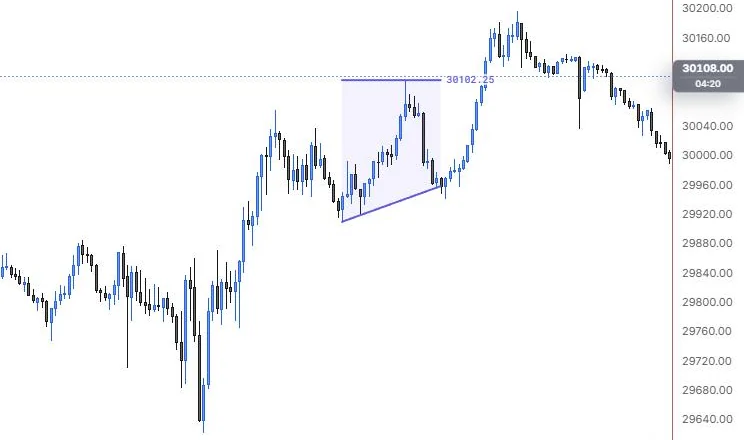
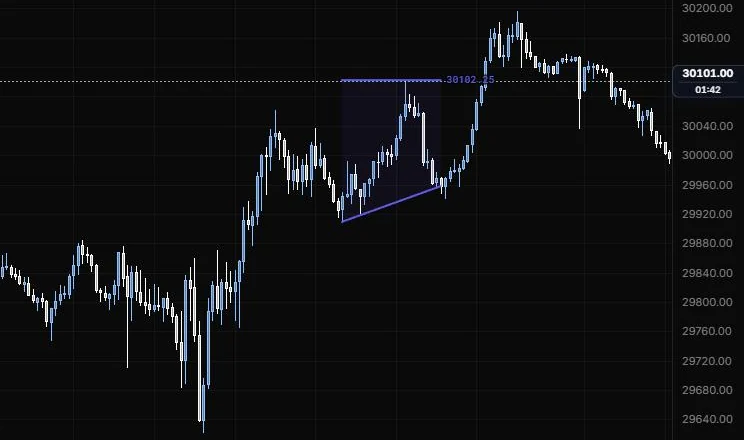
NQ 5m, Oct 15, 2026 · Atlas
How to place: three clicks. Click the start of the trend line, then its end, then the price of the flat side. The third handle stays between the trend line's ends in time, and only its price matters.
Good for: ascending and descending triangles drawn by hand: a flat ceiling with rising lows, or a flat floor with falling highs.
Example: On NQ 5m (Oct 15, 2026), click the 12:25 low and the 14:20 low for the rising side, then the 13:40 high for the flat side. The flat side is labelled 30,102.25, and the shading between it and the rising lows is the classic ascending triangle shape. Price coming back to that flat ceiling after 14:20 is the test the drawing sets up for you.
Settings
| Setting | Options | What it does |
|---|---|---|
| Fill | On or off, default on; opacity 0 to 50%, default 7% | Shades between the two sides. |
| Midline | Line role: show or hide, solid/dashed/dotted, width, opacity (default hidden, dashed, 1 px, 60%) | A line halfway between the trend line and the flat side. Both sides use the style bar. |
| Extend left / Extend right | On or off, default off for both | Runs the shape to the chart edge. |
| Flat price | On or off, default on | Labels the flat side's price. |
| Label size and opacity | 8 to 20 px (default 11); 10% to 100% (default 100%) | How the label text looks. |
Disjoint channel
Two separate lines that don't have to be parallel, with the space between them shaded.
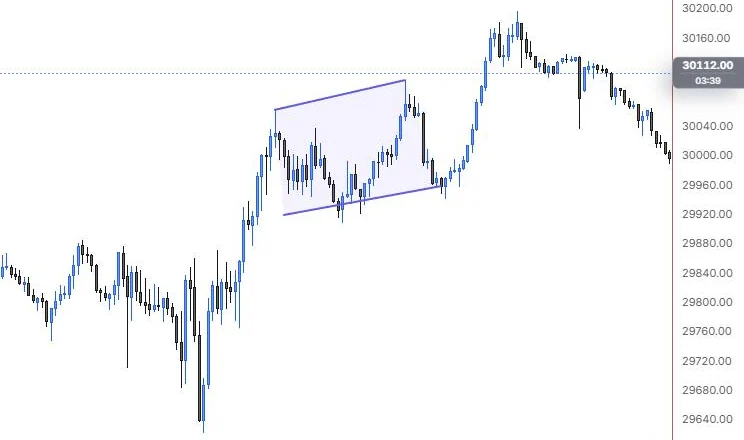
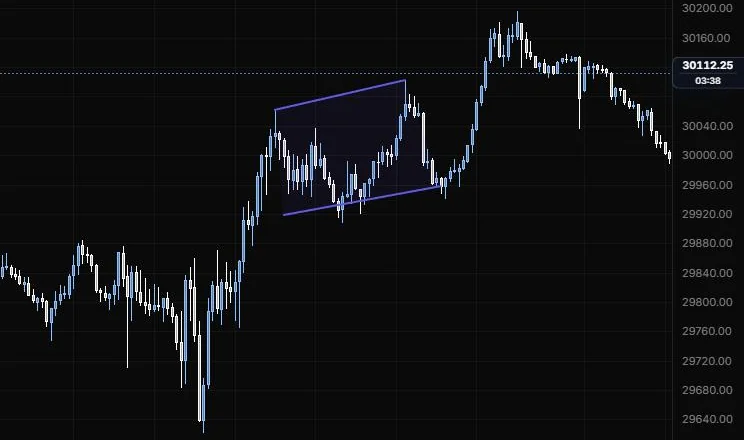
NQ 5m, Oct 15, 2026 · Atlas
How to place: four clicks. Click the first line's start and end, then the second line's start and end.
Good for: broadening or narrowing ranges, where the top and bottom are sloping at different rates.
Example: On NQ 5m (Oct 15, 2026), click the 11:15 and 13:40 highs for the top line, then the 11:25 and 14:20 lows for the bottom one. Both lines rise, with the top one a little steeper, so the shaded range widens slightly through the midday. Lines like these don't meet ahead of the drawing, so there's no apex readout; on a narrowing range, Apex shows the bars to go and the price where they'd cross.
Settings
| Setting | Options | What it does |
|---|---|---|
| Fill | On or off, default on; opacity 0 to 50%, default 7% | Shades between the two lines. |
| Midline | Line role (default hidden, dashed, 1 px, 60%) | A line halfway between the two. Both lines use the style bar. |
| Extend left / Extend right | On or off, default off for both | Runs both lines to the chart edge. |
| Apex | On or off, default on | Where converging lines meet ahead of the drawing: bars to go and the price. |
| Label size and opacity | 8 to 20 px (default 11); 10% to 100% (default 100%) | How the label text looks. |
Trend angle
A trend line that reads out its angle and slope.
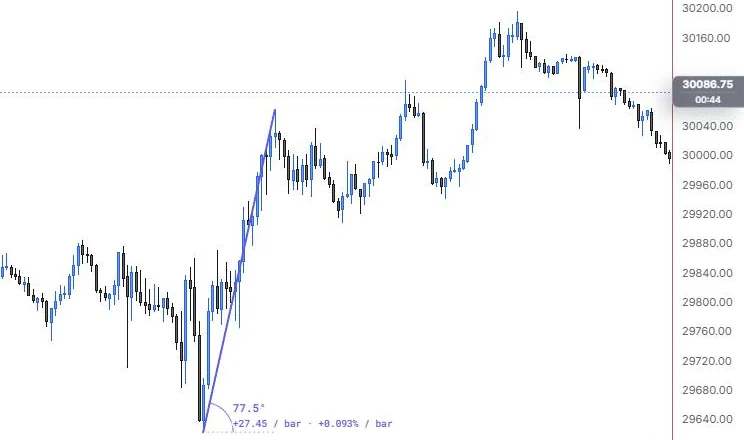
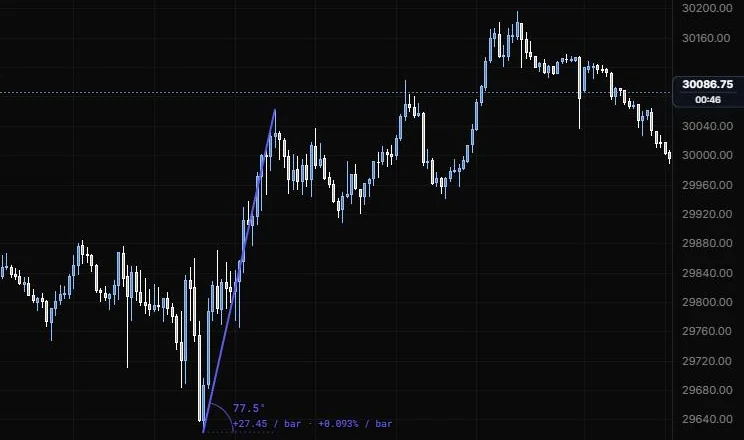
NQ 5m, Oct 15, 2026 · Atlas
How to place: two clicks. Click the start, then the end.
Good for: comparing how steep two moves are. The slope (price and percent per bar) stays the same at any zoom; the angle in degrees is what you see on screen, so it changes when you zoom.
Example: On NQ 5m (Oct 15, 2026), click the 9:55 low, then the 11:15 high. The readout shows 77.5° on screen and a slope of +27.45 points (+0.093%) per bar. Draw a second one on the 14:20 to 15:45 push and compare the per-bar slopes, since those stay the same at any zoom while the degrees don't.
Settings
| Setting | Options | What it does |
|---|---|---|
| Extend right | On or off, default off | Runs the line past its end. |
| Horizontal | Line role (default dotted, 1 px, 60%) | The flat line the angle is measured from. The trend line uses the style bar. |
| Arc | Line role (default solid, 1 px, 80%) | The arc that shows the angle. |
| Angle | On or off, default on | Degrees on screen. Changes with zoom. |
| Slope | On or off, default on | Price and percent per bar. The same at any zoom. |
| Label size and opacity | 8 to 20 px (default 11); 10% to 100% (default 100%) | How the readout looks. |
Cross line
A horizontal and a vertical line crossing at one point.
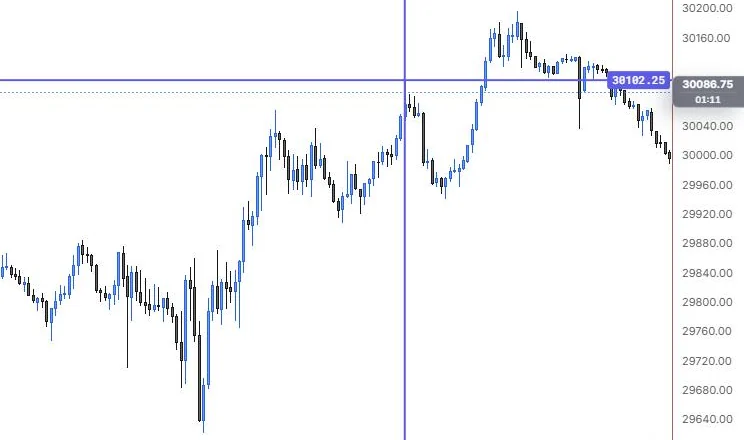
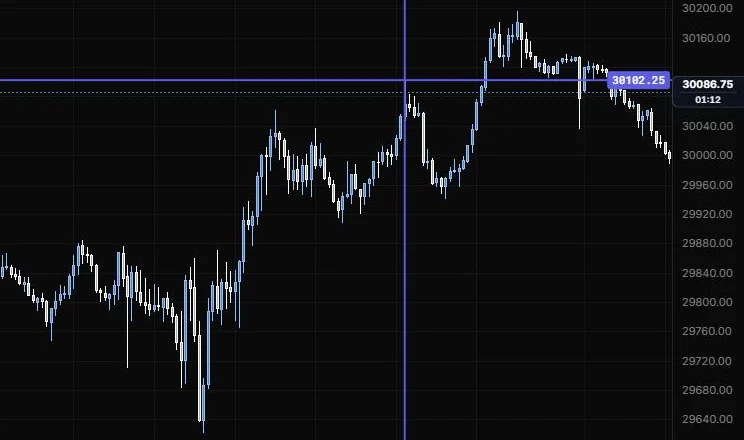
NQ 5m, Oct 15, 2026 · Atlas
How to place: one click on the bar and price you want.
Good for: pinning a single moment and price at once, like the exact bar and price of the high of day.
Example: On NQ 5m (Oct 15, 2026), one click on the 13:40 high drops a cross on that bar, labelled 30,102.25 on the price scale. The horizontal shows the 15:45 push clearing that price, and the vertical marks exactly when the high printed.
Settings
| Setting | Options | What it does |
|---|---|---|
| Horizontal | On or off, default on | Shows the price line. Both lines use the style bar. |
| Vertical | On or off, default on | Shows the time line. |
| Price label | On or off, default on | Labels the price. |
| Time label | On or off, default on | Labels the time. |
| Label size and opacity | 8 to 20 px (default 11); 10% to 100% (default 100%) | How the labels look. |
Info line
A line between two points with a card that measures the move.
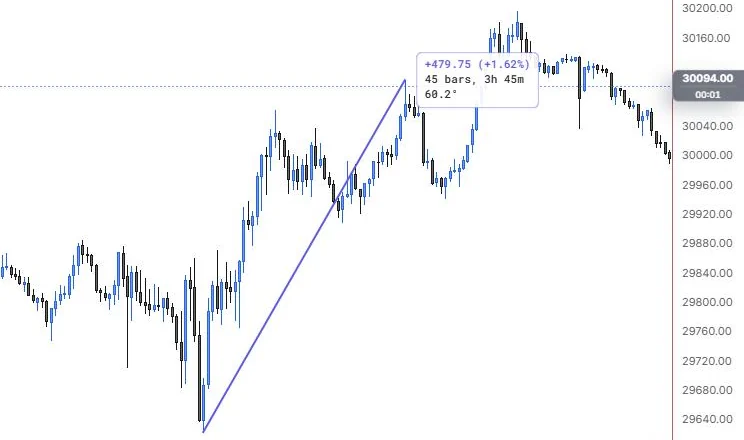
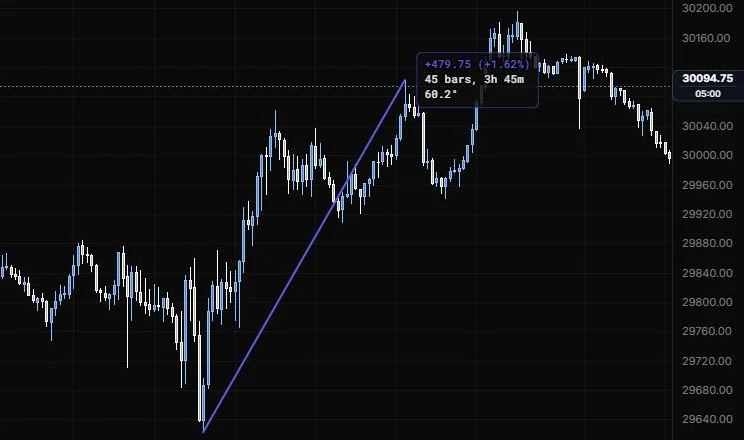
NQ 5m, Oct 15, 2026 · Atlas
How to place: two clicks. Click the start, then the end.
Good for: measuring a swing in points, percent, ticks, bars and time, all at once.
Example: On NQ 5m (Oct 15, 2026), click the 9:55 low, then the 13:40 high. The card reads +479.75 points (+1.62%), 45 bars, 3h 45m and 60.2°. There's no tick count because Tick size is still 0; set it to 0.25 for NQ and the card adds the move in ticks.
Settings
| Setting | Options | What it does |
|---|---|---|
| Price change | On or off, default on | The move in price. |
| Percent change | On or off, default on | The move in percent. |
| Ticks | On or off, default on | The move in ticks. Shown only when a tick size is set. |
| Tick size | 0 to 1000, default 0 (off) | Your instrument's tick, e.g. ES and NQ 0.25, CL 0.01. |
| Bars | On or off, default on | How many bars the line spans. |
| Time | On or off, default on | How long the move took. |
| Angle | On or off, default on | Degrees on screen. Changes with zoom. |
| Position | At the end, Middle, At the start (default At the end) | Where the card sits. |
| Background | On or off, default on | Off shows plain text with a halo. |
| Card size and opacity | 8 to 20 px (default 11); 10% to 100% (default 100%) | How the card text looks. |
Last updated