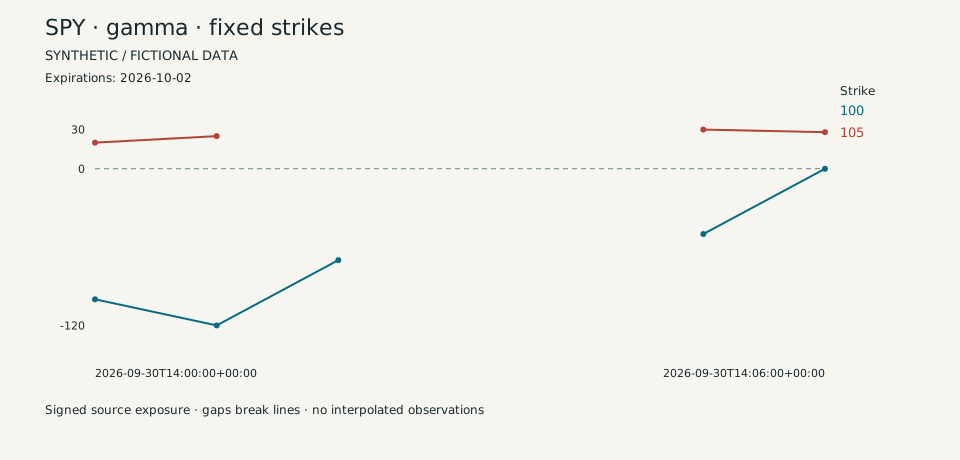
Fixed-strike replay
Follow the same strikes through signed exposure changes. See the gaps instead of filling them in.
use-case node-trackerSkylit / Your research building blocks
Your agent.
Your first working result.
Give your coding agent a starting point. Run an offline demo, see the output, then adapt a research workflow to the question you want to answer.
Internal pilot · GitHub repository access is currently required. Ask about access. A Skylit API key alone does not grant repository access.
Copy. Paste. Start.
Use a coding agent that can run local commands. It can check your setup, run the node-tracker demo and help you choose what to build next.
Repository access, Git and Python 3.11+ are required. The first demo needs no Skylit key, model API key or Python packages. Your coding agent may have its own costs.
Guided setup (GitHub, repository access required, opens in a new tab)Get me started with https://github.com/SkylitAI/skylit-agent-kit. In a repository-scoped session, read AGENTS.md and docs/start-here.md before running commands. Handle setup, run the offline node-tracker demo, and show me the chart. Use docs/capabilities.md to help me choose and build my next workflow. Keep private vaults out and never request credentials in chat. Use live calls only within my authorized budget; publish only with my authorization.Four runnable workflows
Each recipe defaults to fictional fixtures, no network and zero API credits. Read the report, change an input, then build on it.
Follow the same strikes through signed exposure changes. See the gaps instead of filling them in.
use-case node-trackerPut dated OHLCV bars beside separately timed exposure levels. Keep their source times distinct.
use-case price-levelsInspect a returned trade sample alongside strike rollups for an explicit time window.
use-case flow-investigatorReview returned volatility fields with freshness and coverage notes.
use-case volatility-contextUnder the hood
Agent Kits is built around the Skylit Agent Kit repository: maintained examples, shared helpers and agent setup guides. Run Python directly or have your agent help.
Browse the repository (GitHub, repository access required, opens in a new tab)When you’re ready for live data
The offline examples are ready to explore. Live paths are implemented and tested with synthetic responses; authenticated service certification remains pending.
Skylit service access and API credits depend on your account. Open the Developer page.
Start with a dry run. Live mode is explicit; the runner checks the plan against its request and credit caps. Direct MCP calls do not inherit those caps.
Use the secure environment or hidden terminal prompt. Never paste credentials into agent chat.
Before you start
The offline examples do not call Skylit services and need no Skylit account or API key. You do need access to the internal repository. Agent subscriptions may have their own costs.
It is a repository of local tools, examples and guides you can run and adapt. For Skylit’s in-app AI analyst, see Talon.
Optional MCP setup is covered in the agent guides. Direct MCP calls have their own access and costs and do not inherit the local runner’s limits. Start with the public API documentation and the repository’s host-specific guide.
Start an experiment in Agent Lab. Reusable work can graduate into the maintained Kit through review. Code licensing does not include service access or third-party data rights.
Make the workflow your own
Research and education. These workflows do not place trades.