 Atlas
AtlasEssentials
The everyday tools: lines, levels, boxes, arrows, the Fib retracement, long and short positions, the brush and text.
These are the tools you'll reach for every session: mark a level, draw a trend line, box a range, plan a trade. They're quick to place and they stay out of the way. Every tool, grouped: Drawing tools overview.
Trend line
A straight line between two points, with optional extensions and a stats readout.
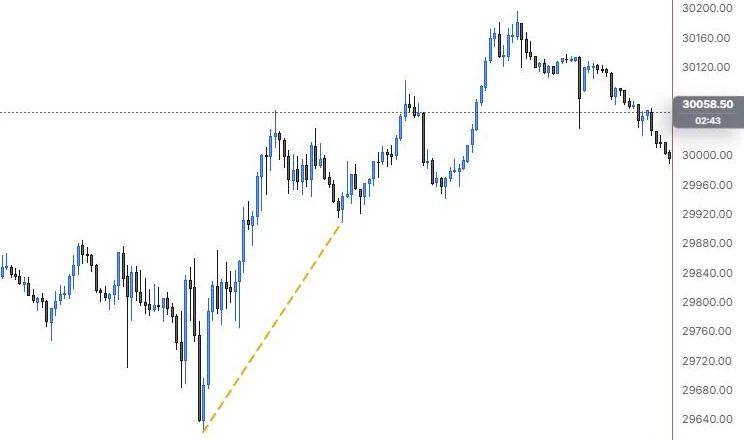
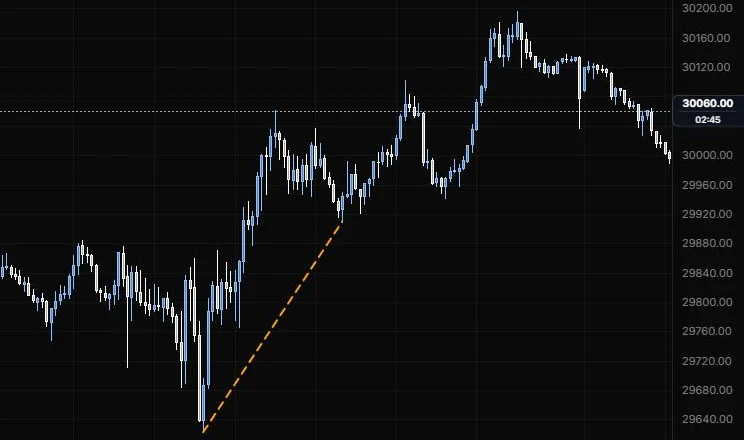
NQ 5m, Oct 15, 2026 · Atlas
How to place: click the start of the line, then the end. You can also press and drag from start to end. On a phone, drag to aim and tap to place each point.
Good for: connecting swing lows in an uptrend or swing highs in a downtrend, so you can see when price breaks the slope it's been respecting.
Example: On NQ 5m (Oct 15, 2026), click the 9:55 day low (29,622.50), then the 12:25 higher low. The line shows the slope of the climb between those two lows. Turn on Extend right and it keeps running ahead of price, so a 5m close under it tells you price has lost that slope.
Settings
| Setting | Options | What it does |
|---|---|---|
| Extend left / Extend right | On or off, default off for both | Runs the line past its anchors to the edge of the chart. |
| Extension | Line role: show or hide, solid/dashed/dotted, width, opacity (default dashed, 1 px, 60%) | How the extended part is drawn, so you can tell it from the part you drew. |
| Middle point | On or off, default off | Marks the halfway point of the line. |
| Price on axis | On or off, default off | Shows both anchors' prices on the price scale. |
| Show stats | Never, When selected, Always (default Never) | When the stats readout appears next to the line. |
| Stats content | Price change (on), Percent (on), Bars (on), Time span (off), Angle (off) | Picks what the readout shows. |
| Stats position | Start, Middle, End (default End) | Where along the line the readout sits. |
| Stats text size | 8 to 20 px, default 11 | Size of the readout. |
| Label | Text, position along and across the line, colour, size, bold, pill or plain background | Puts your own text on the line, from the Text tab or the label button on the toolbar. |
Horizontal line
A level across the whole chart at one price.
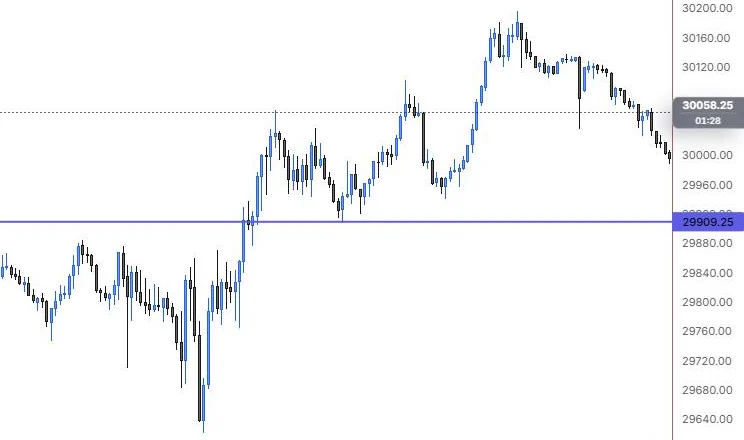
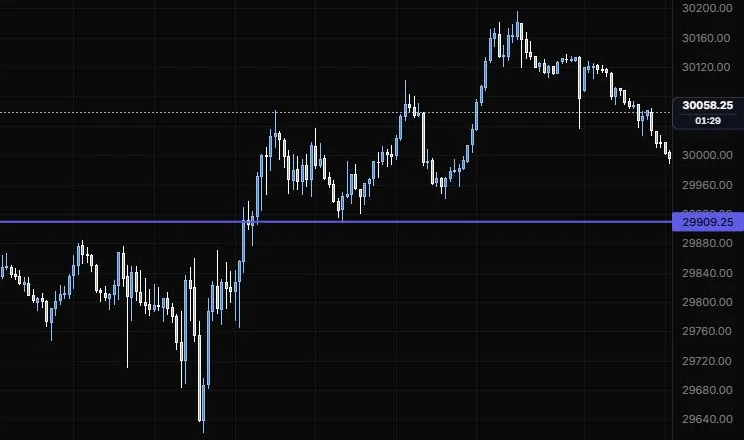
NQ 5m, Oct 15, 2026 · Atlas
How to place: one click at the price you want. The tool stays armed, so you can click a few levels in a row. Once it's down, select it to see its toolbar; on charts where alerts are available you'll also see Alert on cross there.
Good for: marking prior day high and low, the overnight high, a round number or any price you want to react to.
Example: On NQ 5m (Oct 15, 2026), one click on the 12:25 pullback low puts a level at 29,909.25 across the whole chart, with its price on the axis. That's the last pullback low before the afternoon push to the 15:45 high, so it's the line you'd keep an eye on if the evening drift keeps going lower.
Settings
| Setting | Options | What it does |
|---|---|---|
| Price on axis | On or off, default on | Shows the line's price on the price scale. |
| Label | Text, position along and across the line, colour, size, bold, pill or plain background | Names the level right on the line. |
Horizontal ray
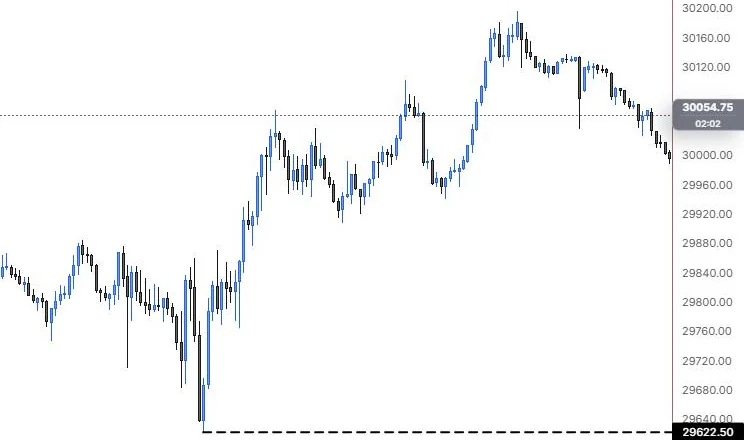
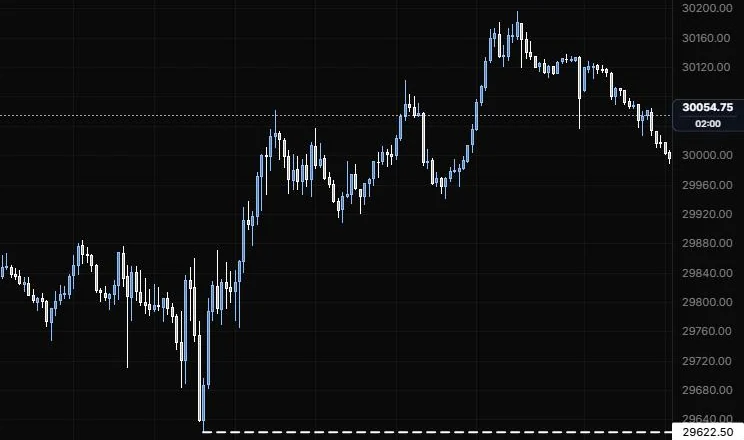
A level that starts at the bar you click and runs to the right.
NQ 5m, Oct 15, 2026 · Atlas
How to place: one click on the bar and price where the level starts.
Good for: levels that only matter from a certain point on, like a gap fill or the high of a failed breakout, without cluttering the history to the left.
Example: On NQ 5m (Oct 15, 2026), click the 9:55 day low and the ray runs right from 29,622.50, with the price on the axis. The history to the left stays clean, and the day low stays on screen however far price moves away from it.
Settings
| Setting | Options | What it does |
|---|---|---|
| Extend left | On or off, default off | Also draws the level back to the left edge. |
| Extend right | On or off, default on | Runs the level to the right edge. |
| Price on axis | On or off, default on | Shows the ray's price on the price scale. |
| Label | Text, position along and across the line, colour, size, bold, pill or plain background | Names the level on the ray. |
Vertical line
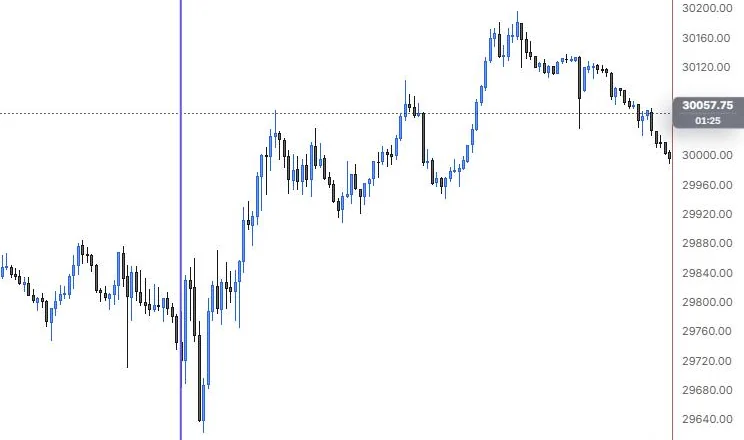
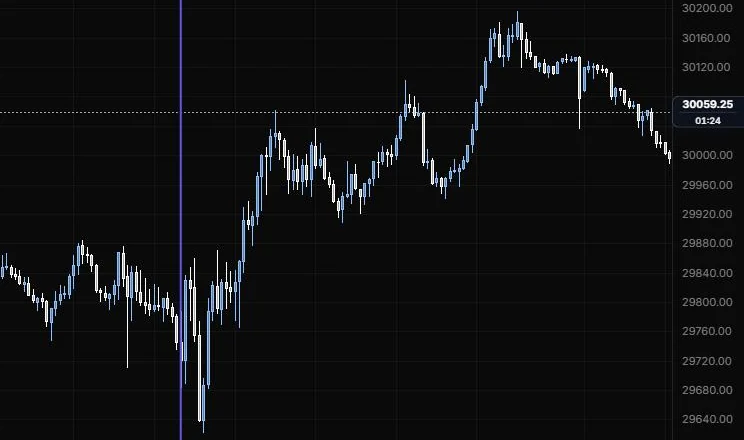
A line through one moment in time, top to bottom.
NQ 5m, Oct 15, 2026 · Atlas
How to place: one click on the bar you want. Keep the button held and drag to slide it before you let go.
Good for: marking a news release, the cash open or the time a big move started, so you can line it up with what came after.
Example: On NQ 5m (Oct 15, 2026), one click on the 9:30 bar marks the cash open from top to bottom. You can see at a glance that the drop into the 9:55 low and the whole rally after it came after the open. Turn on Time on axis if you want the time printed on the scale too.
Settings
| Setting | Options | What it does |
|---|---|---|
| Time on axis | On or off, default off | Shows the line's time on the time scale. |
| Label | Text, position along the line (top, middle, bottom) and across it, colour, size, bold, pill or plain background | Names the moment on the line. |
Rectangle
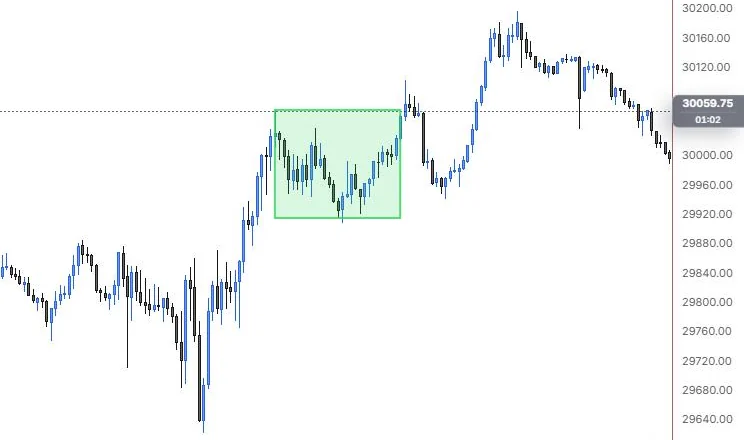
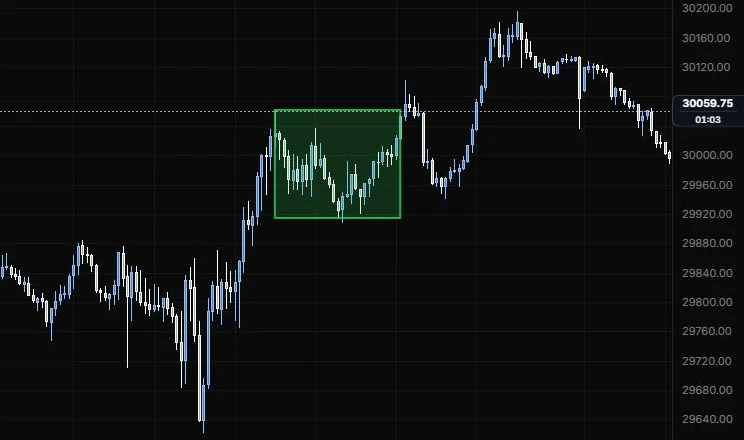
A box between two corners, for ranges and zones.
NQ 5m, Oct 15, 2026 · Atlas
How to place: click one corner, then the opposite corner, or press and drag between them. While you size it, the box shows its top price, bottom price and height.
Good for: boxing the opening range, an overnight consolidation or a supply and demand zone.
Example: On NQ 5m (Oct 15, 2026), click the 11:15 high as one corner, then drag to the 13:30 bar at the level of the 12:25 low for the other. The box frames the midday range, about 29,910 to 30,062, that price chopped inside for over two hours, and the push out of the top right after 13:30 stands out against it. Turn on Middle line if you want the 50% of the range as well.
Settings
| Setting | Options | What it does |
|---|---|---|
| Fill colour | Any colour, default auto (the line colour) | The colour inside the box. |
| Fill opacity | 0 to 80%, default 12% | How strong the fill is. |
| Border | On or off, default on | Draws the outline. |
| Extend left / Extend right | On or off, default off for both | Stretches the box to the chart edge. |
| Middle line | Line role: show or hide, solid/dashed/dotted, width, opacity (default hidden, dashed, 1 px, 60%) | A line at 50% of the box. |
| 25% / 75% | Line role: show or hide, solid/dashed/dotted, width, opacity (default hidden, dotted, 1 px, 45%) | Quarter lines inside the box. |
| Price levels | On or off, default off | Keeps the top, bottom and size readout on screen after you've drawn the box. |
| Label | Text, position along and across the box, colour, size, bold, pill or plain background | Puts your text above, on or below the box. |
Arrow
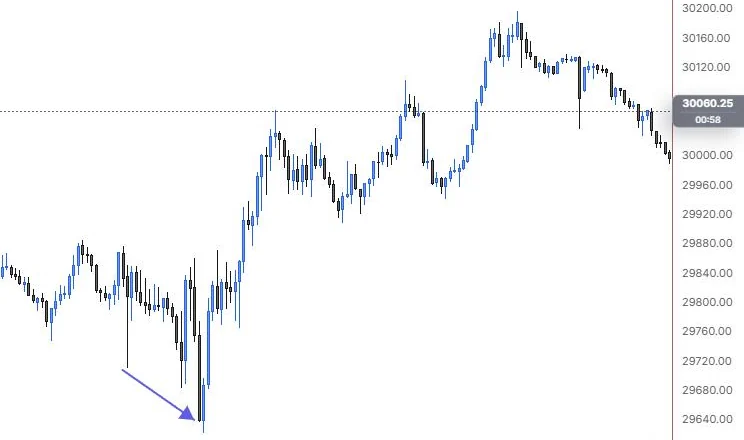
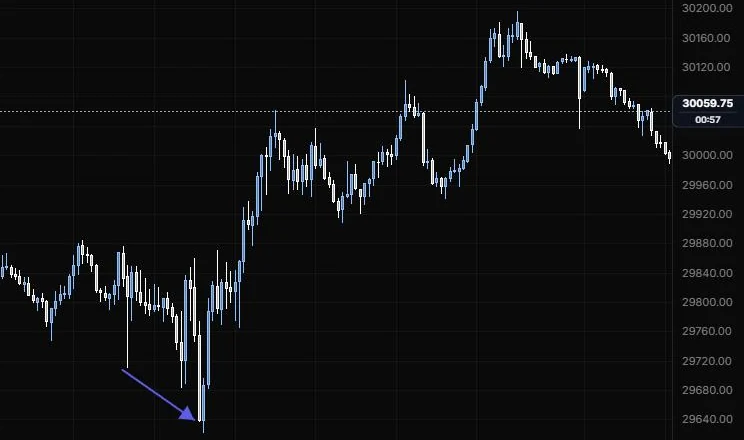
A line with an arrowhead, for pointing at something.
NQ 5m, Oct 15, 2026 · Atlas
How to place: click where the tail goes, then where the head goes, or press and drag from tail to head.
Good for: pointing at a rejection wick or showing the direction you expect next on a chart you're sharing.
Example: On NQ 5m (Oct 15, 2026), click in the empty space up and left of the low for the tail, then on the 9:55 bar for the head. The arrow points straight at the day low (29,622.50), so anyone you share the chart with knows which bar you mean.
Settings
| Setting | Options | What it does |
|---|---|---|
| Head | Filled, Open, None (default Filled) | The arrowhead style. |
| Head size | 0.5 to 3, default 1 | How big the head is. |
| Both ends | On or off, default off | Puts a head on each end. |
| Show stats | Never, When selected, Always (default Never) | When the stats readout appears. |
| Stats content | Price change (on), Percent (on), Bars (on), Time span (off), Angle (off) | Picks what the readout shows. |
| Stats position and size | Start, Middle, End (default End); 8 to 20 px (default 11) | Where the readout sits and how big it is. |
| Label | Text, position along and across the line, colour, size, bold, pill or plain background | Puts your own text on the arrow. |
Fib retracement
Fibonacci levels between a swing's start and end.
NQ 5m, Oct 15, 2026 · Atlas
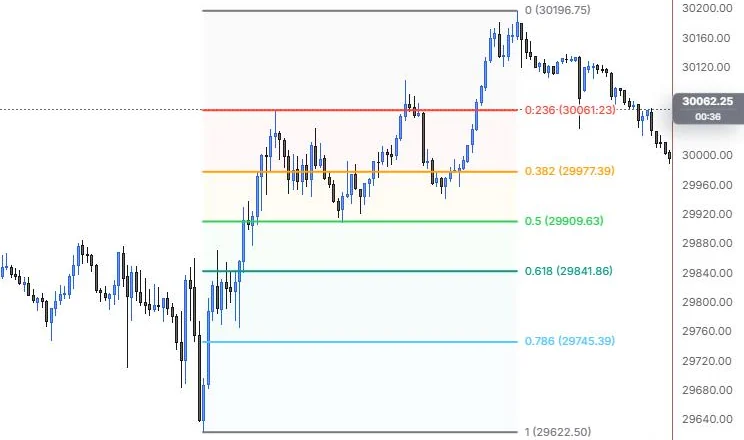
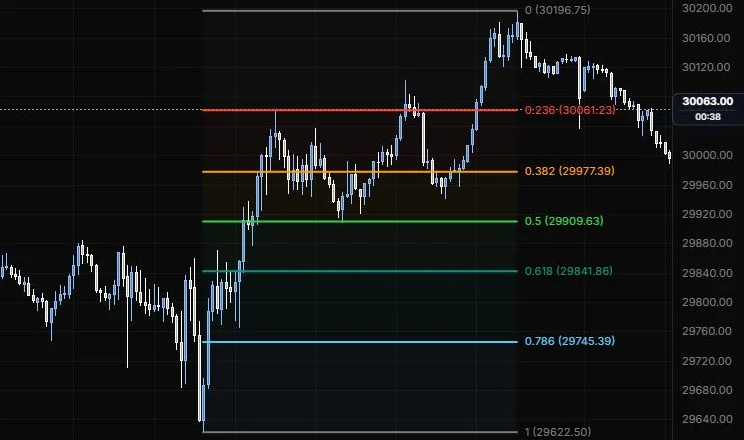
How to place: click the swing start (the 100% end), then the swing end (the 0% end), or press and drag between them. To save a level set you like and reuse it, see Drawing presets.
Good for: finding where a pullback might stall inside a move, like the 0.5 and 0.618 of the leg that just ran.
Example: On NQ 5m (Oct 15, 2026), click the 9:55 low (29,622.50) as the 100% end, then the 15:45 high (30,196.75) as the 0% end. Every level prints with its price: 0.382 at 29,977.39, 0.5 at 29,909.63 and 0.618 at 29,841.86. Looking back, the 12:25 pullback low sits almost on the 0.5, and if the evening drift keeps going, these are the levels you'd watch for a reaction.
Settings
| Setting | Options | What it does |
|---|---|---|
| Levels | 0, 0.236, 0.382, 0.5, 0.618, 0.786, 1 on; 1.618, 2.618, 3.618, 4.236 off | Each level has its own switch, ratio and colour. Add level adds one; Spectrum restores the built-in colours. |
| One colour | Any colour | Makes every level the same colour. |
| Background | On or off, default on; opacity 0 to 40%, default 6% | Shades the bands between levels. |
| Trend line | On or off, default off; stroke and width | A diagonal from the swing start to the swing end. |
| Anchor lines | On or off; stroke | Vertical lines at the two anchors' times. |
| Extend | None, Left, Right, Both (default None) | Runs the level lines to the chart edge. |
| Reverse | On or off, default off | Flips which end is 0 and which is 1. |
| Log scale | On or off, default off | Measures the levels on a log price scale. |
| Label content | Ratio (on), Price (on), % (off) | What each level's label shows. |
| Label position | Left, Centre, Right (default Right); Top, Middle, Bottom (default Middle) | Where the label sits along and against its level. |
| Label size and opacity | 8 to 24 px (default 11); 10% to 100% (default 100%) | How big and how strong the labels are. |
Long position
A trade plan box: entry, target and stop, with the reward to risk.
NQ 5m, Oct 15, 2026 · Atlas
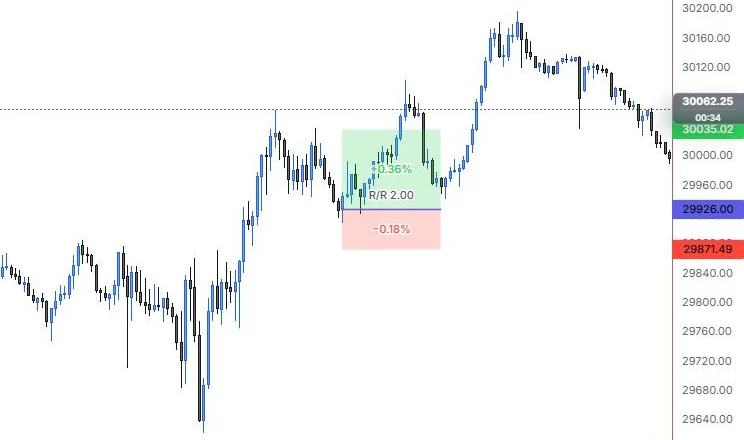
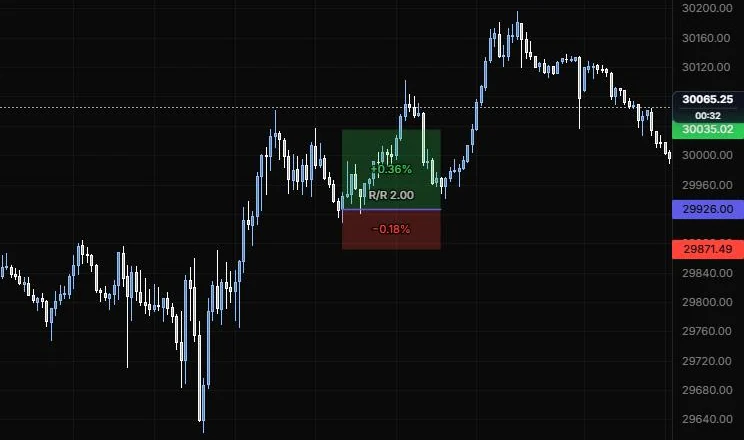
How to place: one click at your entry price. The target and stop appear above and below it at a 2 to 1 reward to risk, sized to your zoom. Drag the target, the stop or the box edges to fit your plan. The toolbar shows the live R/R.
Good for: planning a long before you take it, so you know the reward to risk and, with sizing on, how many contracts fit your risk.
Example: On NQ 5m (Oct 15, 2026), one click at 29,926.00 on the 12:25 pullback sets the entry. With the default 2 to 1, the target lands at 30,035.02 (+0.36%), the stop at 29,871.49 (-0.18%), and the box reads R/R 2.00. Drag the stop and target to your own levels, and set Account, Risk % and Point value (20 for NQ) if you want the contract count too.
Settings
| Setting | Options | What it does |
|---|---|---|
| Target / Stop | Any price | Type exact prices instead of dragging. |
| Profit / Stop colour | Any colour, default green and red | The colours of the two zones. |
| Zone opacity | 2% to 60%, default 12% | How strong the zone fills are. |
| Axis prices | On or off, default on | Entry, target and stop prices on the price scale. |
| Show stats | On hover, Always, Never (default On hover) | When the zone readouts appear. |
| Text size | 8 to 20 px, default 11 | Size of the readouts. |
| Account | 0 to 10,000,000, default 0 (no sizing) | Your account size. Set it to turn on position sizing. |
| Risk % | 0.1% to 10%, default 1% | How much of the account one trade risks. |
| Point value | 0.01 to 1000, default 1 | Dollars per point per contract or share: ES 50, NQ 20, shares 1, options 100. With an account set, the box shows the quantity and the dollar risk and reward. |
Short position
The same trade plan box for a short: target below entry, stop above.
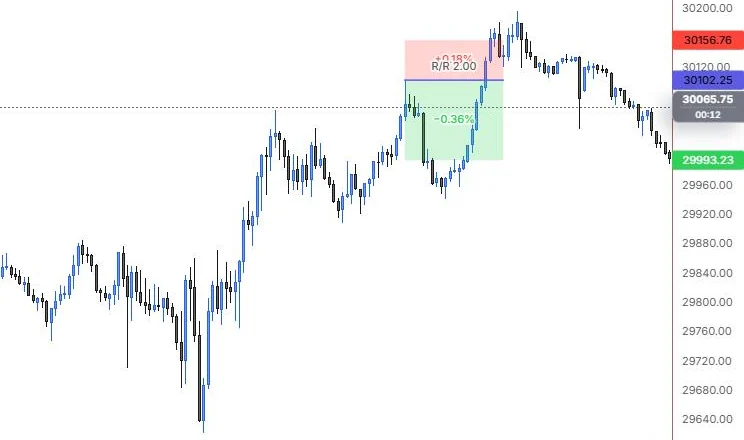
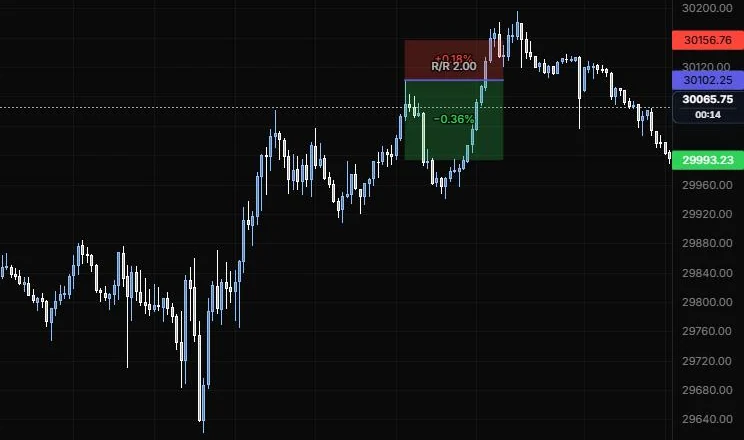
NQ 5m, Oct 15, 2026 · Atlas
How to place: one click at your entry price. The target appears below and the stop above, at a 2 to 1 reward to risk. Drag them, or the box edges, to fit your plan. The toolbar shows the live R/R.
Good for: planning a short into a level, so you know before the fill what you're risking and what you're aiming for.
Example: On NQ 5m (Oct 15, 2026), one click at the 13:40 high sets the entry at 30,102.25. The defaults put the stop at 30,156.76 (0.18% above) and the target at 29,993.23 (0.36% below), so the box reads R/R 2.00. In a real plan you'd drag the stop above a level you trust and the target to the next support instead of keeping the zoom-sized defaults.
Settings
| Setting | Options | What it does |
|---|---|---|
| Target / Stop | Any price | Type exact prices instead of dragging. |
| Profit / Stop colour | Any colour, default green and red | The colours of the two zones. |
| Zone opacity | 2% to 60%, default 12% | How strong the zone fills are. |
| Axis prices | On or off, default on | Entry, target and stop prices on the price scale. |
| Show stats | On hover, Always, Never (default On hover) | When the zone readouts appear. |
| Text size | 8 to 20 px, default 11 | Size of the readouts. |
| Account | 0 to 10,000,000, default 0 (no sizing) | Your account size. Set it to turn on position sizing. |
| Risk % | 0.1% to 10%, default 1% | How much of the account one trade risks. |
| Point value | 0.01 to 1000, default 1 | Dollars per point per contract or share: ES 50, NQ 20, shares 1, options 100. With an account set, the box shows the quantity and the dollar risk and reward. |
Brush
A freehand stroke, like a marker on the chart.
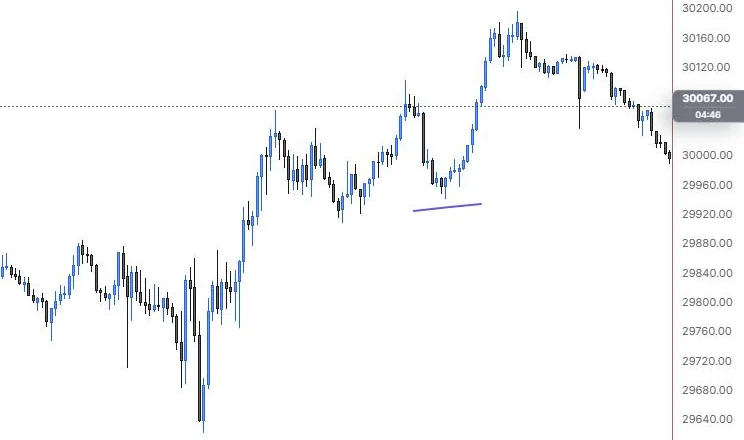
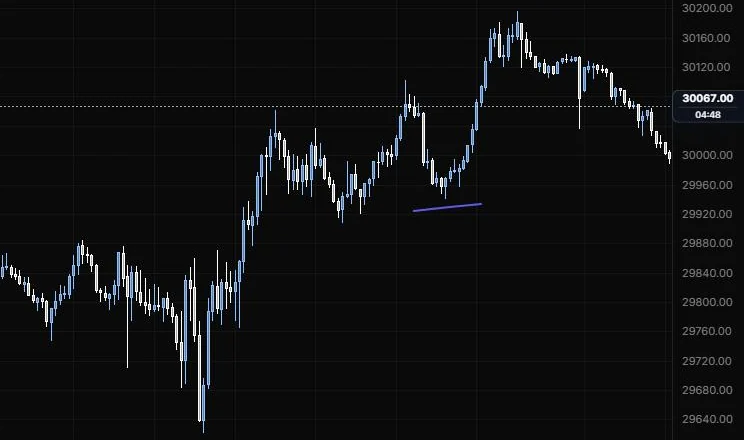
NQ 5m, Oct 15, 2026 · Atlas
How to place: press and drag to draw. Let go to finish the stroke.
Good for: circling something quickly or sketching the path you expect, when a precise tool would be overkill.
Example: On NQ 5m (Oct 15, 2026), press just under the 14:20 lows and drag a short stroke to underline them. There's no price or anchor to set up. It's a quick mark that says "look here" on a chart you're sharing.
Settings
| Setting | Options | What it does |
|---|---|---|
| Fill opacity | 0 to 80%, default 0% | Above zero, closes the stroke and fills the inside. |
Text
A free-text note placed anywhere on the chart.
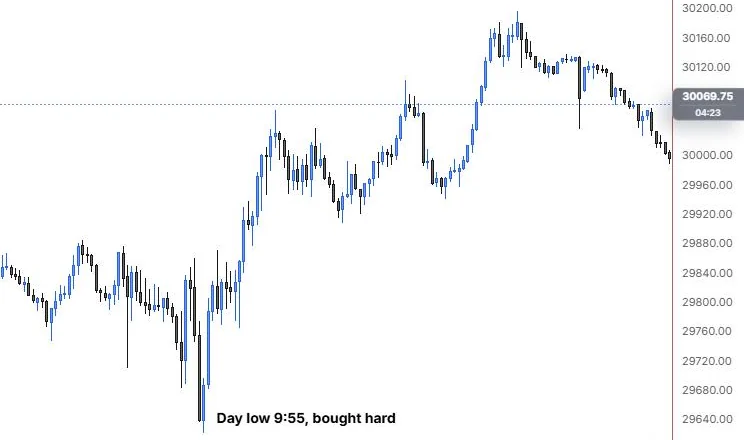
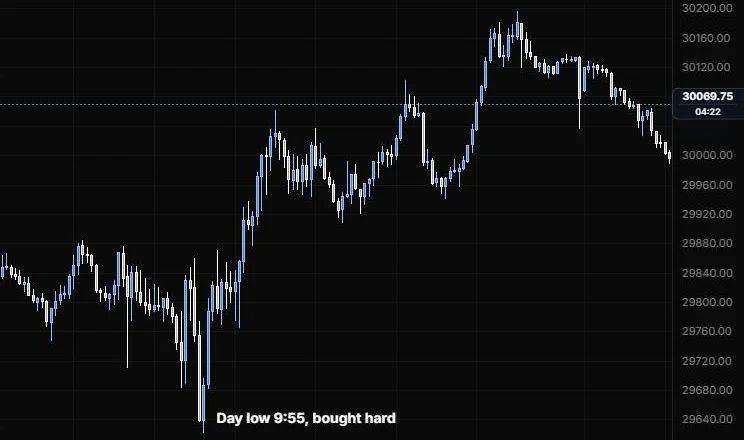
NQ 5m, Oct 15, 2026 · Atlas
How to place: click where you want the text. The editor opens with the cursor ready, so just type. Enter places it, Shift+Enter starts a new line and Esc cancels. Double-click the text later to edit it.
Good for: writing down why you took a trade, or a reminder like "no longs under VWAP" right where it applies.
Example: On NQ 5m (Oct 15, 2026), click just right of the 9:55 low, type "Day low 9:55, bought hard" and press Enter. The note sits beside the bar it's about, so when you scroll back later you still know why that low mattered.
Settings
| Setting | Options | What it does |
|---|---|---|
| Text | Any text | What the note says. |
| Size | 8 to 48 px, default 14 | Font size. |
| Weight | Bold and italic, default off | Font style. |
| Align | Left, Centre, Right (default Left) | How lines line up inside the box. |
| Background | Any colour, default auto; opacity 0% to 100%, default 0% | A box behind the text. |
| Border | Any colour, default auto; width 0 to 4 px, default 0 | An outline around the box. |
| Padding | 0 to 20 px, default 4 | Space between the text and the box edge. |
| Corners | 0 to 16 px, default 4 | How rounded the box corners are. |
Last updated