 Atlas
AtlasCycles & Regression
A regression channel fitted to the bars you pick, and cycle tools that repeat a time spacing across the chart.
The regression trend fits a line and bands to real bars and tells you how well price fits it. The cycle tools repeat a spacing you set, so you can check whether turns keep landing on a rhythm. Every tool, grouped: Drawing tools overview.
Regression trend
A best-fit line through the bars you pick, with deviation bands around it.
NQ 5m, Oct 15, 2026 · Atlas
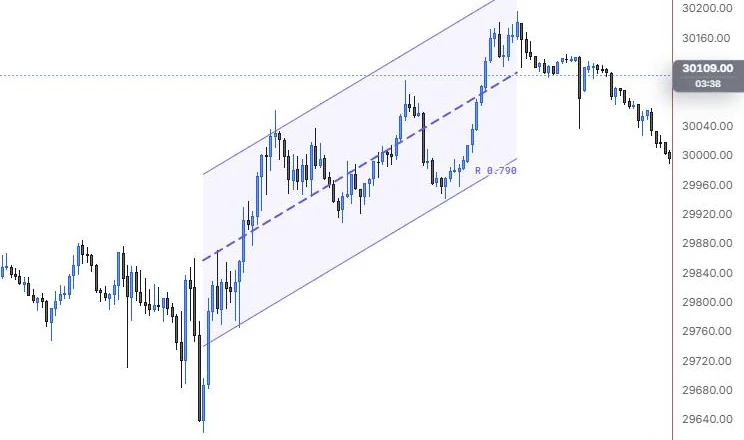
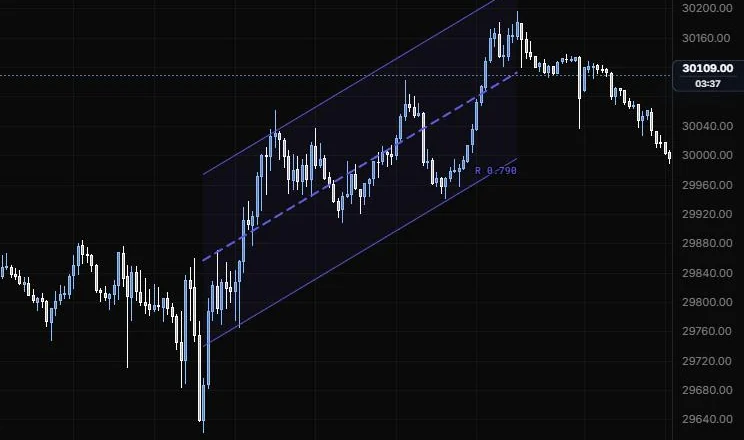
How to place: two clicks. Click the first bar, then the last bar. The anchors snap to bar times (the price isn't touched). Open Analysis from the drawing's toolbar to see the slope per bar, Pearson's R and R², one standard deviation in price, how far the last bar sits from the line, and how many bars sit beyond 2 standard deviations.
Good for: judging how clean a trend is and how stretched price is inside it. A strong R with price at the upper band says the trend is real but extended.
Example: On NQ 5m (Oct 15, 2026), click the 9:55 bar, then the 15:45 bar. The tool fits a dashed line through the closes with 2σ bands either side and reads R 0.790, a decent fit with plenty of chop around the line. The 15:45 high tags the upper band, so by the end of the range price was at the stretched edge of its own trend; open Analysis for the slope, σ and how many bars sat beyond the bands.
Settings
| Setting | Options | What it does |
|---|---|---|
| Source | Close, (H+L)/2, (H+L+C)/3, (O+H+L+C)/4 (default Close) | The price each bar feeds into the fit. |
| Deviation | Standard deviation, Max wick distance (default Standard deviation) | Max wick puts the bands on the furthest high and low in the range and ignores the multipliers. |
| Upper deviation | On or off, default on; ×σ 0 to 5, default 2 | The upper band and how far out it sits. |
| Lower deviation | On or off, default on; ×σ 0 to 5, default 2 | The lower band and how far out it sits. |
| Bands | 1 to 3, default 1 | Evenly spaced bands up to the deviation (3 bands at 3σ gives 1σ, 2σ, 3σ). |
| Snap to bars | On or off, default on | Anchors land on bar times. |
| Band lines | Line role: show or hide, solid/dashed/dotted, width, opacity (default solid, 1 px, 90%); colour auto | How the bands look. The base line uses the style bar. |
| Fill | On or off, default on; opacity 0 to 30%, default 6% | Shades between the bands. |
| Extend left / Extend right | On or off, default off for both | Runs the channel past its anchors. |
| Readout | Pearson's R (on), Slope (off), σ (off) | What the on-chart readout shows. |
| Label size and opacity | 8 to 20 px (default 11); 10% to 100% (default 100%) | How the readout looks. |
Cyclic lines
Vertical lines repeated at the spacing between two points.
NQ 5m, Oct 15, 2026 · Atlas
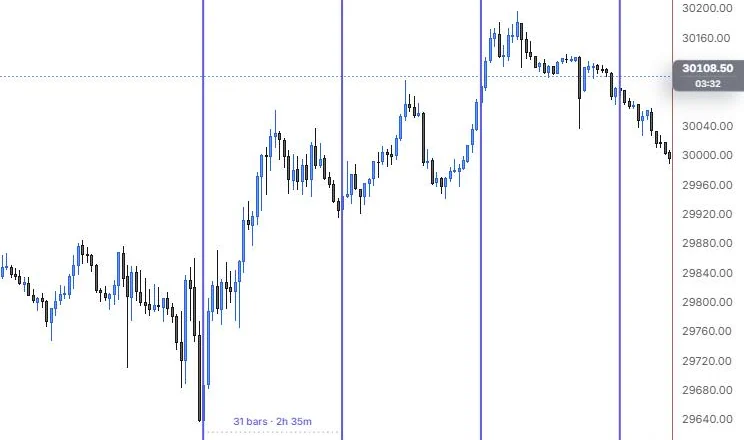
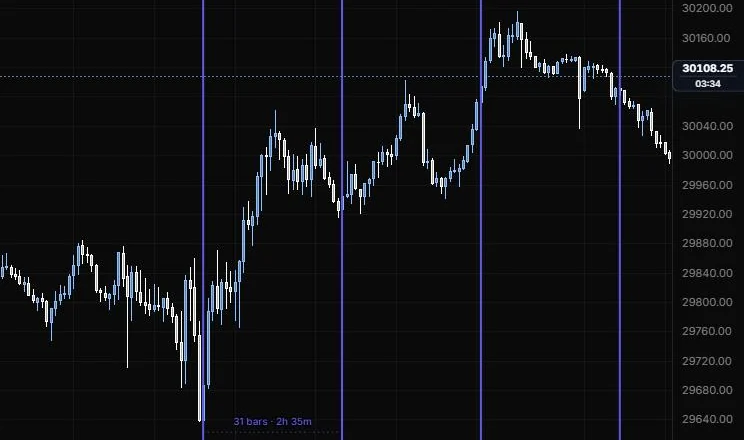
How to place: two clicks. Click the cycle start, then the point one cycle later. The anchors snap to bar times.
Good for: checking whether swing lows or highs keep landing at the same spacing.
Example: On NQ 5m (Oct 15, 2026), click the 9:55 low, then the 12:25 low. The period label reads 31 bars · 2h 35m and the lines repeat at that spacing across the chart. The next line lands partway up the afternoon push instead of on a low, so the rhythm didn't repeat here, and that's exactly the check this tool is for: if it doesn't line up, don't force it.
Settings
| Setting | Options | What it does |
|---|---|---|
| Extend left | On or off, default off | Also repeats the cycle back in time. |
| Snap to bars | On or off, default on | Anchors land on bar times. |
| Period line | Line role: show or hide, solid/dashed/dotted, width, opacity (default dotted, 1 px, 60%) | The line joining the two anchors. The cycle lines use the style bar. |
| Cycle numbers | On or off, default on; at Top or Bottom (default Bottom) | Numbers each cycle line. |
| Period | On or off, default on | Labels the bars and time per cycle. |
| Label size and opacity | 8 to 20 px (default 11); 10% to 100% (default 100%) | How the labels look. |
Time cycles
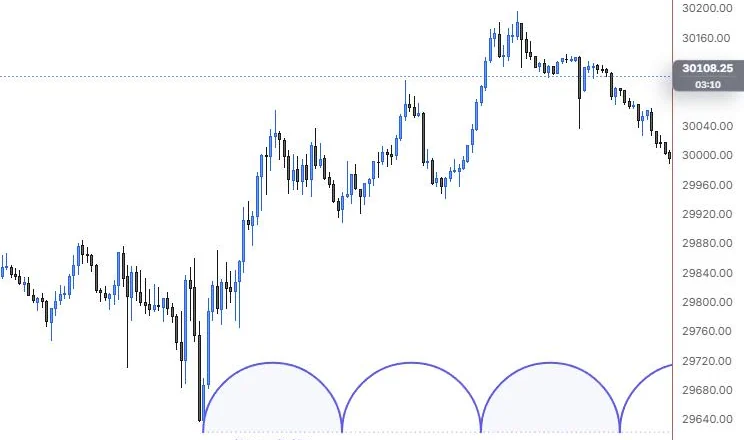
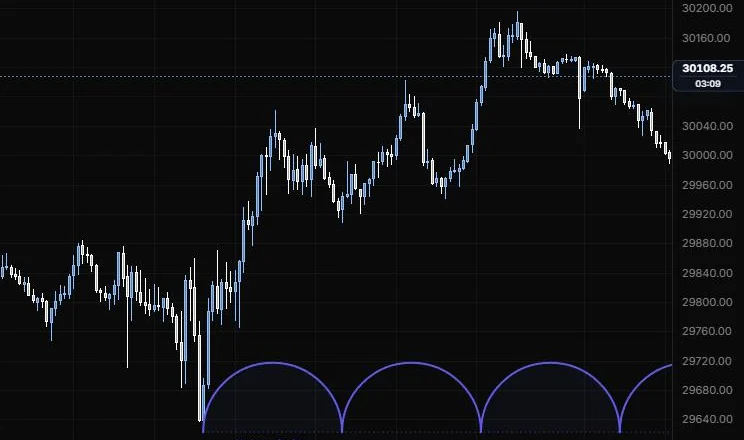
Repeating arcs, one per cycle, along a baseline.
NQ 5m, Oct 15, 2026 · Atlas
How to place: two clicks. Click the cycle start, then the cycle end. Clicking above or below the start sets which side the arcs draw on. The anchors snap to bar times.
Good for: seeing a cycle as a wave of humps, which makes it easier to spot where in the cycle price is right now.
Example: On NQ 5m (Oct 15, 2026), click the 9:55 low, then the 12:25 low. The arcs sit on a baseline at the day low and repeat that low-to-low spacing across the chart, one hump per cycle. The top of each hump marks the middle of its cycle, so you can see at a glance how far into the current one price is.
Settings
| Setting | Options | What it does |
|---|---|---|
| Arc height | Semicircle, From 2nd point (default Semicircle) | From 2nd point makes the arcs reach the second anchor's price. |
| Extend left | On or off, default off | Also repeats the arcs back in time. |
| Snap to bars | On or off, default on | Anchors land on bar times. |
| Fill | On or off, default on; opacity 0 to 30%, default 5% | Shades alternate cycles. |
| Baseline | Line role: show or hide, solid/dashed/dotted, width, opacity (default dotted, 1 px, 50%) | The line the arcs sit on. The arcs use the style bar. |
| Cycle numbers | On or off, default off | Numbers each cycle. |
| Period | On or off, default on | Labels the bars and time per cycle. |
| Label size and opacity | 8 to 20 px (default 11); 10% to 100% (default 100%) | How the labels look. |
Sine line
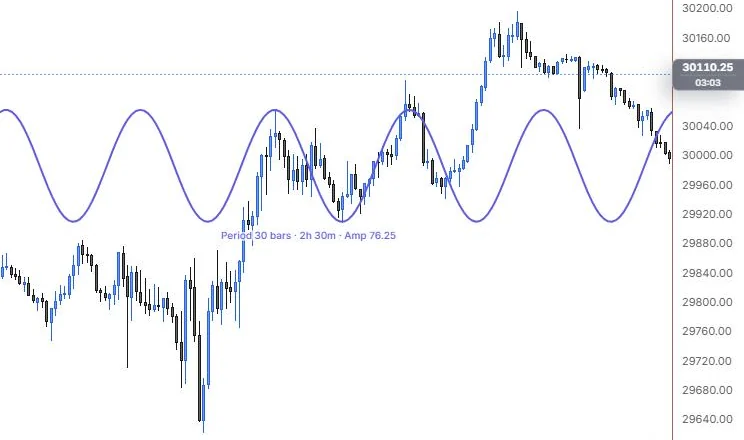
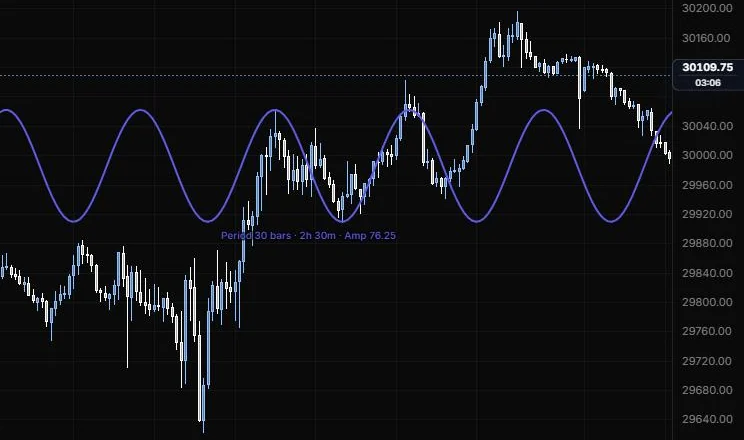
A sine wave fitted to one crest and the trough after it.
NQ 5m, Oct 15, 2026 · Atlas
How to place: two clicks. Click a crest (or a trough), then the trough (or crest) that follows it. The anchors snap to bar times.
Good for: a visual check of a regular up and down rhythm, and where the next crest or trough would land if it keeps going.
Example: On NQ 5m (Oct 15, 2026), click the 11:15 high, then the 12:25 low. The label reads Period 30 bars · 2h 30m · Amp 76.25, and the wave runs across the whole pane. The next crest lands near the 13:40 high, but the trough after it falls in the middle of the afternoon rally, which shows how quickly a clean midday rhythm can stop fitting.
Settings
| Setting | Options | What it does |
|---|---|---|
| Draw | Across the pane, From the first point (default Across the pane) | Where the wave starts. |
| Snap to bars | On or off, default on | Anchors land on bar times. |
| Axis | Line role: show or hide, solid/dashed/dotted, width, opacity (default hidden, dotted, 1 px, 40%) | The wave's center line. The wave uses the style bar. |
| Period | On or off, default on | Labels the full period in bars and time, and the amplitude. |
| Label size and opacity | 8 to 20 px (default 11); 10% to 100% (default 100%) | How the labels look. |
Last updated