 Atlas
AtlasElliott Wave
Elliott Wave counts that check the rules as you place them and project the next wave's target and invalidation.
You place the pivots; the tool snaps them to the wicks, labels them by degree and checks every Elliott rule live. Stop a count partway and it projects the next wave's target zone, invalidation level and path, as an assistant for your count, not a forecast. Every tool, grouped: Drawing tools overview.
Elliott impulse (1-2-3-4-5)
A five-wave impulse count, or a leading or ending diagonal.
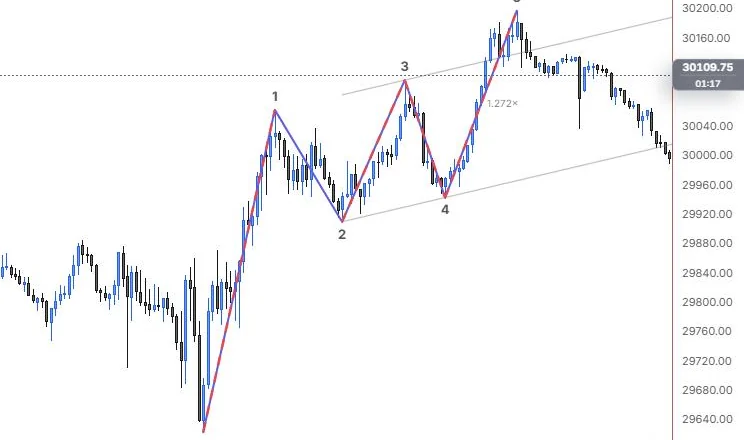
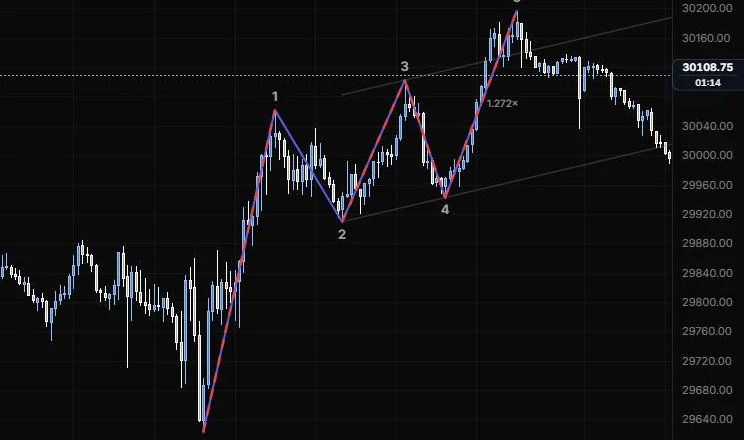
NQ 5m, Oct 15, 2026 · Atlas
How to place: click wave 0 (the origin), then waves 1 to 5 in order. Each pivot snaps to the true wick high or low nearby. You can stop after any wave: press Enter, double-click or tap the last point again, and the count projects the next wave. Open Analysis from the drawing's toolbar for every rule check and the wave relationships.
Good for: keeping a count honest. If wave 3 is the shortest or wave 2 runs past the start of wave 1, the tool tells you right away. On ES or NQ, turn on Leveraged futures so a wave 4 wick into wave 1's territory isn't flagged, as long as no bar closes there.
Example: On NQ 5m (Oct 15, 2026), click the 9:55 low as 0, then the 11:15 high (1), the 12:25 low (2), the 13:40 high (3), the 14:20 low (4) and the 15:45 high (5). The channel runs through 2 and 4 with its parallel through 3, extended ahead, and the 5 leg is marked 1.272×. Waves 1, 3 and 5 carry the red dashed broken-rule highlight because wave 3 here (193 points) is shorter than wave 1 (439.25) and wave 5, and the rules say wave 3 can never be the shortest, so as an impulse this count doesn't hold up.
Settings
| Setting | Options | What it does |
|---|---|---|
| Structure | Impulse, Leading diag., Ending diag. (default Impulse) | Which five-wave pattern the rules check against. |
| Degree | Grand Supercycle down to Miniscule, 12 degrees (default Minor) | Sets the label notation for the wave degree. |
| Notation | (1) (2), ① ② (default (1) (2)) | Plain or circled numbers. |
| Circled degrees | Ring, Text (default Ring) | For Primary and Minute labels: a ring drawn around the label, or the text form. |
| Degree look | Mono, Off, Size, "Size + colour", "Size + colour, lines too" (default Mono) | Helps tell degrees apart: larger degrees draw larger labels. |
| Labels | Look: Plain, Circle, Underline, Box (default Plain); letters Default, ABC, abc; size 8 to 28 px (default 13); colour and opacity | How the wave labels look. |
| Channel | On or off, default on; line role (default solid, 1 px, 55%) | The Elliott channel for the count so far (0 to 2, then 1 to 3, then 2 to 4, with its parallel), extended ahead as the next wave's target. |
| Rule check | On or off, default on; broken rule highlight (default dashed, 2.5 px, 90%) | Live rule validation, with the breaking wave highlighted. |
| Override rules | On or off, default off | Keeps the count as you drew it. It's no longer a valid count, so a "rule broken" mark stays on the chart and every broken rule stays listed under Analysis. |
| Leveraged futures | On or off, default off | Lets wave 4 enter wave 1's territory on wicks only. For futures, not stocks, ETFs or indexes. |
| Projection | On or off, default on; Show projections: Always, "Path always, zones on hover", On hover (default "Path always, zones on hover") | Target boxes with Fibonacci levels, invalidation and the projected path, and when they draw. On a phone, hover means while the count is selected. |
| Other options | Wave lines (on); Boundaries line (default dashed, 50%); Fib ratios (on); Projected path (on); Next move arrow (on); target zone, zone fill (default 8%), ghost path and invalidation line styles; Status chip (on); Snap pivots (on); Suggest (off, previews the best completion from your first pivot, never applied until you Accept) and its line style | Everything else, from the wave path to the suggestion preview. |
Elliott correction (A-B-C)
A three-wave correction: a zigzag or a flat.
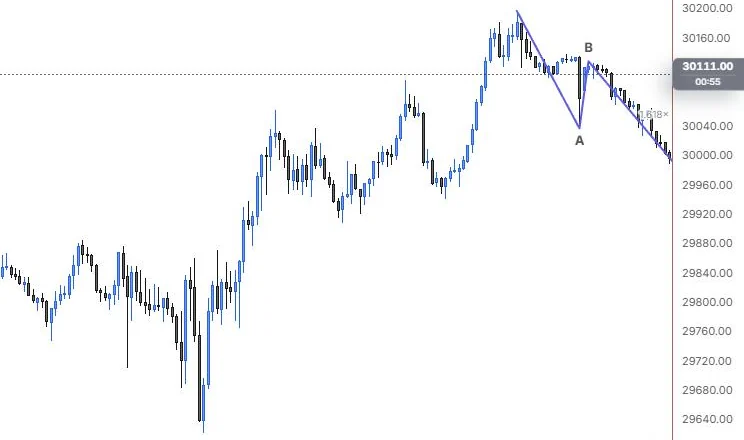
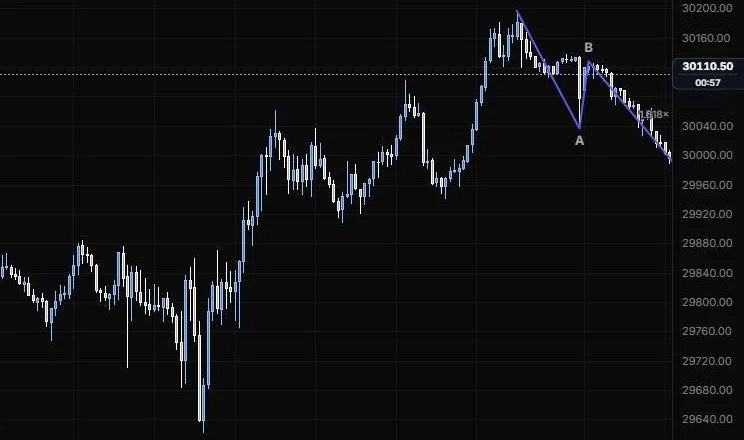
NQ 5m, Oct 15, 2026 · Atlas
How to place: click the origin, then waves A, B and C. Each pivot snaps to the true wick high or low nearby. You can stop after A or B: press Enter, double-click or tap the last point again, and the count projects the next wave. Open Analysis for the rule checks.
Good for: framing a pullback inside a bigger trend, so you can see where C is likely to finish and where the correction idea is wrong.
Example: On NQ 5m (Oct 15, 2026), click the 15:45 high as the origin, the late-day low as A, the bounce after it as B, then the evening low as C. The legs count the pullback down from the session high, and the C leg is marked 1.618×, its length measured against A. With Structure on Auto, the tool reads whether it fits a zigzag or a flat; stop after B instead and it projects the C target zone and invalidation for you.
Settings
| Setting | Options | What it does |
|---|---|---|
| Structure | Auto, Zigzag, Flat (default Auto) | Which correction the rules check against. Auto picks from the pivots. |
| Degree | Grand Supercycle down to Miniscule, 12 degrees (default Minor) | Sets the label notation for the wave degree. |
| Notation | (1) (2), ① ② (default (1) (2)) | Plain or circled labels. |
| Circled degrees | Ring, Text (default Ring) | For Primary and Minute labels: a ring drawn around the label, or the text form. |
| Degree look | Mono, Off, Size, "Size + colour", "Size + colour, lines too" (default Mono) | Helps tell degrees apart: larger degrees draw larger labels. |
| Labels | Look: Plain, Circle, Underline, Box (default Plain); letters Default, ABC, abc; size 8 to 28 px (default 13); colour and opacity | How the wave labels look. |
| Channel | On or off, default on; line role (default solid, 1 px, 55%) | The channel line for the count. |
| Rule check | On or off, default on; broken rule highlight (default dashed, 2.5 px, 90%) | Live rule validation, with the breaking wave highlighted. |
| Override rules | On or off, default off | Keeps the count as you drew it, with the "rule broken" mark and the broken rules listed under Analysis. |
| Leveraged futures | On or off, default off | The wick-only exception for leveraged futures. For futures, not stocks, ETFs or indexes. |
| Projection | On or off, default on; Show projections: Always, "Path always, zones on hover", On hover (default "Path always, zones on hover") | Target boxes with Fibonacci levels, invalidation and the projected path, and when they draw. |
| Other options | Wave lines (on); Boundaries line (default dashed, 50%); Fib ratios (on); Projected path (on); Next move arrow (on); target zone, zone fill (default 8%), ghost path and invalidation line styles; Status chip (on); Snap pivots (on); Suggest (off) and its line style | Everything else, from the wave path to the suggestion preview. |
Elliott triangle (A-B-C-D-E)
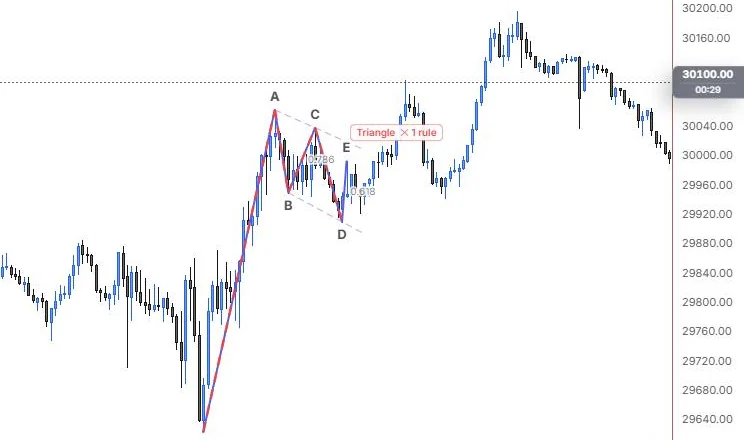
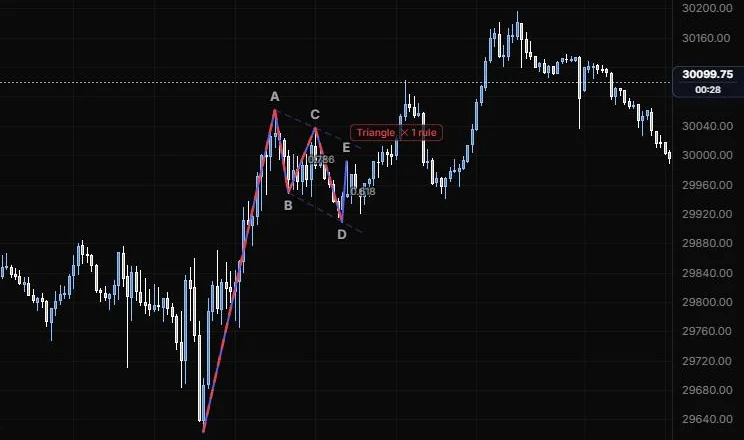
A five-wave contracting triangle, with A to C and B to D boundaries.
NQ 5m, Oct 15, 2026 · Atlas
How to place: click the origin, then waves A to E. Each pivot snaps to the true wick high or low nearby. You can stop after wave B or later: press Enter, double-click or tap the last point again, and the count projects the next wave. Open Analysis for the rule checks.
Good for: a sideways squeeze that usually shows up as a wave 4 or a wave B, where you're waiting for the thrust out of it.
Example: On NQ 5m (Oct 15, 2026), click the 9:55 low as the origin, A on the 11:15 high, then the late-morning swings B, C, D (the 12:25 low) and E. The dashed boundaries join A to C and B to D, but both slope down instead of narrowing and D undercuts B, so the chip reads "Triangle" with one broken rule and the breaking waves are highlighted. Open Analysis to see the rule named; the same pullback passes as a double three in the next section.
Settings
| Setting | Options | What it does |
|---|---|---|
| Degree | Grand Supercycle down to Miniscule, 12 degrees (default Minor) | Sets the label notation for the wave degree. |
| Notation | (1) (2), ① ② (default (1) (2)) | Plain or circled labels. |
| Circled degrees | Ring, Text (default Ring) | For Primary and Minute labels: a ring drawn around the label, or the text form. |
| Degree look | Mono, Off, Size, "Size + colour", "Size + colour, lines too" (default Mono) | Helps tell degrees apart: larger degrees draw larger labels. |
| Labels | Look: Plain, Circle, Underline, Box (default Plain); letters Default, ABC, abc; size 8 to 28 px (default 13); colour and opacity | How the wave labels look. |
| Boundaries | Line role: show or hide, solid/dashed/dotted, width, opacity (default dashed, 1 px, 50%) | The A to C and B to D lines. |
| Channel | On or off, default on; line role (default solid, 1 px, 55%) | The channel line for the count. |
| Rule check | On or off, default on; broken rule highlight (default dashed, 2.5 px, 90%) | Live rule validation, with the breaking wave highlighted. |
| Override rules | On or off, default off | Keeps the count as you drew it, with the "rule broken" mark and the broken rules listed under Analysis. |
| Leveraged futures | On or off, default off | The wick-only exception for leveraged futures. For futures, not stocks, ETFs or indexes. |
| Projection | On or off, default on; Show projections: Always, "Path always, zones on hover", On hover (default "Path always, zones on hover") | Target boxes with Fibonacci levels, invalidation and the projected path, and when they draw. |
| Other options | Wave lines (on); Fib ratios (on); Projected path (on); Next move arrow (on); target zone, zone fill (default 8%), ghost path and invalidation line styles; Status chip (on); Snap pivots (on); Suggest (off) and its line style | Everything else, from the wave path to the suggestion preview. |
Elliott combination (W-X-Y)
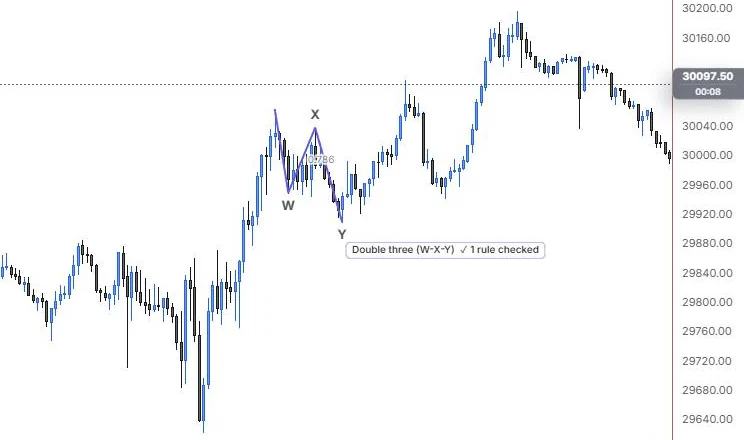
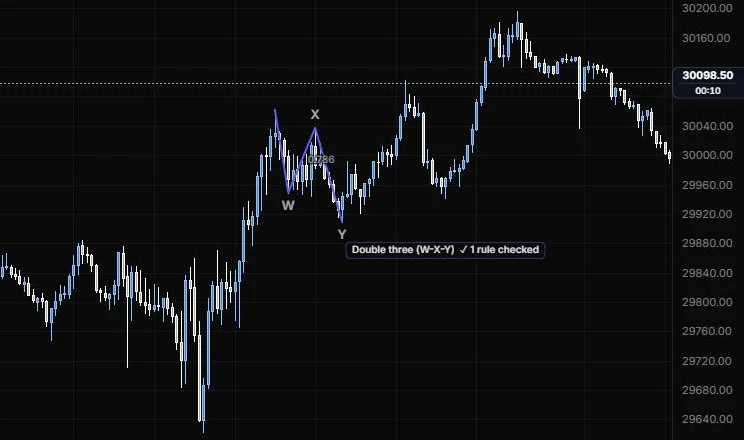
A double three (W-X-Y) or triple three (W-X-Y-X-Z) correction.
NQ 5m, Oct 15, 2026 · Atlas
How to place: click the origin, then waves W, X and Y. For a triple, keep going with the second X and then Z. Each pivot snaps to the true wick high or low nearby. You can stop after wave X or later: press Enter, double-click or tap the last point again, and the count projects the next wave. Open Analysis for the rule checks.
Good for: a correction that won't end on time and keeps chopping sideways, where a simple A-B-C count keeps failing.
Example: On NQ 5m (Oct 15, 2026), click the 11:15 high as the origin, W on the 11:25 low, X on the bounce after it and Y on the 12:25 low. X retraces 0.786 of W, and the chip reads "Double three (W-X-Y)" with its rule passing. The count frames the whole midday pullback as one sideways correction instead of forcing a single A-B-C onto it.
Settings
| Setting | Options | What it does |
|---|---|---|
| Structure | Double (WXY), Triple (WXYXZ) (default Double (WXY)) | Which combination the rules check against. |
| Degree | Grand Supercycle down to Miniscule, 12 degrees (default Minor) | Sets the label notation for the wave degree. |
| Notation | (1) (2), ① ② (default (1) (2)) | Plain or circled labels. |
| Circled degrees | Ring, Text (default Ring) | For Primary and Minute labels: a ring drawn around the label, or the text form. |
| Degree look | Mono, Off, Size, "Size + colour", "Size + colour, lines too" (default Mono) | Helps tell degrees apart: larger degrees draw larger labels. |
| Labels | Look: Plain, Circle, Underline, Box (default Plain); letters Default, ABC, abc; size 8 to 28 px (default 13); colour and opacity | How the wave labels look. |
| Channel | On or off, default on; line role (default solid, 1 px, 55%) | The channel line for the count. |
| Rule check | On or off, default on; broken rule highlight (default dashed, 2.5 px, 90%) | Live rule validation, with the breaking wave highlighted. |
| Override rules | On or off, default off | Keeps the count as you drew it, with the "rule broken" mark and the broken rules listed under Analysis. |
| Leveraged futures | On or off, default off | The wick-only exception for leveraged futures. For futures, not stocks, ETFs or indexes. |
| Projection | On or off, default on; Show projections: Always, "Path always, zones on hover", On hover (default "Path always, zones on hover") | Target boxes with Fibonacci levels, invalidation and the projected path, and when they draw. |
| Other options | Wave lines (on); Boundaries line (default dashed, 50%); Fib ratios (on); Projected path (on); Next move arrow (on); target zone, zone fill (default 8%), ghost path and invalidation line styles; Status chip (on); Snap pivots (on); Suggest (off) and its line style | Everything else, from the wave path to the suggestion preview. |
Last updated