 Atlas
AtlasFibonacci
Fibonacci extensions, channels, time zones, fans, arcs, circles, spirals and wedges, measured off the swings you pick.
The rest of the Fibonacci family (the retracement lives in Essentials): tools that project a swing forward in price, in time, or both. They all measure off the points you pick, so they're only as good as the swing you anchor them to. Every tool, grouped: Drawing tools overview.
Trend-based Fib extension
Extension levels projected from a pullback, sized by the move before it.
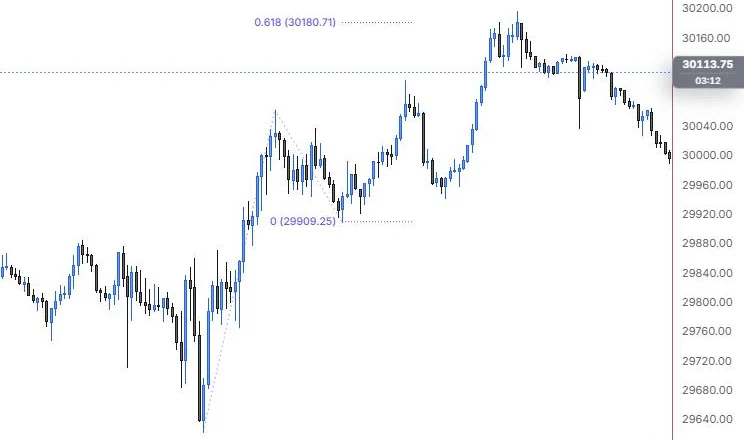
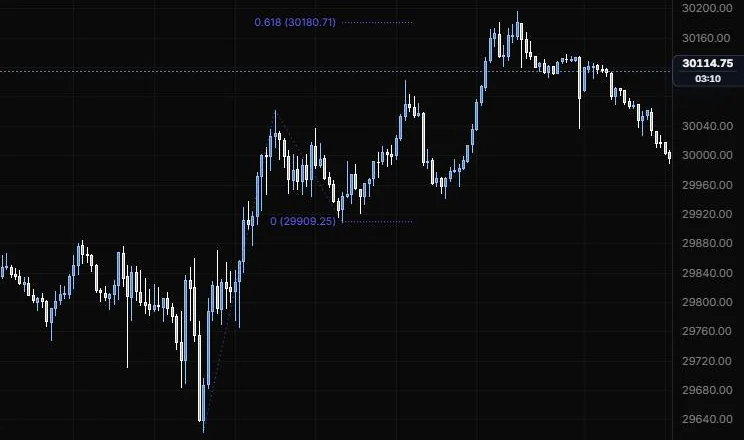
NQ 5m, Oct 15, 2026 · Atlas
How to place: three clicks. Click the trend start (A), the trend end (B), then the end of the retracement (C). The levels project from C using the size of A to B.
Good for: setting targets once a pullback is in, like the 1 and 1.618 extensions of the first leg.
Example: On NQ 5m (Oct 15, 2026), click the 9:55 low (A), the 11:15 high (B) and the 12:25 low (C). The 0 level sits on C at 29,909.25 and the 0.618 projects to 30,180.71, which is the level you'd have had on the chart as the afternoon pushed toward its 15:45 high of 30,196.75. The 1 and higher levels sit above this view, so scroll the price scale up to see the full repeat of the A to B leg.
Settings
| Setting | Options | What it does |
|---|---|---|
| Levels | 0, 0.618, 1, 1.272, 1.618, 2, 2.618 on; 0.236, 0.382, 0.5, 0.786, 1.414, 3.618, 4.236 off | Each level has its own switch and colour, and you can edit the ratios. |
| Level lines | On or off, default on; opacity 5% to 100%, default 100% | Shows the level lines. Their stroke and width come from the style bar. |
| Colours | One colour, Spectrum (default One colour) | One colour for levels, fills, legs and labels, or a colour per level. A level with its own colour keeps it. |
| Extend | None, Left, Right, Both (default None) | Runs the levels to the chart edge. |
| Fill between levels | On or off, default off; opacity 0 to 30%, default 5% | Shades the bands between levels. |
| Reverse | On or off, default off | Projects against the trend instead of with it. |
| Label content | Ratio (on), Price (on), % (off) | What each level's label shows. |
| Label position | Left, Center, Right (default Left); Above, On line, Below (default On line) | Where the label sits along and against its level. |
| Label size and opacity | 8 to 20 px (default 10.5); 10% to 100% (default 100%) | How the labels look. |
| Trend legs | On or off, default on | Draws A to B to C. |
| Leg style | Line role: show or hide, solid/dashed/dotted, width, opacity (default dotted, 1 px, 70%) | How the legs look. |
Fib channel
A sloped channel with Fibonacci lines parallel to the trend.
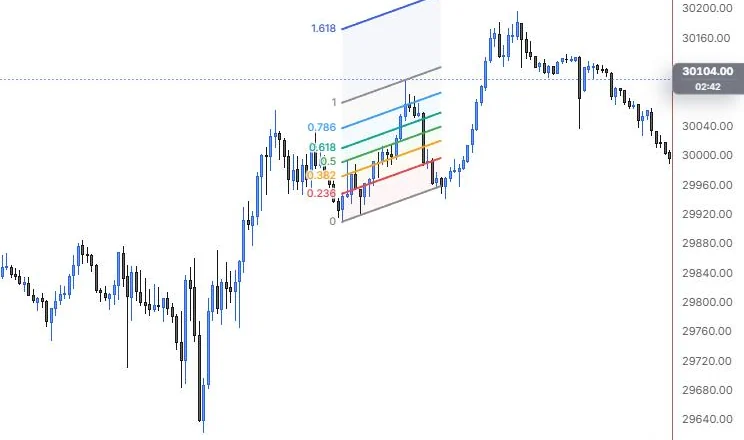
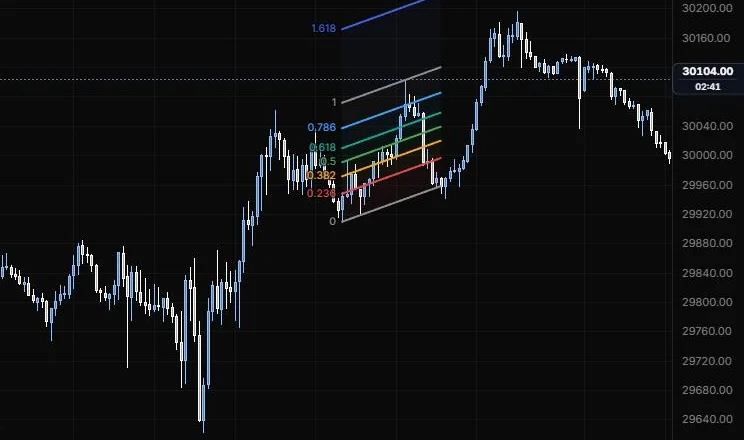
NQ 5m, Oct 15, 2026 · Atlas
How to place: three clicks. Click the trend start, then the trend end, then a point that sets the channel width.
Good for: a trending move where you want pullback levels that slope with the trend instead of flat ones.
Example: On NQ 5m (Oct 15, 2026), click the 12:25 low, then the 14:20 low for the base, then the 13:40 high for the width. The 0 line runs along the lows, the 1 line through the 13:40 high, and 0.236 to 0.786 slope with them in between, with 1.618 as a stretch line above. Each line is labelled with its ratio on the left, so you can read how deep each dip went inside the lane.
Settings
| Setting | Options | What it does |
|---|---|---|
| Levels | 0, 0.236, 0.382, 0.5, 0.618, 0.786, 1, 1.618 on; 1.272, 2.618, 3.618, 4.236 off | The parallel lines, each with its own switch and colour. |
| Level lines | On or off, default on; opacity 5% to 100%, default 100% | Shows the lines. Their stroke and width come from the style bar. |
| Colours | One colour, Spectrum (default Spectrum) | One colour for every level, or a colour per level. |
| Extend | None, Left, Right, Both (default None) | Runs the lines to the chart edge. |
| Fill between levels | On or off, default on; opacity 0 to 30%, default 5% | Shades the bands. |
| Reverse | On or off, default off | Puts level 0 on the width line and 1 on the base. |
| Label content | Ratio (on), Price (off), % (off) | What each label shows. |
| Label position | Left, Right (default Left) | Which end the labels sit at. |
| Label size and opacity | 8 to 20 px (default 10.5); 10% to 100% (default 100%) | How the labels look. |
Fib time zones
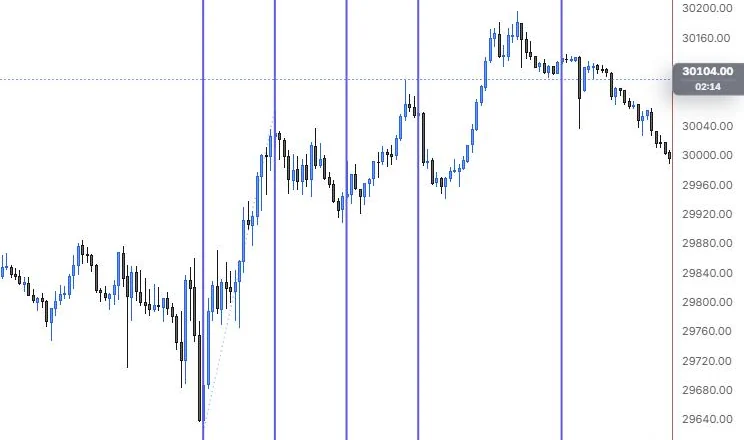
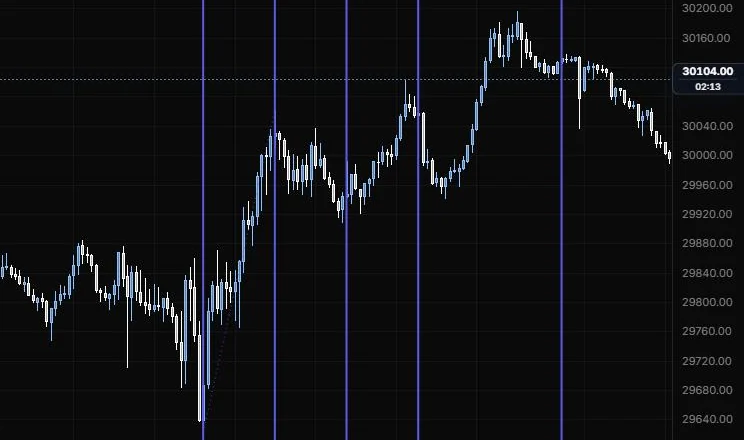
Vertical lines at Fibonacci counts of a time unit you set: 1, 2, 3, 5, 8, 13 and so on.
NQ 5m, Oct 15, 2026 · Atlas
How to place: two clicks. Click the start (zone 0), then the point one unit later (zone 1). Open Analysis from the drawing's toolbar to see every zone's bar count and time, with the next one still ahead marked and future times estimated.
Good for: looking for timing around a swing, when you suspect turns are coming at regular counts.
Example: On NQ 5m (Oct 15, 2026), click the 9:55 low for zone 0, then the 11:15 high for zone 1, so one unit is 16 bars. The next lines land at 2, 3 and 5 units, and you can see zones 2 and 3 fall a bar or two after the 12:25 low and the 13:40 high. Open Analysis for every zone's bar count and time, and when the next one is due.
Settings
| Setting | Options | What it does |
|---|---|---|
| Zones | 0, 1, 2, 3, 5, 8, 13, 21, 34, 55, 89 on; 144, 233 off | The counts that get a line. |
| Level lines | On or off, default on; opacity 5% to 100%, default 100% | Shows the lines. Their stroke and width come from the style bar. |
| Colours | One colour, Spectrum (default One colour) | One colour for every zone, or a colour per zone. |
| Shade alternate zones | On or off, default off; opacity 0 to 30%, default 4% | Shades every other zone. |
| Show | Count, Bars, Time from start, Date, None (default Count) | What each line's label shows. |
| Vertical | Top, Bottom (default Top) | Where the labels sit. |
| Label size and opacity | 8 to 20 px (default 10.5); 10% to 100% (default 100%) | How the labels look. |
| Unit line | Line role: show or hide, solid/dashed/dotted, width, opacity (default dotted, 1 px, 60%) | The line from zone 0 to zone 1 that sets one unit. |
Trend-based Fib time
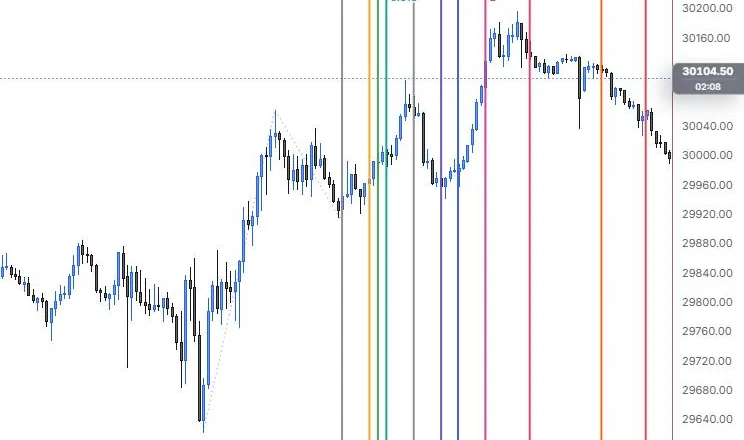
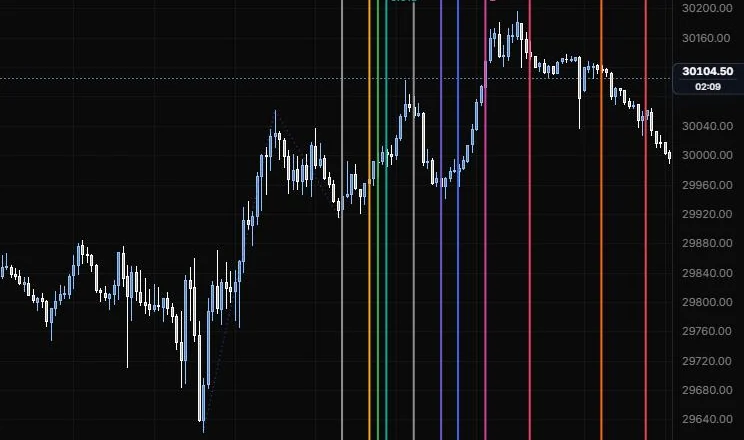
Time ratios of a swing's length, projected forward from a point you pick.
NQ 5m, Oct 15, 2026 · Atlas
How to place: three clicks. Click the trend start (A), the trend end (B), then the projection origin (C). The lines land at Fibonacci ratios of A to B's length, counted from C. Open Analysis to see each line's bar offset and time, with the next one ahead marked.
Good for: asking "if the pullback takes as long as the rally did, when does it end?"
Example: On NQ 5m (Oct 15, 2026), click the 9:55 low (A), the 11:15 high (B) and the 12:25 low (C). The rally took 16 bars, so the lines land at Fibonacci fractions and multiples of 16 bars counted from 12:25, each in its own colour. Looking back, the 1 line lands just after the 13:40 high and the 2.618 line close to the 15:45 high, and Analysis lists each line's bar offset and time.
Settings
| Setting | Options | What it does |
|---|---|---|
| Levels | 0, 0.382, 0.5, 0.618, 1, 1.382, 1.618, 2, 2.618, 3.618, 4.236 on; 0.236, 0.786, 1.272 off | The ratios that get a line. |
| Level lines | On or off, default on; opacity 5% to 100%, default 100% | Shows the lines. Their stroke and width come from the style bar. |
| Colours | One colour, Spectrum (default Spectrum) | One colour for every level, or a colour per level. |
| Shade alternate bands | On or off, default off; opacity 0 to 30%, default 4% | Shades every other band. |
| Show | Ratio, Ratio + bars, Bars, Time from C, Date, None (default Ratio) | What each line's label shows. |
| Vertical | Top, Bottom (default Top) | Where the labels sit. |
| Label size and opacity | 8 to 20 px (default 10.5); 10% to 100% (default 100%) | How the labels look. |
| Trend legs | On or off, default on | Draws A to B to C. |
| Leg style | Line role (default dotted, 1 px, 60%) | How the legs look. |
Fib speed resistance fan
Rays from a swing's start through Fibonacci fractions of its price and time.
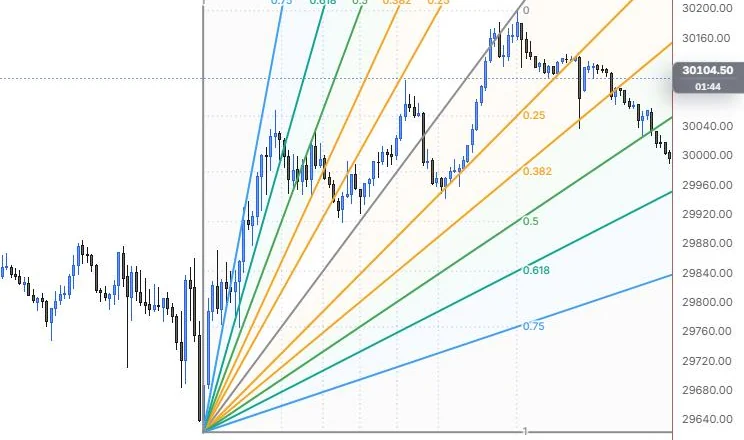
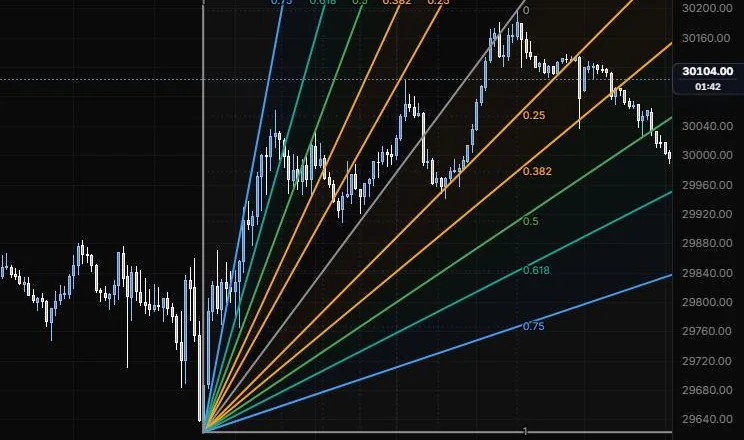
NQ 5m, Oct 15, 2026 · Atlas
How to place: two clicks. Click the trend start, then the trend end.
Good for: reading how fast a pullback is unwinding a move. Holding a shallow ray says the trend is still strong.
Example: On NQ 5m (Oct 15, 2026), click the 9:55 low, then the 15:45 high. The price rays fan out under the swing line and the time rays above it, each labelled with its ratio, over a dotted grid. By the right edge, the evening drift has slipped under the 0.5 price ray and sits above the 0.618, which tells you the pullback is getting deeper but is still inside the fan.
Settings
| Setting | Options | What it does |
|---|---|---|
| Price levels | 0, 0.25, 0.382, 0.5, 0.618, 0.75, 1 all on | The price ratios on the end bar that rays pass through. |
| Time levels | 0, 0.25, 0.382, 0.5, 0.618, 0.75, 1 all on | The time ratios at the end price that rays pass through. |
| Price fan / Time fan | On or off, default on for both | Shows each set of rays. |
| Level lines | On or off, default on; opacity 5% to 100%, default 100% | Shows the rays. Their stroke and width come from the style bar. |
| Colours | One colour, Spectrum (default Spectrum) | One colour for everything, or a colour per level. |
| Extend rays | On or off, default on | Runs the rays past the box. |
| Fill between levels | On or off, default on; opacity 0 to 30%, default 4% | Shades between rays. |
| Reverse | On or off, default off | Flips the fan's orientation. |
| Grid | Line role (default dotted, 1 px, 35%) | The grid inside the start to end box. |
| Labels | Ratio (on), Price (off), % (off), Time ratios (on) | What the labels show. |
| Label size and opacity | 8 to 20 px (default 10.5); 10% to 100% (default 100%) | How the labels look. |
Fib speed resistance arcs
Arcs around a swing's end at Fibonacci fractions of its length.
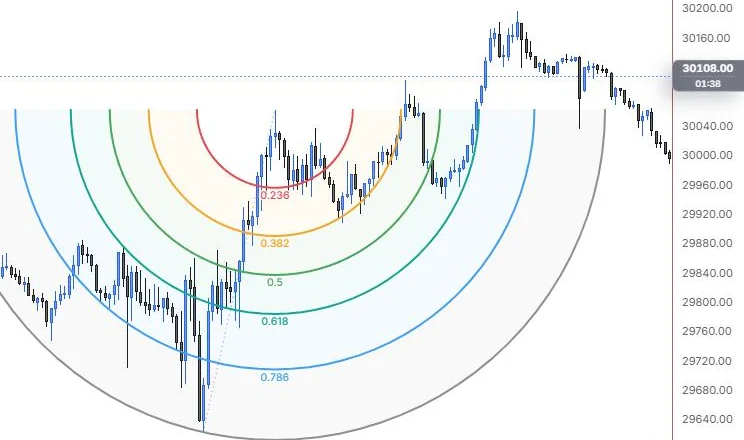
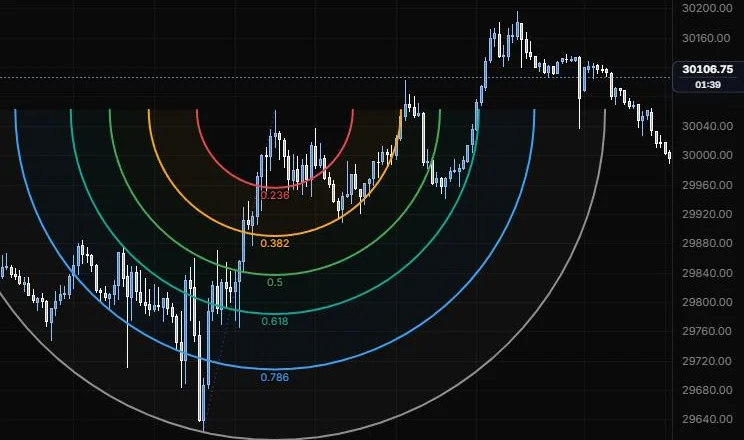
NQ 5m, Oct 15, 2026 · Atlas
How to place: two clicks. Click the trend start, then the trend end, which is the center of the arcs.
Good for: support and resistance that combines price and time: a pullback meets an arc both at a price and at a moment.
Example: On NQ 5m (Oct 15, 2026), click the 9:55 low, then the 11:15 high, which becomes the centre. The 0.236 to 0.786 arcs hang under the high, with the 1 arc passing back through the 9:55 low. You can see the 12:25 pullback low sitting on the 0.382 arc, and because the arcs curve, the level a pullback meets depends on how long it takes as well as how deep it goes.
Settings
| Setting | Options | What it does |
|---|---|---|
| Levels | 0.236, 0.382, 0.5, 0.618, 0.786, 1 on; 1.618, 2.618, 3.618, 4.236 off | The arc radii. |
| Level lines | On or off, default on; opacity 5% to 100%, default 100% | Shows the arcs. Their stroke and width come from the style bar. |
| Colours | One colour, Spectrum (default Spectrum) | One colour for every arc, or a colour per level. |
| Full circles | On or off, default off | Draws whole circles instead of half arcs. |
| Arcs face | Up / down, Along the trend (default Up / down) | Which way the half arcs open. They open away from the trend start. |
| Fill between levels | On or off, default on; opacity 0 to 30%, default 5% | Shades between arcs. |
| Label content | Ratio (on), Price (off), % (off) | What each arc's label shows. |
| Label size and opacity | 8 to 20 px (default 10.5); 10% to 100% (default 100%) | How the labels look. |
| Trend line | Line role (default dotted, 1 px, 60%) | The line from start to end. |
Fib circles
Concentric circles around a center, scaled by Fibonacci ratios of a radius you set.
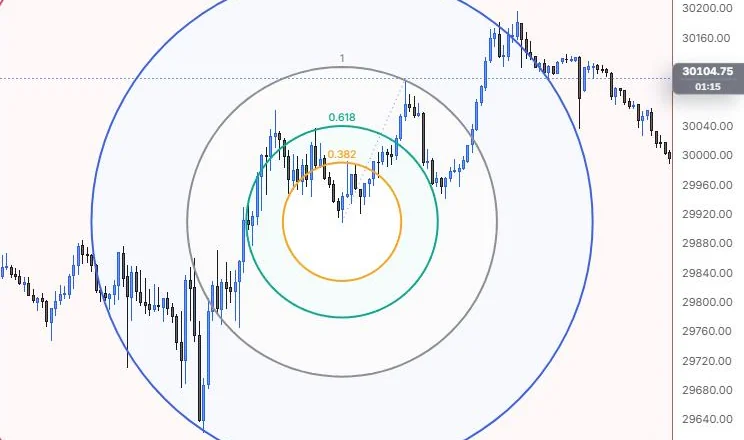
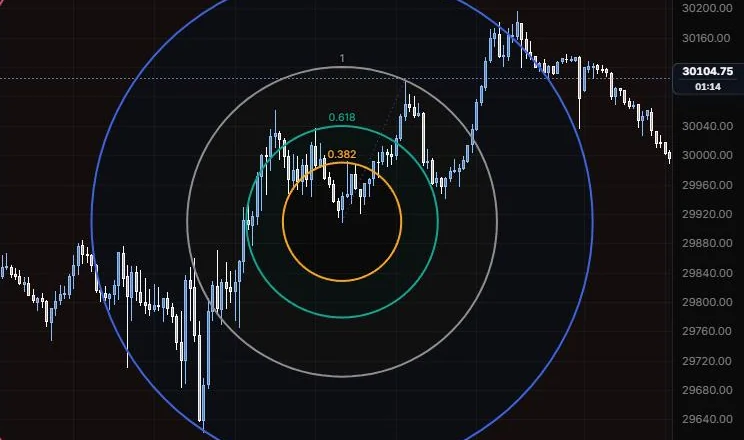
NQ 5m, Oct 15, 2026 · Atlas
How to place: two clicks. Click the center, then a point that sets the radius (level 1).
Good for: spotting where a move might run out of room in both price and time around a key turn.
Example: On NQ 5m (Oct 15, 2026), click the 12:25 low for the centre, then the 13:40 high so level 1 passes through it. The 0.382, 0.618, 1 and 1.618 circles ring the low, and at this zoom the 1.618 one runs close to both the 9:55 low and the 15:45 high. The default circle is drawn on screen, so that fit changes when you zoom; switch Shape to Ellipse if you want it tied to bars and price.
Settings
| Setting | Options | What it does |
|---|---|---|
| Levels | 0.382, 0.618, 1, 1.618, 2.618 on; 0.236, 0.5, 0.786, 3.618, 4.236 off | The circle sizes, as multiples of the radius. |
| Level lines | On or off, default on; opacity 5% to 100%, default 100% | Shows the circles. Their stroke and width come from the style bar. |
| Colours | One colour, Spectrum (default Spectrum) | One colour for every circle, or a colour per level. |
| Shape | Circle (screen), Ellipse (bars × price) (default Circle (screen)) | Ellipse makes level 1 pass through the radius point's bar and price, so it scales with the chart. |
| Fill between levels | On or off, default on; opacity 0 to 30%, default 4% | Shades between circles. |
| Label content | Ratio (on), Price (off), % (off) | What each label shows. |
| Label position | Top, Right, Bottom (default Top) | Where the labels sit on each circle. |
| Label size and opacity | 8 to 20 px (default 10.5); 10% to 100% (default 100%) | How the labels look. |
| Radius line | Line role (default dotted, 1 px, 60%) | The line from the center to the radius point. |
Fib spiral
A golden spiral from a center point, growing by 1.618 every quarter turn.
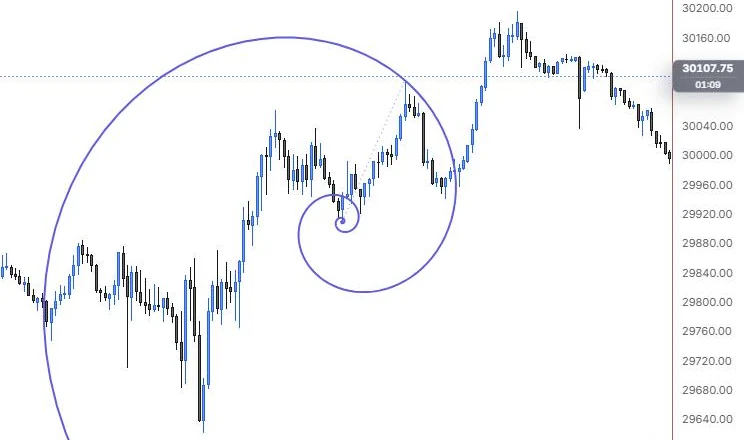
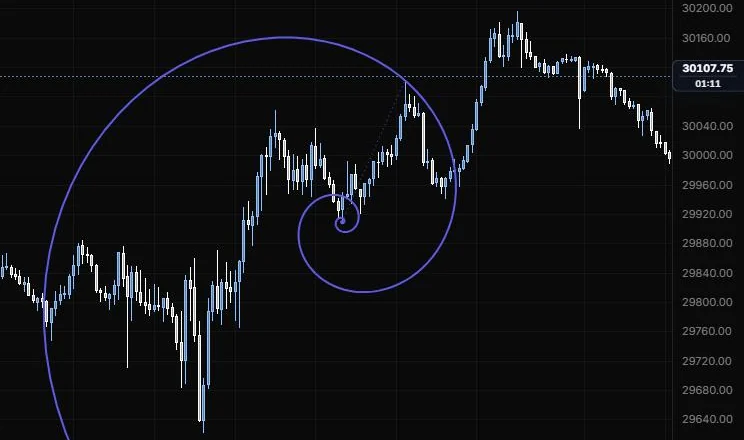
NQ 5m, Oct 15, 2026 · Atlas
How to place: two clicks. Click the center, then a point that sets the scale and direction.
Good for: a visual guide to an accelerating move, more of a study tool than a level.
Example: On NQ 5m (Oct 15, 2026), click the 12:25 low for the centre, then the 13:40 high for the scale. The spiral winds out from the low counter-clockwise, passes through the 13:40 high and grows by 1.618 every quarter turn. Read it as a picture of how an accelerating move unfolds, not as a level to trade off.
Settings
| Setting | Options | What it does |
|---|---|---|
| Direction | Counter-clockwise, Clockwise (default Counter-clockwise) | Which way the spiral turns. |
| Radius line | Line role (default dotted, 1 px, 60%) | The line from the center to the scale point. |
| Quarter spokes | Line role (default hidden, dotted, 1 px, 40%) | Lines from the center to each quarter turn. |
| Show | φⁿ ratio, None (default None) | Labels each quarter turn with its ratio. |
| Label size and opacity | 8 to 20 px (default 10.5); 10% to 100% (default 100%) | How the labels look. |
Fib wedge
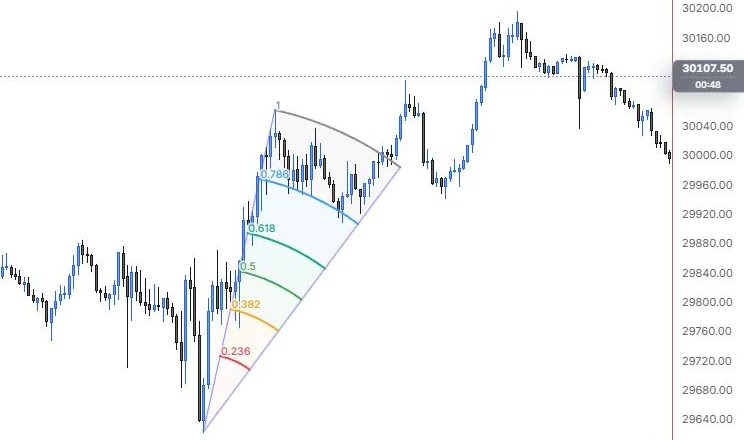
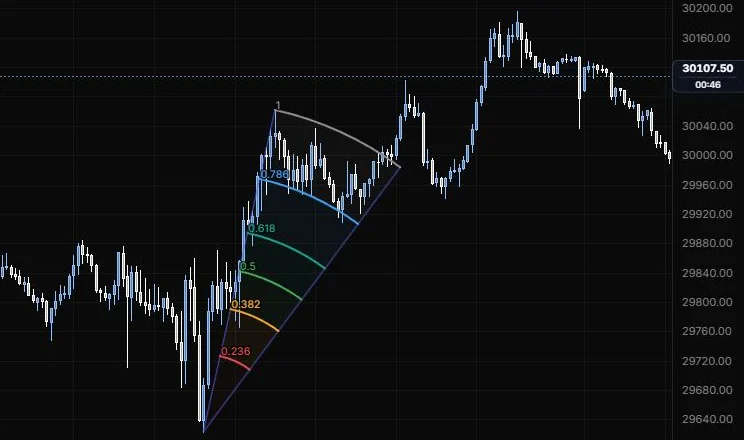
A wedge from an apex, with Fibonacci arcs between its two edges.
NQ 5m, Oct 15, 2026 · Atlas
How to place: three clicks. Click the apex, then the first edge (which sets the radius), then the second edge.
Good for: framing a fan-shaped move from a single turning point and marking levels inside it.
Example: On NQ 5m (Oct 15, 2026), click the 9:55 low for the apex, then the 11:15 high for the first edge, then aim the second edge at the 15:45 high. The wedge fans out between those two directions, with arcs from 0.236 up to 1 at the 11:15 high's distance. The arcs show how far along the move from the low price has travelled, measured in both price and time.
Settings
| Setting | Options | What it does |
|---|---|---|
| Levels | 0.236, 0.382, 0.5, 0.618, 0.786, 1 on; 1.272, 1.618 off | The arcs inside the wedge. |
| Level lines | On or off, default on; opacity 5% to 100%, default 100% | Shows the arcs. Their stroke and width come from the style bar. |
| Colours | One colour, Spectrum (default Spectrum) | One colour for every level, or a colour per level. |
| Fill between levels | On or off, default on; opacity 0 to 30%, default 6% | Shades between the arcs. |
| Label content | Ratio (on), % (off) | What each label shows. |
| Label size and opacity | 8 to 20 px (default 10.5); 10% to 100% (default 100%) | How the labels look. |
| Edges | Line role (default solid, 1 px, 80%) | The two wedge edges. |
Last updated