 Atlas
AtlasGann
Gann boxes, squares and fans for reading price and time together, built on a 1x1 scale of price per bar.
Gann tools treat price and time as one grid, and everything hangs off the 1x1: one unit of price per bar, set by the two points you place. The Analysis panel shows that scale in plain numbers, so you always know what the angles mean. Every tool, grouped: Drawing tools overview.
Gann box
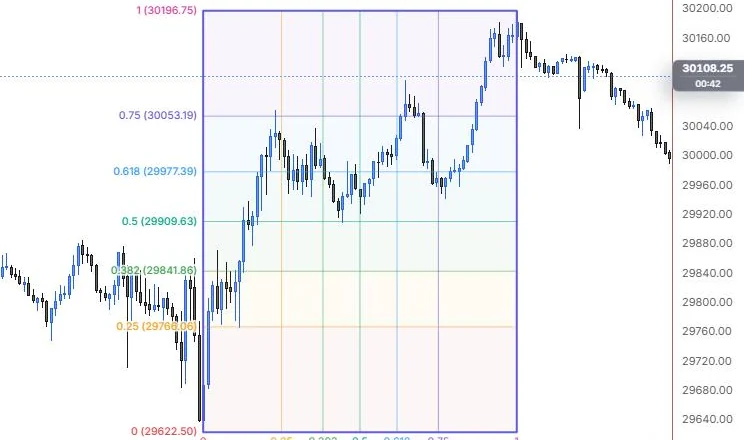
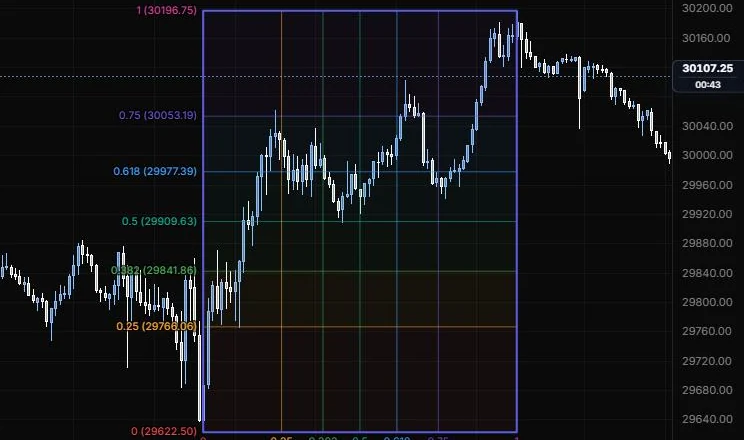
A box split into price and time fractions, with optional angle lines.
NQ 5m, Oct 15, 2026 · Atlas
How to place: two clicks. Click the first corner, then the opposite corner. Open Analysis from the drawing's toolbar to see the box size in bars and price, the diagonal's price per bar, and the 50% price and 50% time.
Good for: framing a swing and watching its halfway marks. The 50% of price and the 50% of time are the lines to watch.
Example: On NQ 5m (Oct 15, 2026), click the 9:55 low (29,622.50), then the 15:45 high (30,196.75). The box splits the swing into price levels on the left (0.5 at 29,909.63, 0.618 at 29,977.39) and time fractions along the bottom. Looking back, the 12:25 pullback low sits right on the 0.5 price line, between the 0.382 and 0.5 time lines, and those halfway marks are where you'd watch any evening pullback.
Settings
| Setting | Options | What it does |
|---|---|---|
| Price levels | 0, 0.25, 0.382, 0.5, 0.618, 0.75, 1 all on | The horizontal fractions of the box. |
| Time levels | 0, 0.25, 0.382, 0.5, 0.618, 0.75, 1 all on | The vertical fractions of the box. |
| Price lines / Time lines | Line role: show or hide, solid/dashed/dotted, width, opacity (default solid, 1 px, 55%) | How each set of lines looks. |
| Colours | One colour, Spectrum (default Spectrum); level colour auto | One colour for every line, or a colour per level. |
| Background | Price bands, Time bands, Both, None (default Price bands); opacity 0 to 30%, default 5% | Which bands get shaded. |
| Reverse | On or off, default off | Measures 0 to 1 from the second corner instead. |
| Angles | None, Diagonals, Fan, Both (default None) | Diagonals cross the box; Fan runs from the 0 corner to every level on the far edges. |
| Angle lines | Line role (default dashed, 1 px, 60%); colour auto | How the angle lines look. |
| Price labels | Ratio + price, Ratio, Price, None (default Ratio + price); side Left, Right, Both (default Left) | What the price labels show and where. |
| Time labels | Ratio, Date, Bars, Ratio + date, None (default Ratio); side Bottom, Top, Both (default Bottom) | What the time labels show and where. |
| Show 1x1 scale | On or off, default off | Labels the box diagonal as price per bar. |
| Other options | Label size (8 to 20 px, default 10.5) and opacity, for price and time labels separately | Fine-tunes the label text. |
Gann square
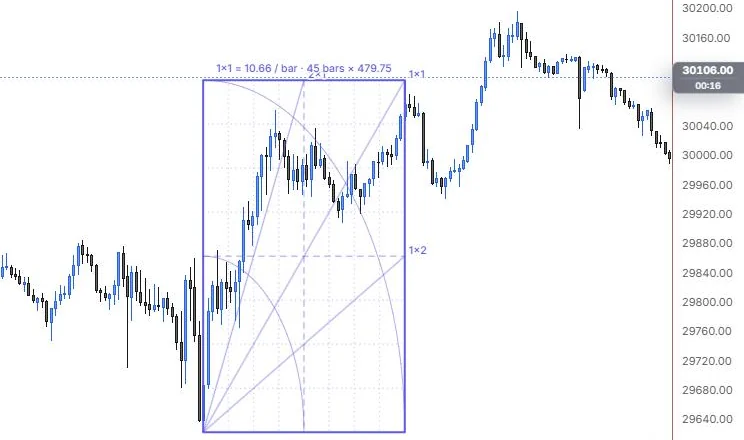
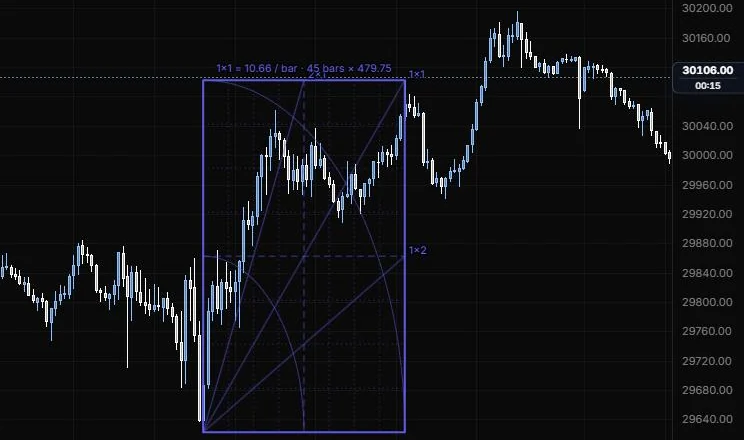
A square grid with Gann angles and arcs from its origin corner.
NQ 5m, Oct 15, 2026 · Atlas
How to place: two clicks. Click the origin corner, then the opposite corner to set the size. Open Analysis to see the square's size, its price per bar and the nearest round scale.
Good for: studying how a move unfolds against the 1x1 and its neighbours. The classic read: above the 1x1 the trend is strong, below it the trend is losing steam.
Example: On NQ 5m (Oct 15, 2026), click the 9:55 low as the origin, then the 13:40 high as the opposite corner. The label reads 1×1 = 10.66 / bar · 45 bars × 479.75, and the square draws the 1×2, 1×1 and 2×1 angles with its arcs and grid. Price rides above the 1×1 for most of the morning, dips just under it into the 12:25 low, then climbs back to the corner at 13:40.
Settings
| Setting | Options | What it does |
|---|---|---|
| Grid | On or off, default on; Divisions: Eighths, Quarters, Thirds, Halves (default Eighths) | The grid inside the square. |
| Grid lines | Line role (default dotted, 1 px, 35%); colour auto | How the grid looks. |
| Half lines | Line role (default dashed, 1 px, 60%) | The 1/2 division, the strongest one. |
| Arcs | On or off, default on; radius ×0.5 and ×1 on, ×0.25, ×0.75, ×1.5, ×2 off | Circles in price and bars around the origin. |
| Arc lines | Line role (default solid, 1 px, 50%); colour auto | How the arcs look. |
| Angles | On or off, default on; 1×2, 1×1, 2×1 on; 1×8, 1×4, 1×3, 3×1, 4×1, 8×1 off | Which Gann angles draw. 1×2 is one price unit per 2 bars (flatter); 2×1 is two price units per bar (steeper). |
| From | Origin, All corners (default Origin) | Where the angles start. |
| Extend past the square | On or off, default off | Runs the angles beyond the square. |
| Angle lines | Line role (default solid, 1 px, 60%); colour auto | How the angles look. |
| Colours and background | One colour, Spectrum (default One colour); background off, opacity 0 to 30% (default 4%) | Line colours and the square's fill. |
| Labels | Angle labels Ratio or None (default Ratio); Show 1x1 scale on; Division labels None, Fraction, Price / bars, Both (default None) | What gets labelled. |
| Other options | Label size and opacity for angle and division labels | Fine-tunes the label text. |
Gann square (fixed)
A Gann square that keeps a set price per bar, so only its size in bars is up to you.
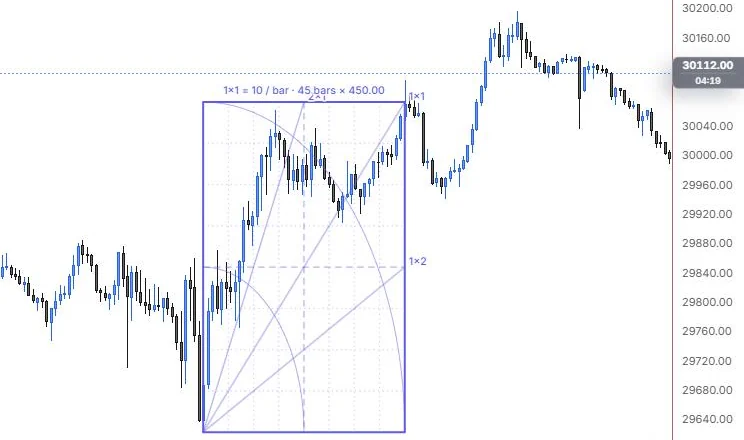
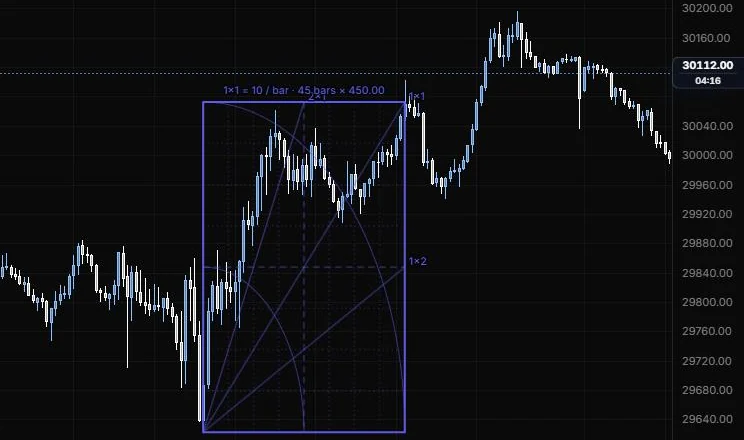
NQ 5m, Oct 15, 2026 · Atlas
How to place: two clicks. Click the origin corner, then drag out the size in bars. With Price per bar at 0, the scale comes from your drag, rounded. Set a value and the second corner snaps onto the square, so its price always follows its bar count. Analysis shows the square's size and scale, and offers to lock the scale, use your drag's scale, go back to auto, or snap the point to the corner.
Good for: keeping the same 1x1 across several squares, so angles on different swings mean the same thing.
Example: On NQ 5m (Oct 15, 2026), set Price per bar to 10, click the 9:55 low and drag out 45 bars. The label reads 1×1 = 10 / bar · 45 bars × 450.00, so the top corner sits at 30,072.50, a little under the 13:40 high. Draw a second square from another low at the same 10 points per bar and the angles on both mean the same thing, so you can compare the two moves fairly.
Settings
| Setting | Options | What it does |
|---|---|---|
| Price per bar | 0 to 1,000,000, default 0 (auto) | Locks the 1x1. At 0 the square uses your drag's scale, rounded. |
| Grid | On or off, default on; Divisions: Eighths, Quarters, Thirds, Halves (default Eighths) | The grid inside the square. |
| Grid and half lines | Line roles (grid dotted 35%, half lines dashed 60%); colour auto | How the grid looks. |
| Arcs | On or off, default on; radius ×0.5 and ×1 on, ×0.25, ×0.75, ×1.5, ×2 off | Circles in price and bars around the origin. |
| Arc lines | Line role (default solid, 1 px, 50%); colour auto | How the arcs look. |
| Angles | On or off, default on; 1×2, 1×1, 2×1 on; 1×8, 1×4, 1×3, 3×1, 4×1, 8×1 off | Which Gann angles draw. |
| From | Origin, All corners (default Origin) | Where the angles start. |
| Extend past the square | On or off, default off | Runs the angles beyond the square. |
| Angle lines | Line role (default solid, 1 px, 60%); colour auto | How the angles look. |
| Colours and background | One colour, Spectrum (default One colour); background off, opacity 0 to 30% (default 4%) | Line colours and the square's fill. |
| Labels | Angle labels Ratio or None (default Ratio); Show 1x1 scale on; Division labels None, Fraction, Price / bars, Both (default None) | What gets labelled. |
| Other options | Label size and opacity for angle and division labels | Fine-tunes the label text. |
Gann fan
Gann angles fanning out from a pivot, scaled by a 1x1 you set.
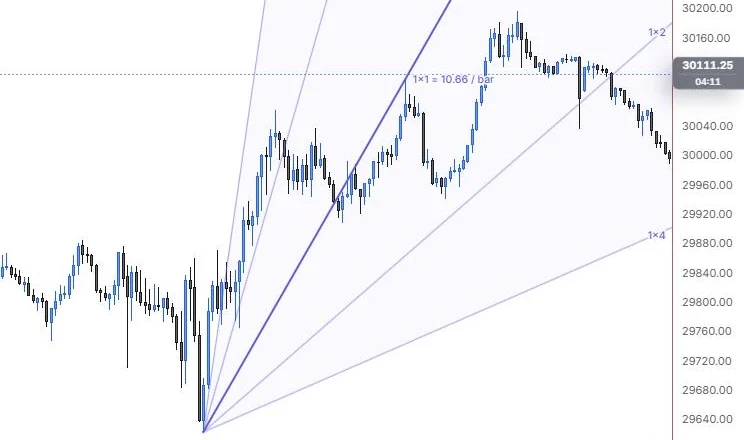
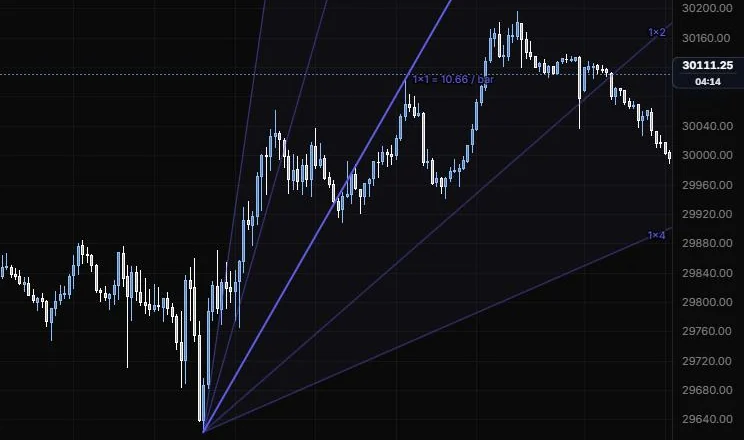
NQ 5m, Oct 15, 2026 · Atlas
How to place: two clicks. Click the origin (a pivot high or low), then the point that sets the 1x1 scale. The 1x1 always draws. Open Analysis to see the 1x1 in price per bar, whether the fan is rising or falling, and where each angle sits at the last bar, with the close above or below it.
Good for: support and resistance that rises or falls with time from a major turn.
Example: On NQ 5m (Oct 15, 2026), click the 9:55 low as the origin, then the 13:40 high to set the scale. The 1x1 runs through that high and reads 10.66 points per bar, with the 2×1 and 4×1 above it and the 1×2 and 1×4 below. After 13:40 price trades under the 1x1, holds between it and the 1×2 through the afternoon, and the evening drift slips under the 1×2 toward the 1×4.
Settings
| Setting | Options | What it does |
|---|---|---|
| Angles | 1×4, 1×2, 2×1, 4×1 on; 1×8, 1×3, 3×1, 8×1 off | Which angles draw besides the 1x1. 1×4 is one price unit per 4 bars (flatter); 4×1 is four per bar (steeper). |
| Angle lines | Line role: show or hide, solid/dashed/dotted, width, opacity (default solid, 1 px, 60%) | Every angle except the 1x1, which uses the style bar. |
| Colours | One colour, Spectrum (default One colour); angle colour auto | One colour for every angle, or a colour per angle. |
| Reverse | On or off, default off | Swaps the price and time reading (1x2 becomes 2x1). |
| Fill between angles | On or off, default on; opacity 0 to 30%, default 4%; colour auto | Shades between the angles. |
| Angle labels | Ratio, Ratio + price, None (default Ratio) | Price is where each angle leaves the chart. |
| Show 1x1 scale | On or off, default on | Labels the price per bar from your two points. |
| Label size and opacity | 8 to 20 px (default 10.5); 10% to 100% (default 100%) | How the labels look. |
Last updated