 Atlas
AtlasAnnotate
Notes, labels and markers for writing on the chart: what happened, where, and why it mattered.
Annotate tools are how you leave yourself a trail. Mark the entry, tag the level, write down what you saw, so the chart still makes sense when you open it next week. Every tool, grouped: Drawing tools overview.
Callout
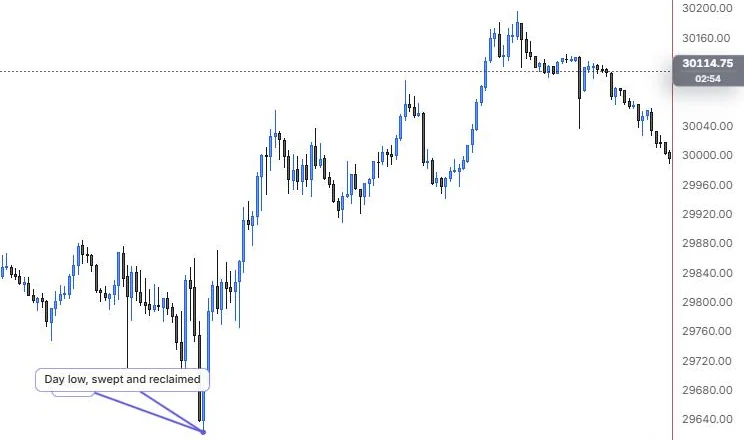
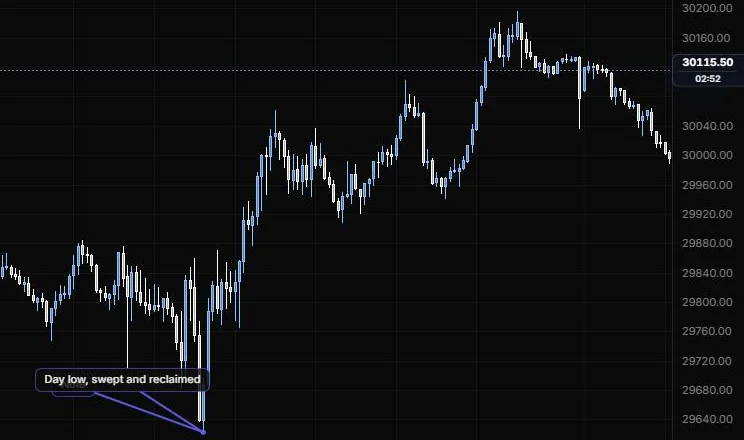
A text box with a leader line pointing at the spot it's about.
NQ 5m, Oct 15, 2026 · Atlas
How to place: two clicks. Click the point of interest, then where the note box should sit. A text box opens as soon as you place it, so you can type straight away. Edit the text later from the settings.
Good for: explaining one bar or one level on a chart you'll share or review, without the text sitting on top of the price action.
Example: On NQ 5m (Oct 15, 2026), click the tip of the 9:55 low, then a clear spot off to the left, and type "Day low, swept and reclaimed". The leader points straight at the wick and the box sits clear of the candles, so the note explains the bar without covering it.
Settings
| Setting | Options | What it does |
|---|---|---|
| Text | Up to 140 characters, default Note | What the callout says. |
| Text size | 11, 12, 14 | Font size. |
| Text colour | Default empty (theme ink) | Colour of the text. |
| Opacity | 10% to 100%, default 100% | The whole label: background, border and text. |
| Background | On or off, default on | The box behind the text. |
| Border | On or off, default on | A hairline in the line colour. |
| Border style | Line role: show or hide, solid/dashed/dotted, width, opacity (default solid, 1 px, 60%) | How the border looks. |
| Leader | Line role (default solid, 2 px) | The line from the note to its point. |
Price label
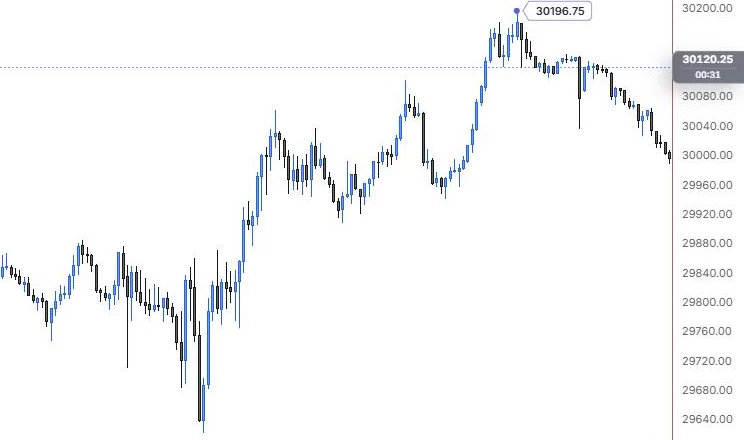
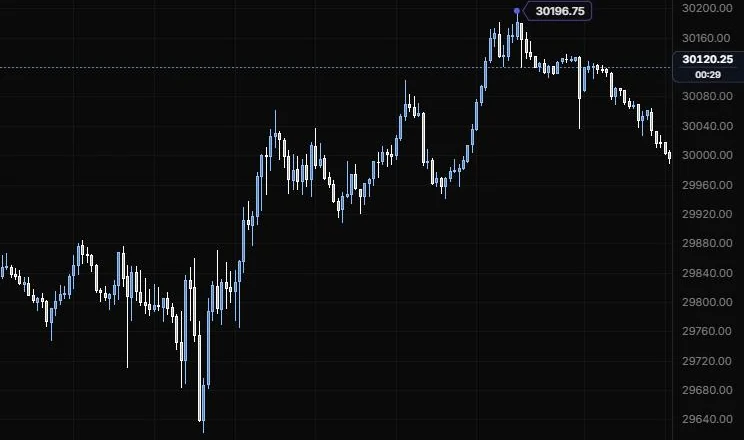
A slim tag that points at one price and shows it.
NQ 5m, Oct 15, 2026 · Atlas
How to place: one click, on the price you want to tag. The tag reads that price, with your text in front of it if you add some.
Good for: tagging a level without drawing a full line across the chart, like a target or the price you got filled at.
Example: On NQ 5m (Oct 15, 2026), one click on the 15:45 high pins a Quiet tag reading 30196.75 right beside it. It marks the session high without a line across the whole chart, and if you set the text to something like "HOD", the tag reads that in front of the price.
Settings
| Setting | Options | What it does |
|---|---|---|
| Text | Up to 40 characters, default empty | Optional text, shown before the price. |
| Style | Quiet, Solid | Quiet is an outlined tag, Solid is filled. |
| Side | Right, Left | Which way the tag points. |
| Text size | 11, 12, 14 | Font size. |
| Opacity | 10% to 100%, default 100% | The whole label: background, border and text. |
| Border | Line role (default solid, 1 px, 65%) | The tag's outline, Quiet style only. |
Note
A pinned card for longer notes, with a stem down to the spot it's pinned to.
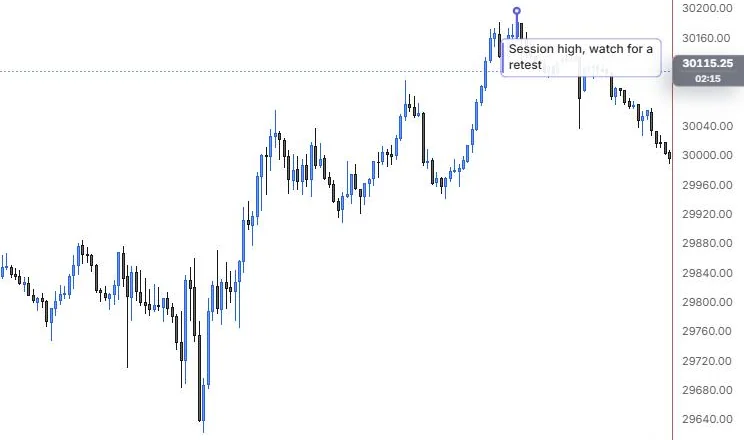
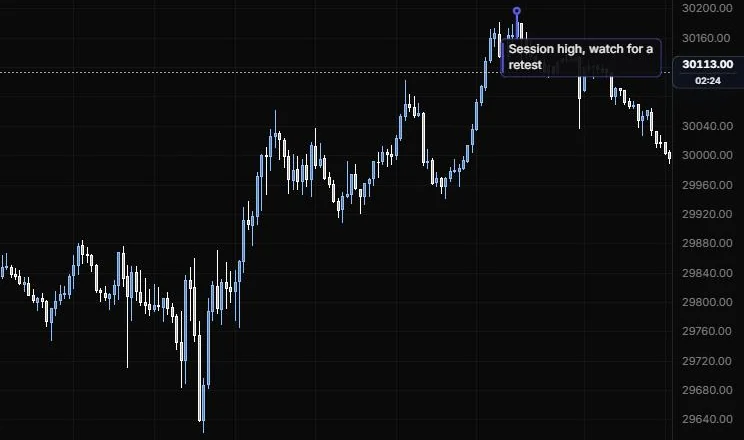
NQ 5m, Oct 15, 2026 · Atlas
How to place: one click, where you want to pin the note. A text box opens as soon as you place it, so you can type straight away. New lines are kept.
Good for: the longer stuff: your plan for the day, why you skipped a setup, what you'd do differently. Set Show card to When selected and only the pin stays on the chart until you click it.
Example: On NQ 5m (Oct 15, 2026), click the 15:45 high and type "Session high, watch for a retest". The card sits beside the pin on a short stem, and the text wraps to the card's width. If it gets in the way of the evening bars, set Show card to When selected and only the pin stays on the chart.
Settings
| Setting | Options | What it does |
|---|---|---|
| Note | Up to 600 characters, default Note | The text. New lines are kept. |
| Size | 8 to 28 px, default 12 | Font size. |
| Bold | On or off, default off | Bold text. |
| Text colour and opacity | Default empty (theme ink); 10% to 100%, default 100% | How the text looks. |
| Background | On or off, default on; opacity 0 to 100%, default 92% | The card behind the text. |
| Border | Line role (default solid, 1 px, 55%) | Drawn in the line colour. |
| Wrap width | 60 to 480 px, default 180 | How wide the card gets before the text wraps. |
| Accent edge | On or off, default on | A strip in the line colour along the card. |
| Show card | Always, When selected | When selected keeps only the pin on the chart. |
| Position | Auto, Above, Below | Where the card sits relative to the pin. |
| Stem length | 0 to 200 px, default 28 | The stem uses the style bar's line. |
| Other options | Background colour (default theme surface) | Card colour. |
Signpost
A bold label on a post, standing on a bar's high or low.
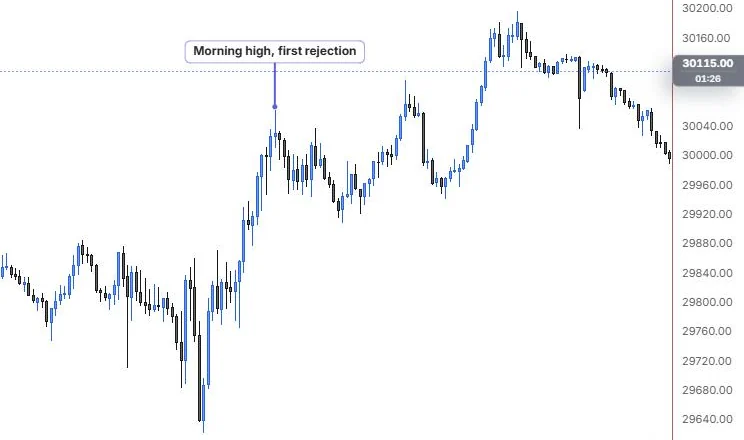
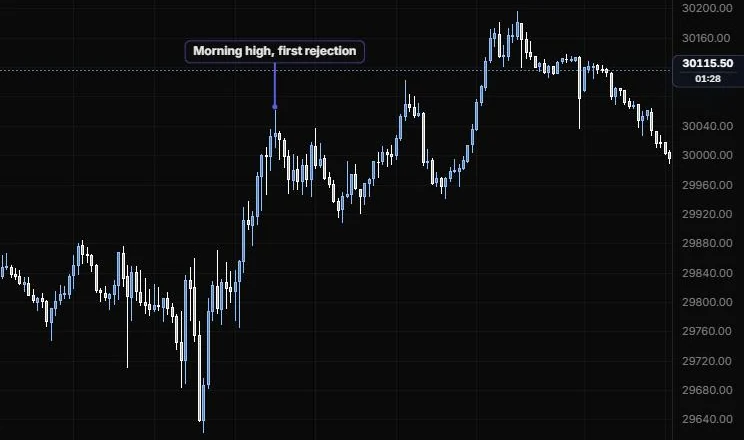
NQ 5m, Oct 15, 2026 · Atlas
How to place: one click, on a bar. With Snap to high / low on (the default), the post lands on that bar's high or low, whichever is nearer your click. A text box opens as soon as you place it, so you can type straight away.
Good for: naming the big moments of the day so they jump out, like "Open", "News" or "Stop run".
Example: On NQ 5m (Oct 15, 2026), click the 11:15 bar and type "Morning high, first rejection". The post snaps to the bar's high and stands above it with the label in bold, so the first big turn of the day jumps out even when you zoom out.
Settings
| Setting | Options | What it does |
|---|---|---|
| Text | Up to 120 characters, default Signpost | The label. |
| Size | 8 to 28 px, default 12 | Font size. |
| Bold | On or off, default on | Bold text. |
| Text colour and opacity | Default empty (theme ink); 10% to 100%, default 100% | How the text looks. |
| Background | On or off, default on; opacity 0 to 100%, default 88% | The box behind the text. |
| Border | Line role (default solid, 1 px, 55%) | Drawn in the line colour. |
| Position | Auto, Above, Below | Auto puts it above a high and below a low. |
| Length | 8 to 240 px, default 44 | How tall the post is. It uses the style bar's line. |
| Snap to high / low | On or off, default on | Lands the post on the bar's high or low. |
| Other options | Background colour (default theme surface) | Box colour. |
Flag mark
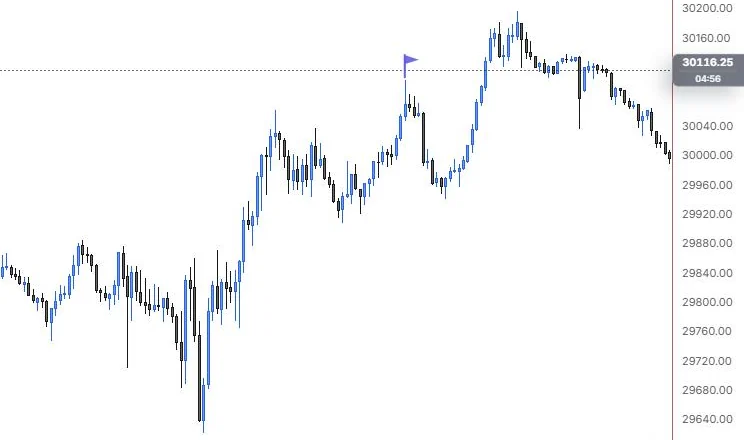
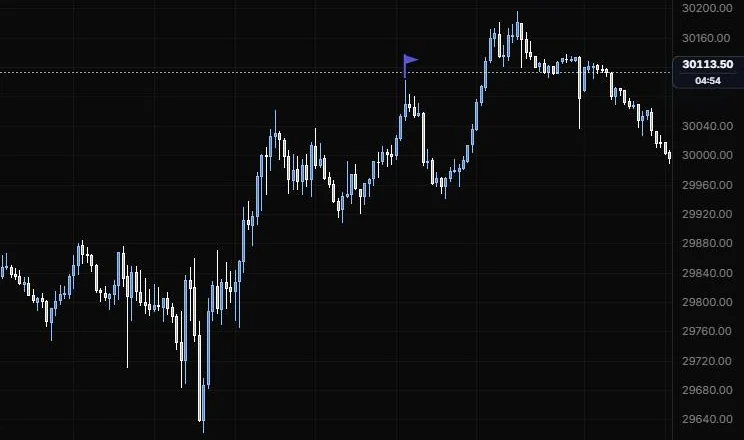
A small flag on a pole, planted on a bar's high or low.
NQ 5m, Oct 15, 2026 · Atlas
How to place: one click, on a bar. With Snap to high / low on (the default), the flag lands on that bar's high or low. Text is optional.
Good for: quick, quiet markers you can drop on every instance of something, like each time a level was tested.
Example: On NQ 5m (Oct 15, 2026), click the 13:40 bar and the flag snaps to the top of its high, with no text needed. Drop one on the 11:15 and 15:45 highs too, and the row of flags shows the day's stepping highs without a word on the chart.
Settings
| Setting | Options | What it does |
|---|---|---|
| Flag colour | Default auto | Colour of the flag. |
| Flag opacity | 10% to 100%, default 90% | How solid the flag is. |
| Flag size | 4 to 40 px, default 10 | Size of the flag. |
| Pole height | 8 to 120 px, default 22 | The pole uses the style bar's line. |
| Position | Auto, Above, Below | Auto puts it above a high and below a low. |
| Snap to high / low | On or off, default on | Lands the flag on the bar's high or low. |
| Text | Up to 60 characters, default empty | Optional label. |
| Other options | Text size (8 to 28 px, default 11), bold, text colour, background (default off), border | How the text looks. |
Arrow marker
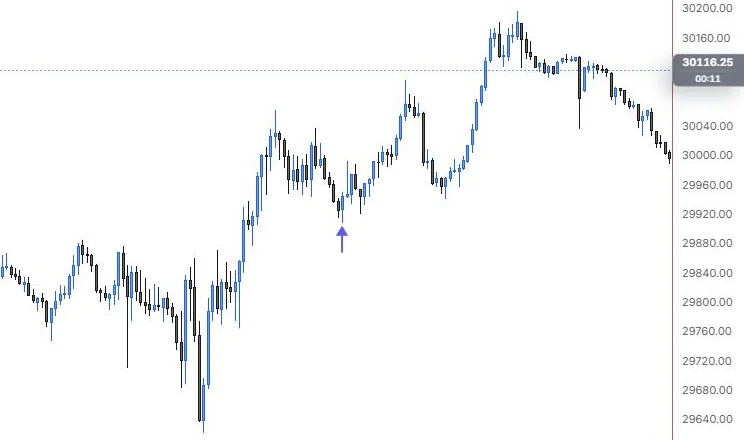
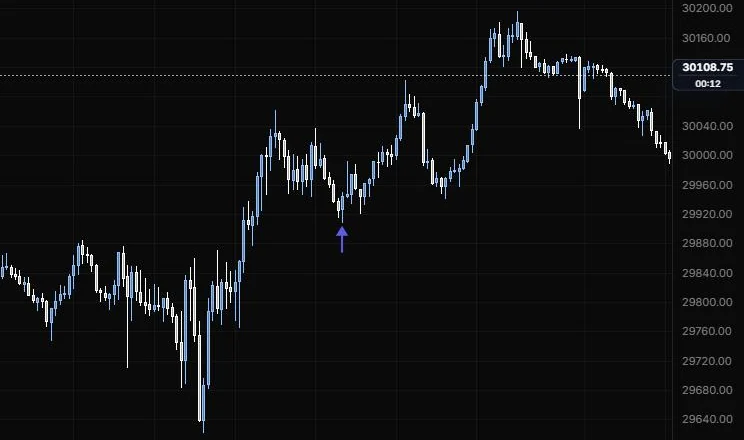
A short arrow pointing at a bar's high or low.
NQ 5m, Oct 15, 2026 · Atlas
How to place: one click, on a bar. With Snap to high / low on (the default), the arrow lands on that bar's high or low. On Auto it points up from under a low and down from over a high.
Good for: marking entries and exits on a trade review, or the bar where a signal fired.
Example: On NQ 5m (Oct 15, 2026), click just under the 12:25 pullback low. On Auto the arrow snaps to the bar's low and points up at it. On a trade review you'd add text like "Long" and drop a second arrow where you got out, so the whole trade reads at a glance.
Settings
| Setting | Options | What it does |
|---|---|---|
| Direction | Auto, Up, Down | Auto points up under a low and down over a high. |
| Length | 10 to 80 px, default 26 | How long the arrow is. The shaft uses the style bar's line. |
| Head colour | Default auto | Colour of the arrowhead. |
| Snap to high / low | On or off, default on | Lands the arrow on the bar's high or low. |
| Text | Up to 80 characters, default empty | Optional label. |
| Other options | Text size (8 to 28 px, default 11), bold, text colour, background (default off), border | How the text looks. |
Price note
A labelled price with a leader, set off to the side where it's easy to read.
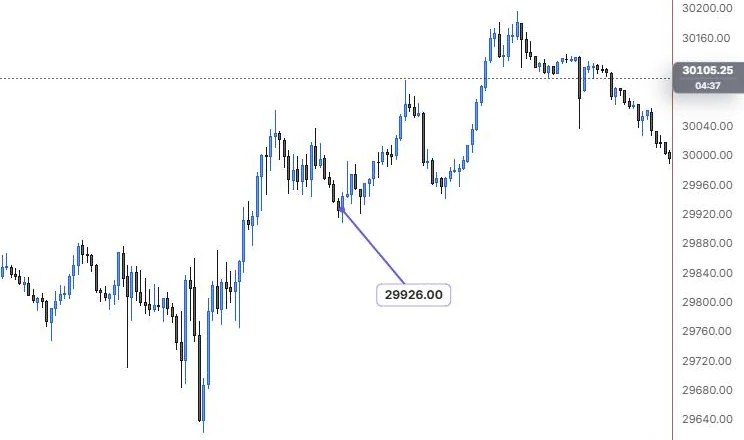
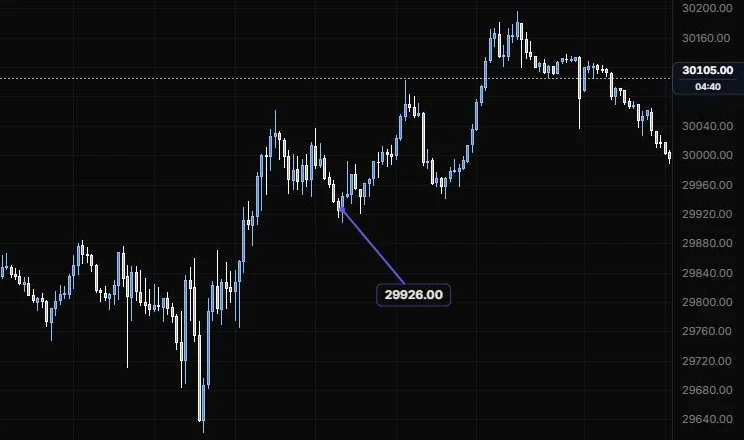
NQ 5m, Oct 15, 2026 · Atlas
How to place: two clicks. Click the price to note (with Snap to OHLC on, the default, it lands on the nearest open, high, low or close), then click where the label should sit.
Good for: calling out an exact print, like the session high or the price a level broke at, with the number in big type.
Example: On NQ 5m (Oct 15, 2026), click the 12:25 pullback bar, then a clear spot below and to the right. Snap to OHLC lands the note on the nearest open, high, low or close, so the label reads 29926.00 rather than the wick low a little under it. Turn on Distance from last and it also shows how far the latest close sits from that price.
Settings
| Setting | Options | What it does |
|---|---|---|
| Text | Up to 80 characters, default empty | Optional text, shown above the price. |
| Size | 8 to 28 px, default 12 | Font size. |
| Bold | On or off, default on | Bold text. |
| Text colour and opacity | Default empty (theme ink); 10% to 100%, default 100% | How the text looks. |
| Background | On or off, default on; opacity 0 to 100%, default 88% | The box behind the label. |
| Border | Line role (default solid, 1 px, 55%) | Drawn in the line colour. |
| Distance from last | On or off, default off | The change from the last bar's close to the noted price. |
| Snap to OHLC | On or off, default on | While placing, the anchor lands on the nearest open, high, low or close. |
| Price level | Line role, default off (dashed) | Extends the noted price to the right edge. |
Last updated