 Atlas
AtlasSmart Money and ICT
Order blocks, fair value gaps, liquidity, structure breaks, killzones and SMT, drawn by hand or found by scanning the bars you drag across.
These tools follow the ICT and smart money definitions closely, and most of them do the finding for you. You drag across a stretch of bars and the tool scans those bars, the chart's own candles, for whatever its rule describes: gaps, blocks, equal highs, divergences. If nothing in the range fits the rule, it says so. A tool finding a pattern doesn't mean the pattern will work. It means the bars match the definition, and the Analysis panel shows you exactly which checks passed so you can judge for yourself. Every tool, grouped: Drawing tools overview.
Order block
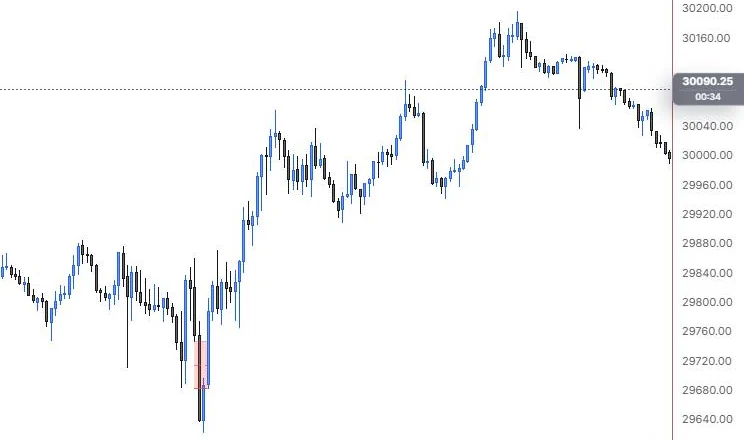
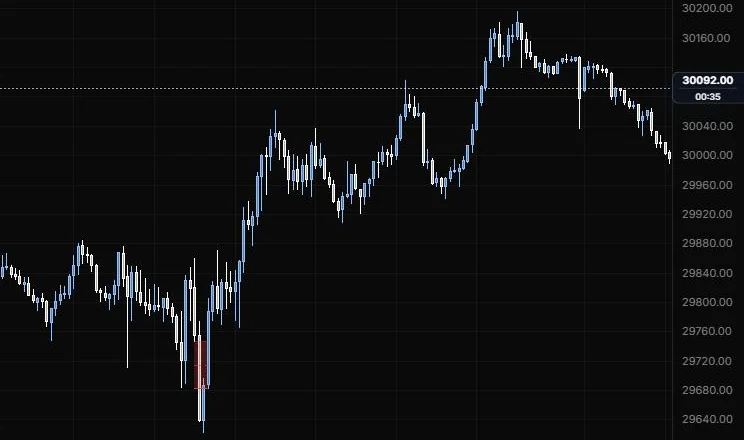
A zone marking the last opposite-close candle before a move that broke structure.
NQ 5m, Oct 15, 2026 · Atlas
How to place: two clicks. By default you draw the block yourself: click one corner of the block candle, then the opposite corner. Or set Block to Find in range, drag across the bars to search, and the tool picks the last opposite-close candle before the most recent displacement in that range that broke structure. Either way the zone extends right until price returns to it. Open Analysis from the drawing's toolbar to see each ICT rule as a pass or fail check, with the measured values.
Good for: marking where a move started, so you have a level to watch when price comes back to it.
Example: On NQ 5m (Oct 15, 2026), click one corner of the 9:50 down candle and then the opposite corner. That's the last down-close candle before the rally off the 9:55 low, so the box marks where the move started. The 9:55 bar trades straight back through it into the day low, so the zone stops there instead of running right; set Block to Find in range if you'd rather the tool pick the candle and run the ICT checks for you.
Settings
| Setting | Options | What it does |
|---|---|---|
| Block | Your box, Find in range | Draw the block yourself, or let the tool find it in the bars you drag across. |
| Zone | Full range, Body, Open → extreme | For a found block: the candle's high to low, its body, or ICT's open to low (bullish) or open to high (bearish). |
| Bias | Auto, Bullish, Bearish | Auto: the first close outside the block decides. |
| Swing strength | 1 to 5 bars each side, default 1 | 1 is the 3-candle swing. Raise it to ignore minor swings. |
| Displacement | 0 to 5× ATR, default 1 | A body at least this multiple of the ATR counts as displacement. |
| Find needs displacement | On or off, default off | Only finds blocks whose move displaced. |
| Extend | Right, None | Whether the zone runs right. |
| Stop at mitigation and Mitigated on | Default on; Touch, 50% (mean), Full | Stops the zone when price returns to it, at the near edge, the middle or the far edge. |
| Fade when mitigated | On or off, default on | Dims a block once it's been mitigated. |
| Mean threshold (50%) | On or off, default on; line role (default dashed, 1 px, 60%) | The block's 50% line. |
| Proximal and distal edge | Line roles (default solid, 1 px at 90% and 35%) | The two edges of the zone. |
| Other options | Fill opacity (default 10%), bullish and bearish colours, scan range outline, label, Bull / Bear in label, text size and opacity | How the zone and label look. |
Fair value gap
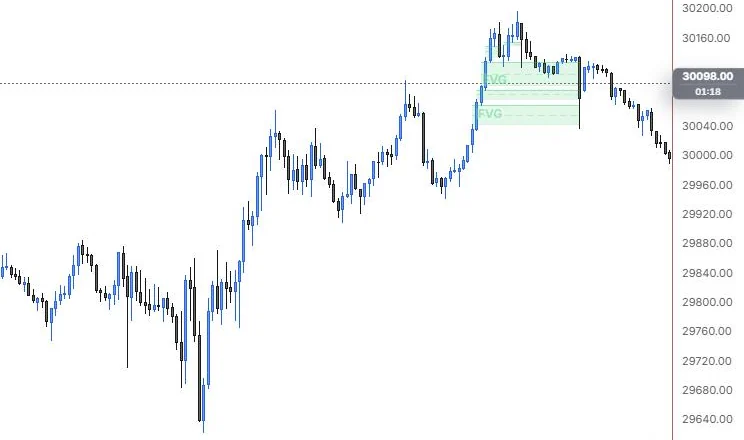
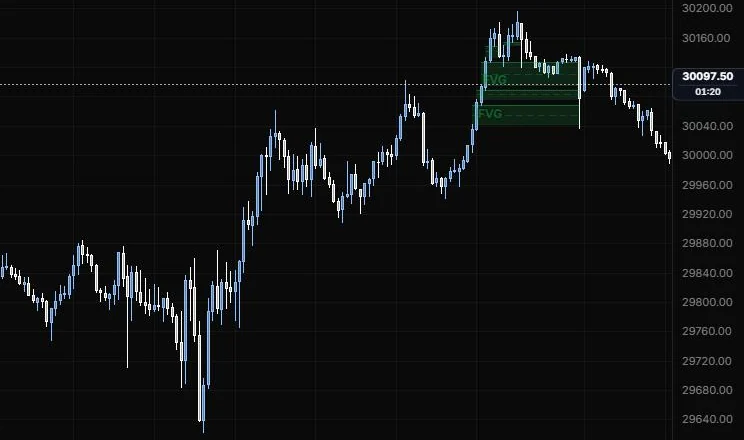
The three-candle imbalances in a range: gaps between the first candle's wick and the third's.
NQ 5m, Oct 15, 2026 · Atlas
How to place: two clicks: the start and the end of the range to scan. The tool marks every 3-candle imbalance in that range that passes the size filters (a bullish gap is where candle one's high sits below candle three's low). If none is found, your dragged box is drawn instead. Each gap extends right until it fills. Open Analysis to see every gap listed with its checks and fill state.
Good for: spotting the price inefficiencies a fast move left behind, which traders watch as places price may come back to.
Example: On NQ 5m (Oct 15, 2026), drag from 9:30 to 15:45. With the default size filter, only two gaps in the whole session qualify, both left by the 15:00 push higher, and each is boxed with a dashed CE line. They run right until the sharp late-day drop trades back through them, so you can see exactly where the afternoon imbalance got filled.
Settings
| Setting | Options | What it does |
|---|---|---|
| Gaps | Detect in range, Manual box | Detect finds every gap in the range; Manual box draws only your box. |
| Min size | 0 to 2× ATR, default 0.25 | Ignores gaps smaller than this. On intraday charts nearly every bar leaves a sliver. |
| Min gap | 0 to 2%, default 0 | Ignores gaps smaller than this percent of price. |
| Displacement | 0 to 5× ATR, default 0 (off) | Only keeps gaps whose middle candle's body, in the gap's direction, is at least this big. |
| Filled when | Wick through, CE (50%) reached, Close through | Where a gap ends: price trading through its far edge, reaching its 50%, or closing beyond it. |
| Show | 1 to 50 most recent, default 5 | How many gaps are drawn. |
| Extend until filled | On or off, default on | Runs each gap right until it fills. |
| Show partial fill | On or off, default on | Shows how much of a gap has been filled. |
| Hide filled gaps | On or off, default on | Removes gaps once they've filled. |
| Consequent encroachment | On or off, default on; line role (default dashed, 1 px, 55%) | The gap's 50% line. |
| Original edge | Line role (default dotted, 1 px, 40%) | Where a partly filled gap started. |
| Other options | Proximal and distal edge lines, fill opacity (default 10%), bullish and bearish colours, scan range outline, label, text size and opacity | How the zones and labels look. |
Liquidity level
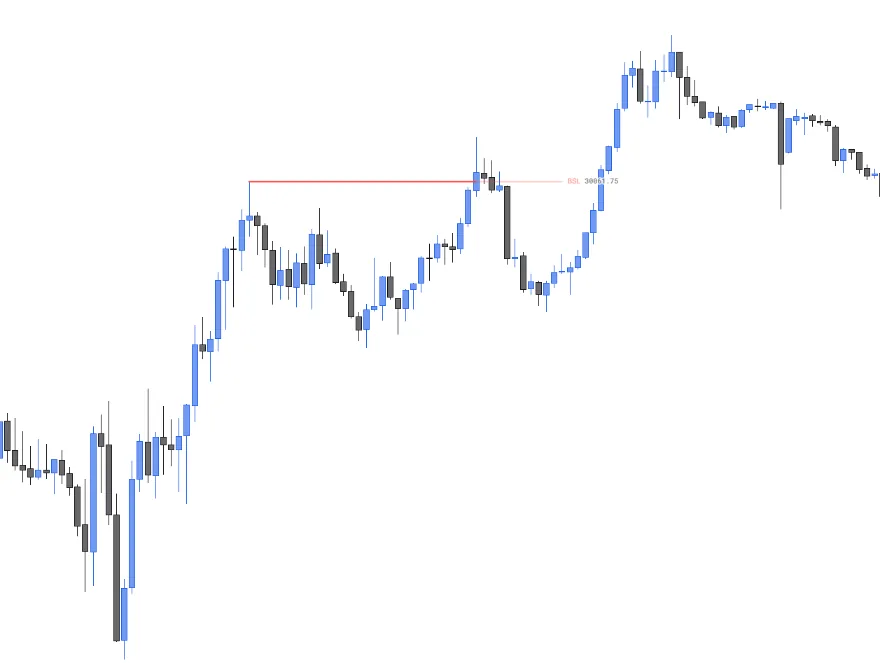
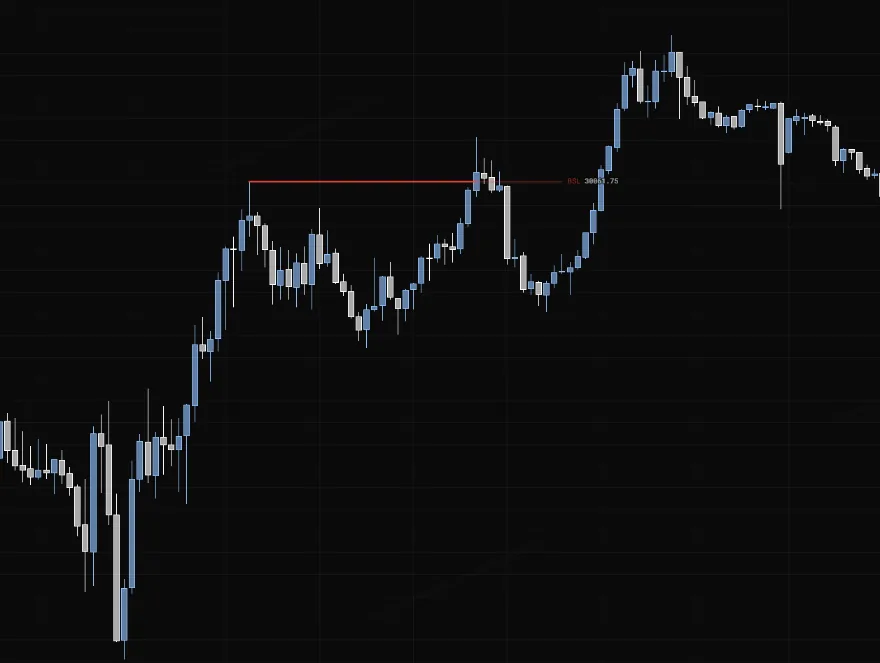
A line at a swing high or low where stops are likely resting, marked when it gets swept or run.
NQ 5m, Oct 15, 2026 · Atlas
How to place: two clicks. Click the swing high or low (with Snap to the wick on, the default, the level lands on that bar's high or low), then click how far the line should run. The tool watches the bars after the anchor: a wick through that closes back is marked as a sweep (×), and a close beyond that holds is a run. The line fades after either. Open Analysis to see the side and what happened.
Good for: keeping track of the obvious highs and lows the market likes to raid, and seeing at a glance whether a raid reversed or kept going.
Example: On NQ 5m (Oct 15, 2026), click the 11:15 swing high and drag the line out to the right. It snaps to the wick, and the label shows the level's price, 30,061.75. The line stops at the push just after 13:30 that closes above it and holds, which counts as a run, so there's no × sweep mark: buyers took the level and kept going.
Settings
| Setting | Options | What it does |
|---|---|---|
| Side | Auto, Buy-side (BSL), Sell-side (SSL) | Auto: a level above the anchor bar's close is BSL (buy stops above highs), below is SSL. |
| Snap to the wick | On or off, default on | The level lands on the anchored bar's high or low. |
| Extend | To 2nd point, Right | Where the line stops. |
| Mark the sweep | On or off, default on | Marks a sweep (wick through, close back) with an × and a run (close beyond that holds). |
| Reclaim within | 0 to 10 bars, default 0 | A close beyond that closes back within this many bars still counts as a sweep. 0 means the same bar. |
| Level line | On or off, default on | The line itself, in the style bar's colour, width and stroke. |
| Label, $$$ marker, Price | Default on, off, on | What the label shows. |
| Text size and opacity | 8 to 20 px, default 10; 10% to 100%, default 100% | How the label looks. |
Break of structure / CHoCH
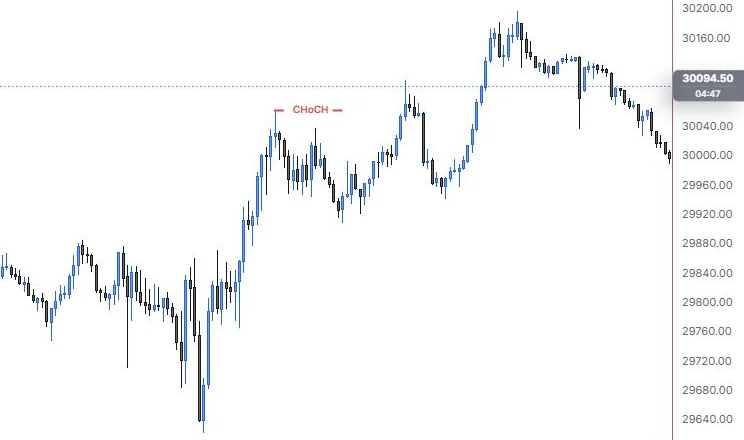
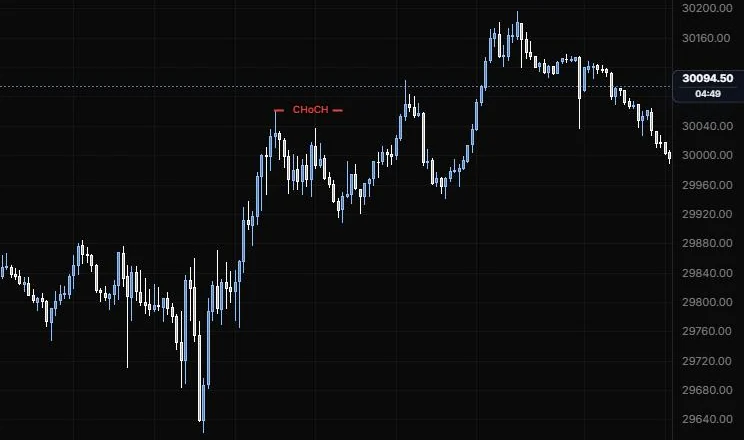
A line from a swing to the candle that broke it, labelled BOS, CHoCH or MSS.
NQ 5m, Oct 15, 2026 · Atlas
How to place: two clicks. Click the swing point, then the candle that broke it. On Auto, the tool reads the trend before the break: a break with the trend is a BOS, the first break against it is a CHoCH, and a CHoCH whose leg displaced and left a fair value gap is an MSS. Open Analysis to see each rule as a pass or fail check with the values it measured.
Good for: labelling structure honestly. The tool checks for a body close beyond the swing by default, so a wick through isn't mistaken for a break.
Example: On NQ 5m (Oct 15, 2026), click the 11:15 swing high, then the candle you're marking as the break. On Auto the tool reads the swings before it and labels this one CHoCH, meaning it sees the first break against the prior trend rather than a continuation BOS. It would read MSS if that leg had displaced and left a fair value gap, and Analysis shows which checks drove the call.
Settings
| Setting | Options | What it does |
|---|---|---|
| Kind | Auto, BOS, CHoCH, MSS | Auto classifies the break from the prior trend. Pick one to force the label. |
| Direction | Auto, Bullish, Bearish | Auto: the breaking candle's close against the swing level. |
| Confirmed by | Body close, Wick | ICT needs a body close beyond the swing. A wick through is only a sweep. |
| Swing strength | 1 to 5 bars each side, default 1 | 1 is the 3-candle swing. Raise it to ignore minor swings. |
| Displacement | 0 to 5× ATR, default 1 | MSS needs a candle in the break leg with a body at least this big. |
| Bullish and Bearish colour | Default green and red | Line and label colours. |
| Break line | On or off, default on | The line itself. Its stroke and width are in the style bar. |
| Label | On or off, default on | The BOS, CHoCH or MSS label. |
| ✓ / ✕ in label | On or off, default off | Shows whether the chosen kind's rules hold. |
| Text size and opacity | 8 to 20 px, default 10; 10% to 100%, default 100% | How the label looks. |
Premium / discount (OTE)
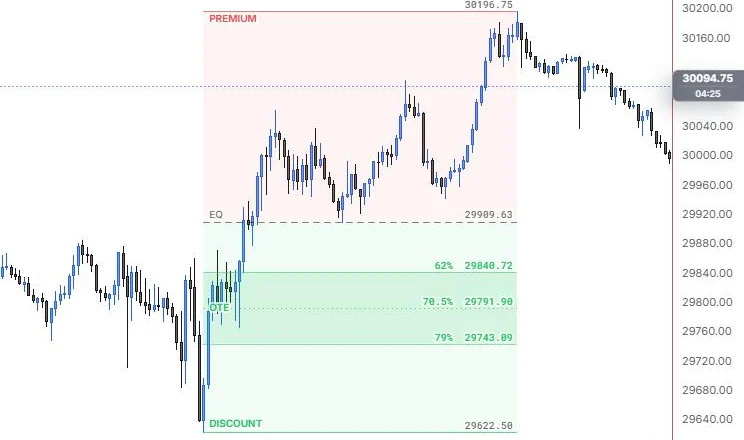
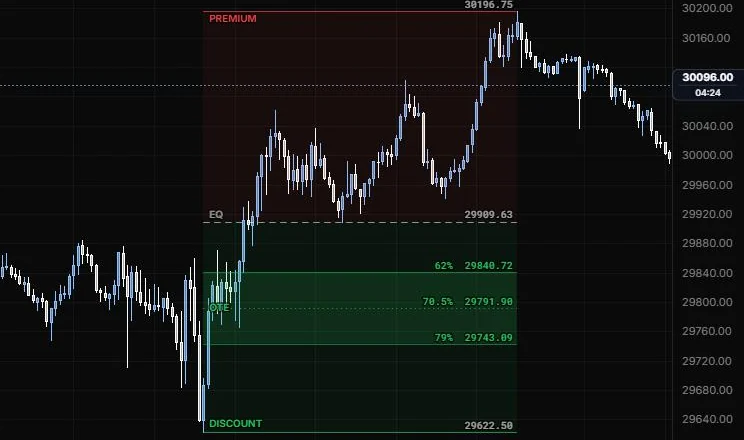
A dealing range split into premium and discount halves, with the optimal trade entry band.
NQ 5m, Oct 15, 2026 · Atlas
How to place: two clicks. For a long setup, click the swing low and then the swing high. For a short, click the high and then the low. The tool shades the upper half as premium, the lower half as discount, draws the 50% equilibrium, and the OTE band at the 62% to 79% retracement with a 70.5% line. Open Analysis to see whether the last close is in premium or discount and whether it's inside the OTE.
Good for: answering "am I buying cheap or chasing?" against the leg you're trading.
Example: On NQ 5m (Oct 15, 2026), click the 9:55 low (29,622.50), then the 15:45 high (30,196.75). Equilibrium sits at 29,909.63, with premium shaded above and discount below, and the OTE band in the discount half: 62% at 29,840.72, 70.5% at 29,791.90 and 79% at 29,743.09. The 12:25 pullback low sat right on equilibrium, and the evening drift is still in premium, so a long by this read would want a pullback into that OTE band.
Settings
| Setting | Options | What it does |
|---|---|---|
| Direction | Auto, Long, Short | Auto: drawn low to high is a long setup. |
| High / low | Your anchors, Bar extremes | Bar extremes uses the highest high and lowest low of the bars between your clicks. |
| OTE band (62 to 79%) | On or off, default on | The optimal trade entry band. |
| Extend | None, Right | Whether the zones run right. |
| Zone opacity and OTE opacity | 0 to 40%, default 6%; 0 to 50%, default 14% | Shading of the halves and of the OTE band. |
| Premium and Discount colour | Default red and green | The two halves. |
| High / low | Line role: show or hide, solid/dashed/dotted, width, opacity (default solid, 1 px, 70%) | The dealing range's swing high and low. |
| Equilibrium | Line role (default dashed, 1 px) | The 50% line. |
| OTE edges and OTE 70.5% | Line roles (default solid 50% and dotted 85%) | The band edges and its middle line. |
| Other options | Labels, prices, text size (default 10), text opacity | How the labels look. |
Session / killzone
A shaded time band for a session or killzone, with that window's high and low boxed.
NQ 5m, Oct 15, 2026 · Atlas
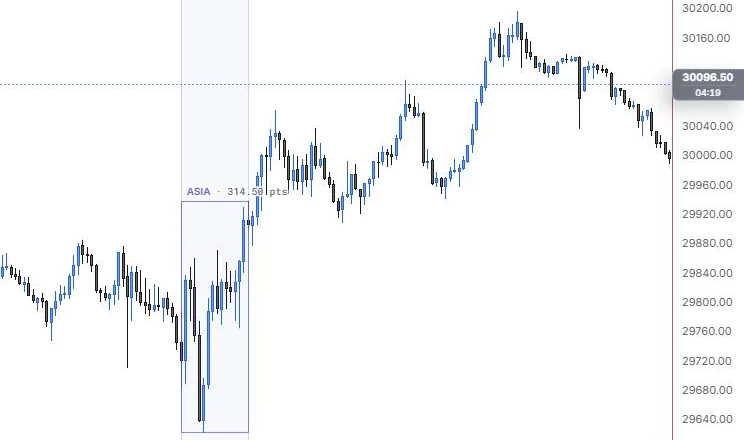
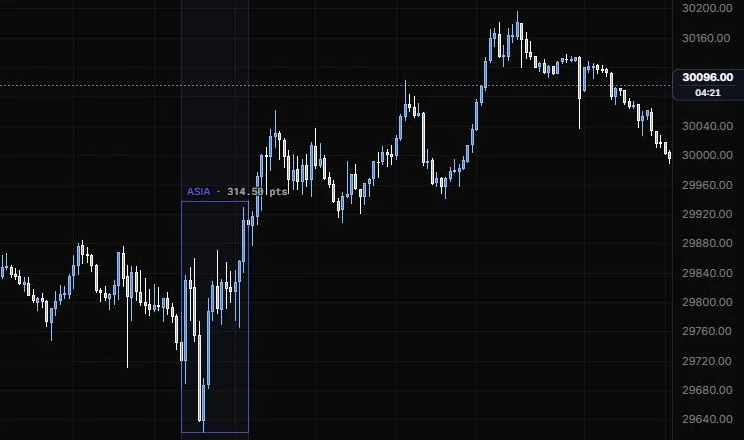
How to place: two clicks: the session start and the session end. With a preset picked (London, NY AM and so on) and Timing on Auto, the tool draws that preset's New York hours on every day your band covers, and skips days the bars show the market was shut. With Custom it draws your band as you dragged it.
Good for: keeping the killzones in view while you mark up a few days, and seeing each window's range at a glance.
Example: On NQ 5m (Oct 15, 2026), drag from 9:30 to 11:00. The tool shades that window, boxes its high and low and puts the range in the label: 314.50 points, from the 9:55 day low up to the push out of the top. The picture still shows the default "Asia" label, which you'd rename in settings; pick a preset like NY AM KZ instead and it draws that preset's hours on every day your drag covers.
This is a drawing over the days you drag across. The Killzones indicator is a separate tool under Indicators.
Settings
| Setting | Options | What it does |
|---|---|---|
| Session | Custom, Asia KZ (20:00 to 00:00 NY), London KZ (02:00 to 05:00), NY AM KZ (07:00 to 10:00), NY Lunch (12:00 to 13:00), NY PM KZ (13:30 to 16:00), London SB (03:00 to 04:00), AM Silver Bullet (10:00 to 11:00), PM Silver Bullet (14:00 to 15:00) | ICT killzones and silver bullet hours, in New York time. They follow US daylight saving. |
| Timing | Auto, Your band, Clock (NY) | Auto draws a preset's hours on every day your band covers, or your band for Custom. Clock lets Custom use the Start and End below. |
| Start (NY) and End (NY) | HH:MM, New York time | Custom hours, used with Clock timing. |
| Name | Up to 32 characters | Your own label. Blank uses the preset name. |
| Preset colour | On or off, default on | Off uses the drawing colour instead of the preset's. |
| Band opacity | 0 to 30%, default 5% | Shading of the time band. |
| Session edges | Line role (default solid, 1 px, 25%) | The start and end verticals. |
| High / low box | On or off, default on; outline line role (default solid, 1 px, 75%) | A box round the window's high and low. |
| Label and Range size | On or off, both default on | The name and the window's range in the label. |
| Text size and opacity | 8 to 20 px, default 10; 10% to 100%, default 100% | How the label looks. |
Inversion fair value gap
Fair value gaps that price later closed through, which flip from support to resistance or the other way.
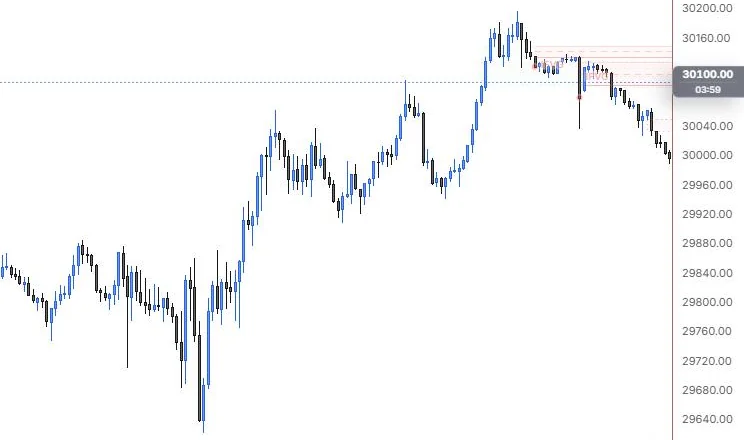
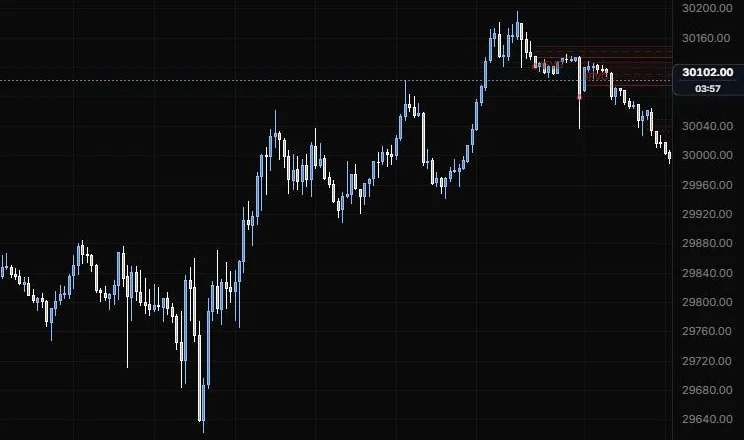
NQ 5m, Oct 15, 2026 · Atlas
How to place: two clicks: the start and end of the range to scan. The tool finds every fair value gap formed in that range that a later candle closed through (a wick through is a fill, not an inversion). A bullish gap closed below becomes bearish, and the other way round. Open Analysis to see each one listed with its checks.
Good for: catching the gaps that failed, since a level that flipped is one many ICT traders lean on.
Example: On NQ 5m (Oct 15, 2026), drag across the late afternoon after the 15:45 top. The bullish gaps left on the way up get closed through on the drop that follows, so the tool redraws them as bearish IFVGs from the inversion close, in red with dashed CE lines, carried right. The zones that used to sit under price as support now sit above it, which is the flip this tool exists to show.
Settings
| Setting | Options | What it does |
|---|---|---|
| Min gap size | 0 to 2× ATR, default 0.25 | Ignores gaps smaller than this. |
| Gap displacement | 0 to 5× ATR, default 0 (any gap) | Only gaps whose middle candle displaced at least this much. |
| Show | 1 to 50 most recent, default 5 | How many are drawn. |
| Hide failed | On or off, default off | An IFVG fails when a later close goes back through it. Off, it's drawn up to that bar. |
| Extend | Until it ends, To the range end | How far each zone runs. |
| Consequent encroachment | On or off, default on; line role (default dashed, 1 px, 55%) | The gap's 50% line. |
| Show the source gaps | On or off, default on; outline line role (default dotted, 1 px, 50%) | A faint outline of the original gap. |
| Proximal and distal edge | Line roles (default solid, 1 px at 90% and 35%) | The two edges of the zone. |
| Other options | Fill opacity (default 10%), bullish and bearish colours, scan range outline, label, text size and opacity | How the zones and labels look. |
Balanced price range
The overlap of a fair value gap and a later opposite gap.
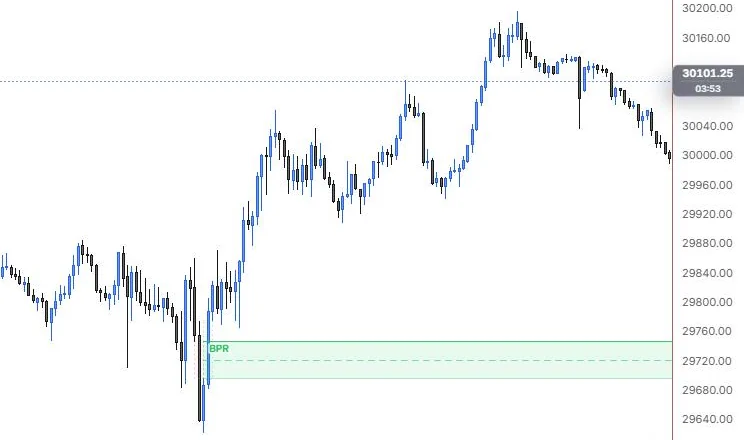
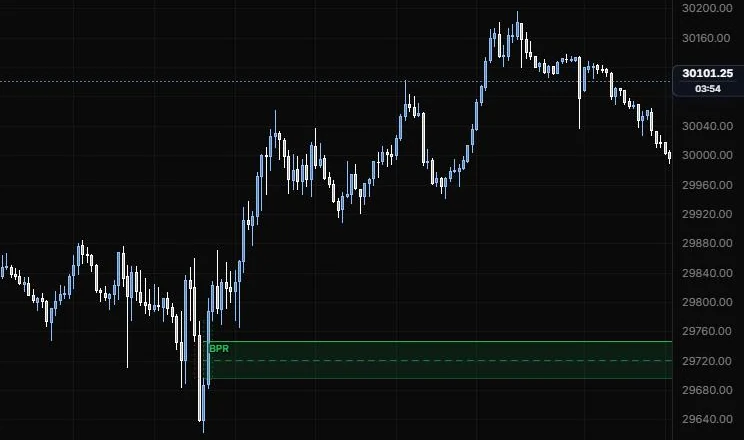
NQ 5m, Oct 15, 2026 · Atlas
How to place: two clicks: the start and end of the range to scan. The tool pairs each gap with the most recent earlier opposite gap it overlaps, within 30 bars by default, and draws the overlap as the BPR. Open Analysis to see each one listed with its checks.
Good for: finding the spots where price ran both ways through the same prices quickly, which leaves a tight zone traders mark.
Example: On NQ 5m (Oct 15, 2026), drag across the bars around the 9:55 low. The drop into the low leaves a bearish gap and the snap-back off it leaves a bullish one over some of the same prices, and the tool boxes that overlap as a BPR, roughly 29,700 to 29,745, with a dashed CE line. It carries the zone right across the session, so you'd see it again if price ever came back down to the morning's lows.
Settings
| Setting | Options | What it does |
|---|---|---|
| Min gap size | 0 to 2× ATR, default 0.25 | Ignores gaps smaller than this. |
| Gaps within | 1 to 200 bars, default 30 | The opposing gap must form within this many bars of the first. |
| Show | 1 to 50 most recent, default 5 | How many are drawn. |
| Hide failed | On or off, default on | A BPR fails when a later close goes through its far edge. |
| Extend | Until it ends, To the range end | How far each zone runs. |
| Consequent encroachment | On or off, default on; line role (default dashed, 1 px, 55%) | The overlap's 50% line. |
| Show the source gaps | On or off, default on; outline line role (default dotted, 1 px, 50%) | Faint outlines of the two gaps. |
| Proximal and distal edge | Line roles (default solid, 1 px at 90% and 35%) | The two edges of the zone. |
| Other options | Fill opacity (default 10%), bullish and bearish colours, scan range outline, label, text size and opacity | How the zones and labels look. |
Breaker block
An order block that failed after liquidity was taken, now acting from the other side.
NQ 5m, Oct 15, 2026 · Atlas
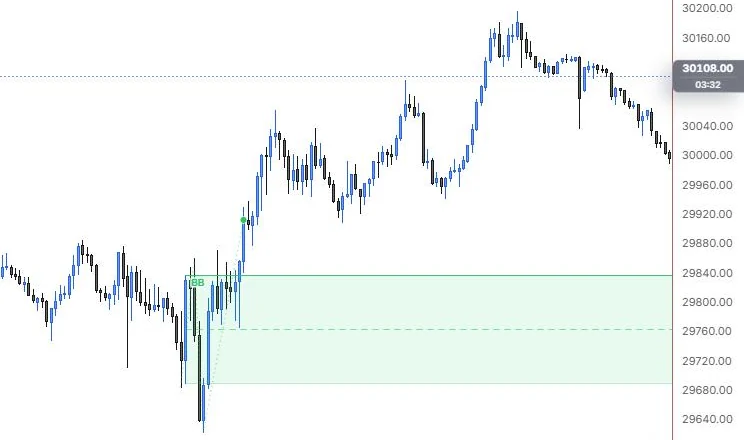
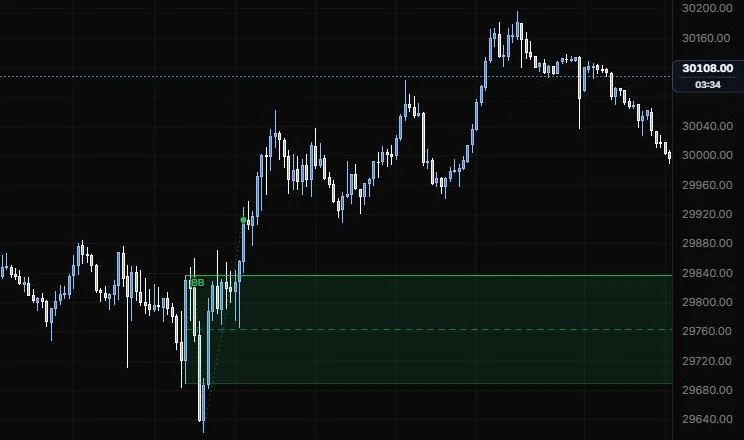
How to place: two clicks: the start and end of the range to scan. For a bullish breaker the tool looks for this sequence in the bars: a swing low, a swing high, a drop to a lower low that takes the first low's liquidity, then a close above the swing high. The block is the last up-close candle at or before that swing high (the bearish block that failed). Bearish is the mirror. Open Analysis to see each step with its checks.
Good for: marking the level where one side got trapped, which traders watch for a retest after the shift.
Example: On NQ 5m (Oct 15, 2026), drag across the morning from before 9:45 to past 10:30. The tool finds the sequence around the 9:45 to 10:00 lows: a swing low, a bounce, the drop to the 9:55 day low that takes the first low's stops, then a close back above the bounce high. It boxes the failed up-close candle as a bullish breaker (BB), about 29,688 to 29,836 with its CE line, and a dotted line with a dot traces the swings and the break that made it.
Settings
| Setting | Options | What it does |
|---|---|---|
| Swing strength | 1 to 5 bars each side, default 1 | 1 is the 3-candle swing. Raise it to ignore minor swings. |
| Zone | Full range, Body, Open → extreme | The failed block candle's high to low, its body, or open to extreme. |
| Displacement | 0 to 5× ATR, default 1 | A body at least this big counts as displacement (checked in Analysis). |
| Require displacement | On or off, default off | Only blocks whose break leg displaced. |
| Bull / Bear in label | On or off, default off | Adds the bias to the label. |
| Show | 1 to 50 most recent, default 5 | How many are drawn. |
| Hide failed | On or off, default on | A breaker fails when a later close goes through its far edge. |
| Extend | Until it ends, To the range end | How far each zone runs. |
| Consequent encroachment | On or off, default on | The block's 50% line. |
| Show the swings | On or off, default on; swing line role (default dotted, 1 px, 55%) | The structure that made the block: prior swing, swing, extreme, break. |
| Other options | Proximal and distal edge lines, fill opacity (default 10%), bullish and bearish colours, scan range outline, label, text size and opacity | How the zones and labels look. |
Mitigation block
Like a breaker, but the failed block formed without taking liquidity first.
NQ 5m, Oct 15, 2026 · Atlas
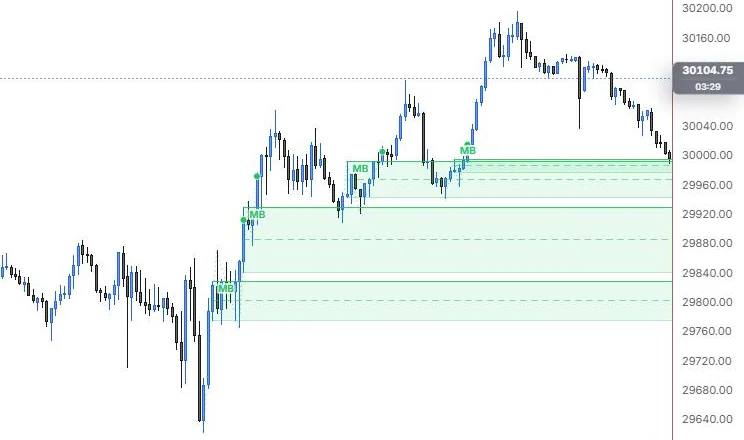
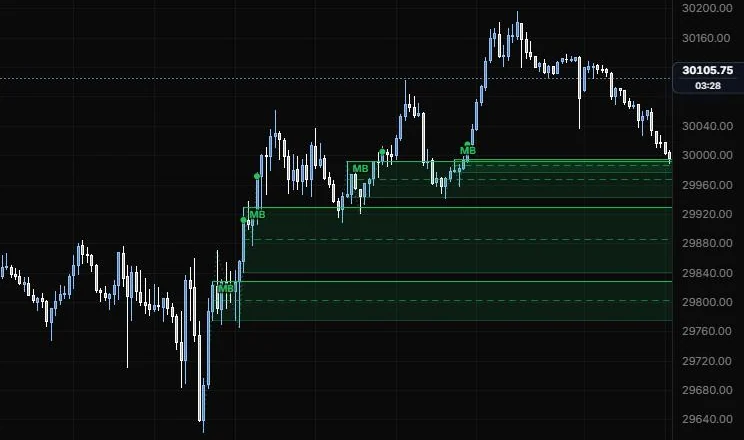
How to place: two clicks: the start and end of the range to scan. The sequence is the same as the breaker (swing low, swing high, drop, close above the swing high), except the drop makes a higher low instead of a lower one, so no sell-side liquidity was taken. The block is the last up-close candle at or before the swing high. Bearish is the mirror. Open Analysis to see each step with its checks.
Good for: telling apart the two kinds of failed block. Some traders treat a block that broke without a liquidity raid differently from a breaker, and this keeps them separate on the chart.
Example: On NQ 5m (Oct 15, 2026), drag from 10:00 to 14:30. The rally legs keep making higher lows, so no sell-side liquidity is taken, and the tool finds four bullish mitigation blocks (MB) stepping up the day, each with its CE line and a dot where the break above the swing high confirmed it. They read as a ladder of zones under price, from the morning legs up to the one just under 30,000 from the 14:20 push.
Settings
| Setting | Options | What it does |
|---|---|---|
| Swing strength | 1 to 5 bars each side, default 1 | 1 is the 3-candle swing. Raise it to ignore minor swings. |
| Zone | Full range, Body, Open → extreme | The failed block candle's high to low, its body, or open to extreme. |
| Displacement | 0 to 5× ATR, default 1 | A body at least this big counts as displacement (checked in Analysis). |
| Require displacement | On or off, default off | Only blocks whose break leg displaced. |
| Bull / Bear in label | On or off, default off | Adds the bias to the label. |
| Show | 1 to 50 most recent, default 5 | How many are drawn. |
| Hide failed | On or off, default on | A mitigation block fails when a later close goes through its far edge. |
| Extend | Until it ends, To the range end | How far each zone runs. |
| Consequent encroachment | On or off, default on | The block's 50% line. |
| Show the swings | On or off, default on; swing line role (default dotted, 1 px, 55%) | The structure that made the block. |
| Other options | Proximal and distal edge lines, fill opacity (default 10%), bullish and bearish colours, scan range outline, label, text size and opacity | How the zones and labels look. |
Rejection block
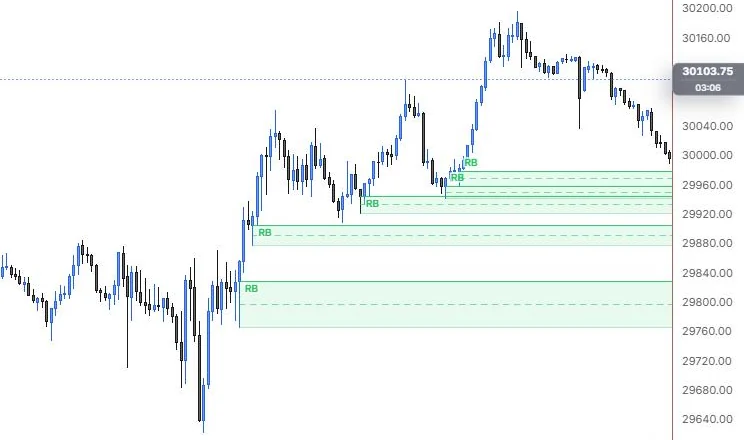
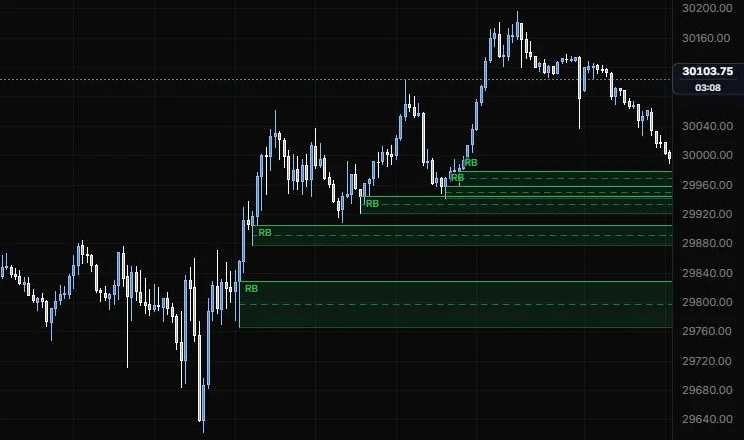
The long wick of a swing high or low, from the body edge to the wick's tip.
NQ 5m, Oct 15, 2026 · Atlas
How to place: two clicks: the start and end of the range to scan. The tool finds every swing high whose upper wick, or swing low whose lower wick, is at least half the candle's range by default, and boxes that wick. Open Analysis to see each one listed with its checks.
Good for: marking where price got pushed away hard, as a zone to watch if price comes back up into the wick.
Example: On NQ 5m (Oct 15, 2026), drag from the morning rally through the afternoon pullbacks. The tool boxes the long lower wicks at the swing lows as bullish rejection blocks (RB), from the bottom of each body down to the wick's tip, each with its 50% line and carried right. You end up with a stack of zones where sellers got rejected on the way up, from the 10:00 rally leg to the 14:20 low.
Settings
| Setting | Options | What it does |
|---|---|---|
| Swing strength | 1 to 5 bars each side, default 1 | 1 is the 3-candle swing. Raise it to ignore minor swings. |
| Min wick | 20 to 95% of range, default 50 | The rejecting wick's share of the candle's high to low. |
| Show | 1 to 50 most recent, default 5 | How many are drawn. |
| Hide failed | On or off, default on | A rejection block fails when a later close goes beyond the wick. |
| Extend | Until it ends, To the range end | How far each zone runs. |
| Consequent encroachment | On or off, default on; line role (default dashed, 1 px, 55%) | The wick's 50% line. |
| Proximal and distal edge | Line roles (default solid, 1 px at 90% and 35%) | The two edges of the zone. |
| Other options | Fill opacity (default 10%), bullish and bearish colours, scan range outline, label, text size and opacity | How the zones and labels look. |
Volume imbalance
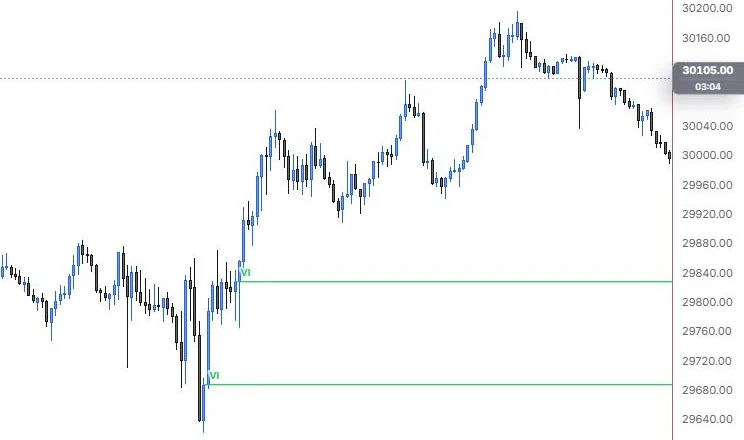
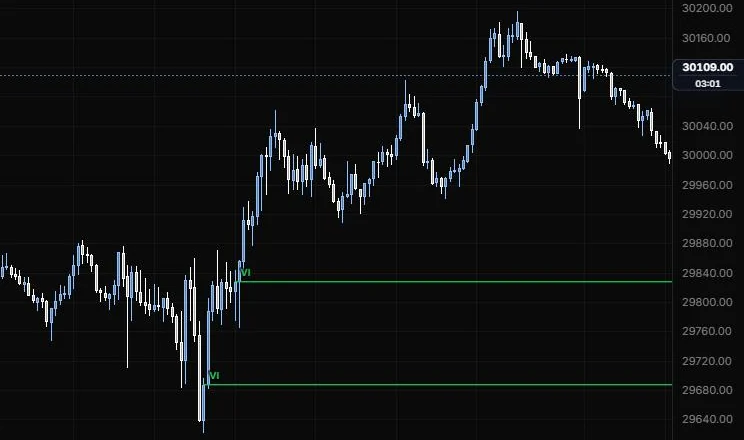
A gap between two candles' bodies where their wicks still overlap.
NQ 5m, Oct 15, 2026 · Atlas
How to place: two clicks: the start and end of the range to scan. The tool finds every pair of back-to-back candles whose bodies leave a gap while their wicks overlap. A bullish one has the second body sitting wholly above the first, and the zone runs from the first body's top to the second body's bottom. Open Analysis to see each one listed.
Good for: the smaller imbalances a fair value gap scan won't catch, often seen at the open of a new bar after a quick move.
Example: On NQ 5m (Oct 15, 2026), drag across the morning. The tool finds two bullish volume imbalances (VI), one right off the 9:55 low near 29,685 and one on the push near 29,830, where the next body opened above the last with the wicks still overlapping. Both are only a few ticks tall, so they draw as thin lines carried right rather than boxes.
Settings
| Setting | Options | What it does |
|---|---|---|
| Both candles same way | On or off, default on | ICT's usual reading: two up-close (bullish) or two down-close (bearish) candles. |
| Min size | 0 to 2× ATR, default 0 | Ignores imbalances smaller than this. |
| Show | 1 to 50 most recent, default 5 | How many are drawn. |
| Hide filled | On or off, default on | Filled means price traded through the far body edge. |
| Extend | Until it ends, To the range end | How far each zone runs. |
| Consequent encroachment | On or off, default off; line role (default dashed, 1 px, 55%) | The imbalance's 50% line. |
| Proximal and distal edge | Line roles (default solid, 1 px at 90% and 35%) | The two edges of the zone. |
| Other options | Fill opacity (default 10%), bullish and bearish colours, scan range outline, label, text size and opacity | How the zones and labels look. |
Opening gap (NWOG / NDOG)
The gap between one session's last close and the next session's first open.
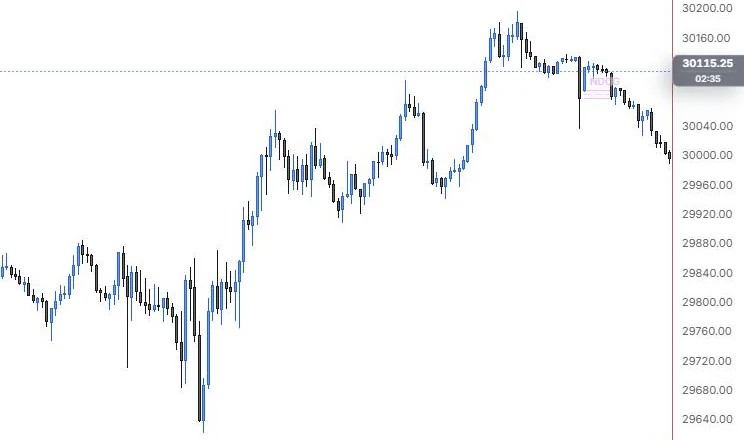
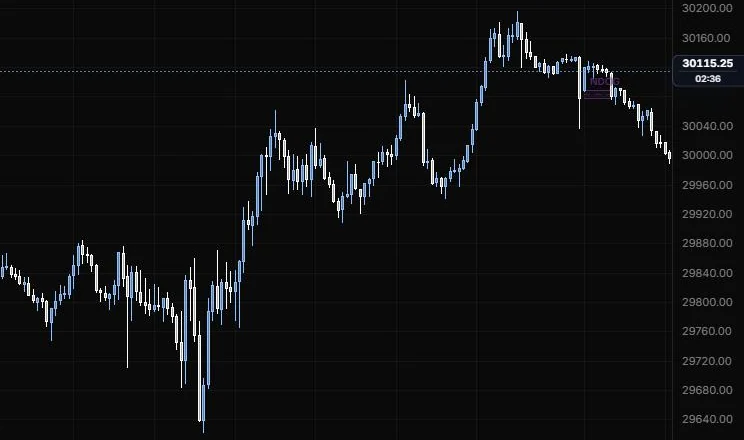
NQ 5m, Oct 15, 2026 · Atlas
How to place: two clicks: the start and end of the range to scan. Wherever the bars pause for at least 30 minutes (CME's daily halt is 60), the tool takes the gap between the bar before the pause and the bar after it. A gap that also starts a new trading week is a New Week Opening Gap (NWOG); otherwise it's a New Day Opening Gap (NDOG). Open Analysis to see each gap listed.
Good for: keeping last week's and this week's opening gaps on the chart, since many ICT traders treat them as reference levels for days afterwards.
Example: On NQ 5m (Oct 15, 2026), drag across the session and into the evening. The only pause in range is the daily halt, so the tool finds one gap: a small NDOG between the last bar before the halt and the 18:00 reopen, boxed with its CE line. Drag across a Sunday open instead and that gap would come up as an NWOG.
Settings
| Setting | Options | What it does |
|---|---|---|
| Gaps | NWOG + NDOG, New week (NWOG), New day (NDOG) | Which gaps to find. |
| Session break | 15 to 720 min, default 30 | A pause in the bars at least this long starts a new session. |
| Show | 1 to 50 most recent, default 5 | How many are drawn. |
| Hide filled | On or off, default off | Filled means price traded back to the prior close. |
| Extend | Until it ends, To the range end | How far each zone runs. |
| NWOG colour and NDOG colour | Default blue and purple | Colours for the two kinds. |
| Consequent encroachment | On or off, default on; line role (default dashed, 1 px, 55%) | The gap's 50% line. |
| Proximal and distal edge | Line roles (default solid, 1 px at 90% and 35%) | The two edges of the zone. |
| Other options | Fill opacity (default 10%), scan range outline, label, text size and opacity | How the zones and labels look. |
Equal highs / lows
Two or more swing highs (or lows) at nearly the same price, where stops tend to pile up.
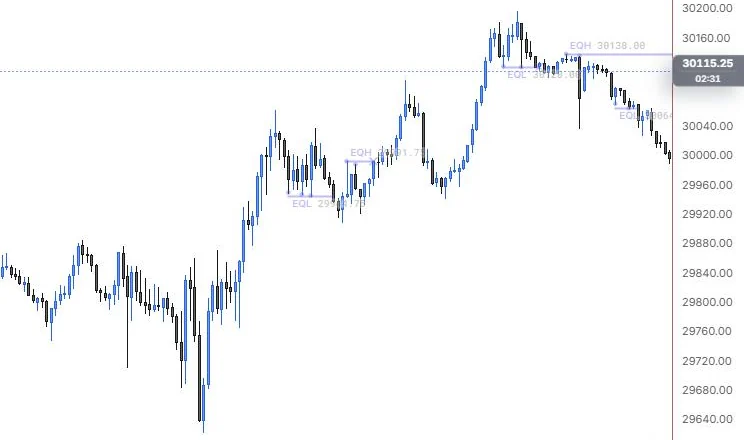
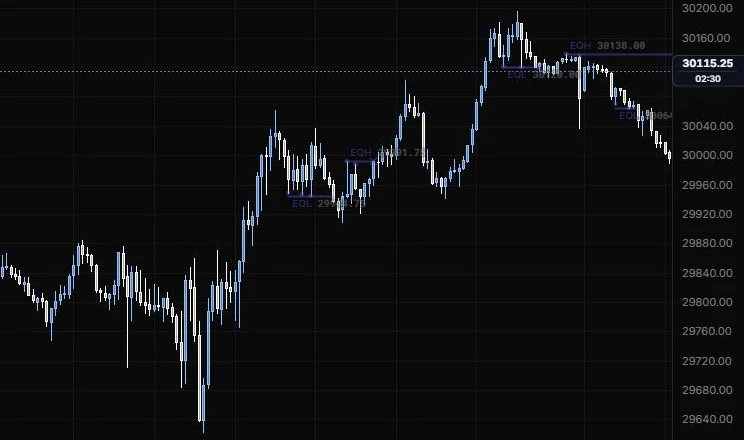
NQ 5m, Oct 15, 2026 · Atlas
How to place: two clicks: the start and end of the range to scan. The tool groups confirmed swings whose prices sit within the tolerance of each other, as long as no bar between them traded beyond the group (that would have taken the earlier one already). Each group gets a line, and the tool marks when it's later swept or run. Open Analysis to see each group listed.
Good for: finding the clean double tops and bottoms that look like obvious liquidity, without eyeballing whether two highs are "close enough".
Example: On NQ 5m (Oct 15, 2026), drag across the whole session. The tool joins each group with a line and labels it with its price: equal lows and highs in the midday chop, then after the top an EQL at 30,120.00 and an EQH at 30,138.00 on the late-day highs. Those are the spots where stops tend to pile up, and the tool marks it if a later bar sweeps or runs one.
Settings
| Setting | Options | What it does |
|---|---|---|
| Find | Highs + lows, Equal highs, Equal lows | Which side to look for. |
| Swing strength | 1 to 5 bars each side, default 1 | 1 is the 3-candle swing. Raise it to ignore minor swings. |
| Tolerance in | Ticks, % of price | How "equal" is measured. Ticks are inferred from the bars' own prices. |
| Tolerance (ticks) | 0 to 50 ticks, default 2 | Used when Tolerance in is Ticks. |
| Tolerance (%) | 0 to 1%, default 0.02% | Used when Tolerance in is % of price. |
| Reclaim within | 0 to 10 bars, default 0 | A close beyond that closes back within this many bars is a sweep, not a run. |
| Show | 1 to 50 most recent, default 5 | How many groups are drawn. |
| Hide taken | On or off, default off | Taken means swept or run through. |
| Extend | Until it ends, To the range end | How far each line runs. |
| Label and Price | On or off, both default on | What the label shows. |
| Other options | Scan range outline, text size (default 10), text opacity | How the labels look. |
SMT divergence
Swings where this chart and a correlated market disagree: one makes a new high or low and the other doesn't.
NQ 5m, Oct 15, 2026 · Atlas
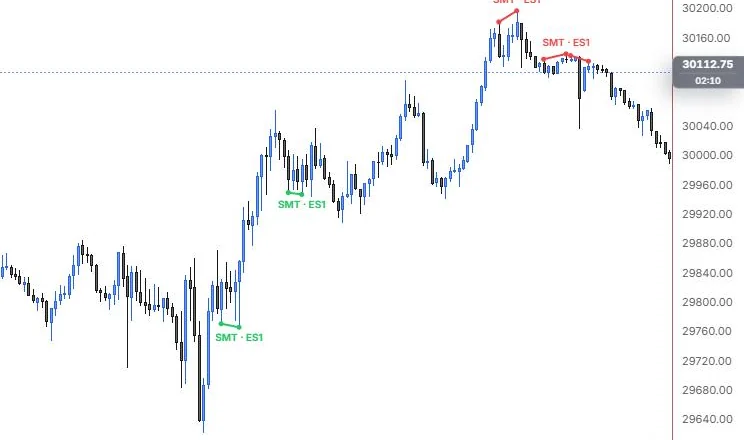
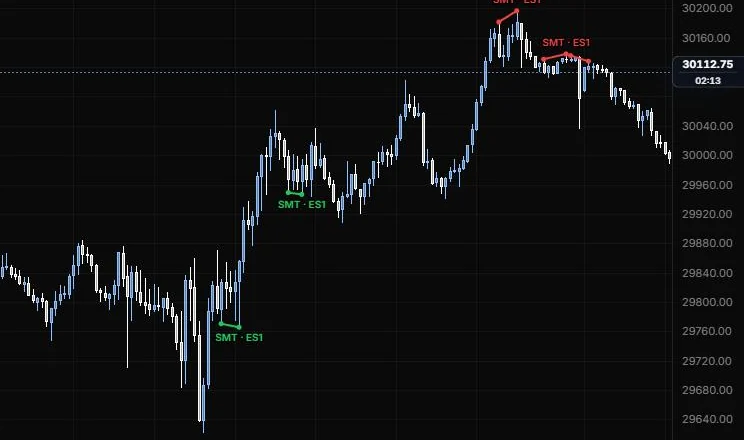
How to place: two clicks: the start and end of the range to scan. The tool loads the partner market's bars for the same range and interval, lines them up bar for bar with this chart, and compares swings. If one makes a higher high and the other makes an equal or lower high, that's a bearish SMT. A lower low on one without the other is a bullish SMT. Either market can be the one that makes the new extreme. Each divergence is drawn as a line joining this chart's two swings, with a dot at each end and an "SMT · partner" label. The partner's prices live on a different scale, so they show in the Analysis panel, not on this chart's axis.
Good for: the classic ES versus NQ check at a swing. When one index sweeps a high and the other refuses to follow, a lot of ICT traders read that as a warning.
Example: On NQ 5m (Oct 15, 2026), drag across the whole session. With ES as the default partner, the tool draws green "SMT · ES1" lines at the morning lows, where one market made a lower low and the other didn't, and red ones at the afternoon highs, where one made a higher high and the other didn't. ES's prices live on a different scale, so Analysis lists both markets' prices at each swing.
The partner market: leave Compare with blank and the tool uses the usual partner for this chart's symbol:
| This chart | Compared with |
|---|---|
| ES1 or ES | NQ1 or NQ |
| NQ1 or NQ | ES1 or ES |
| MES1 and MNQ1 | each other |
| YM1, RTY1 | ES1 |
| SPX, SPXW | NDX |
| NDX | SPX |
| SPY and QQQ | each other |
| DIA, IWM | SPY |
Any other symbol has no default, so type the one you want into Compare with. A named partner always wins over the default, and an option contract as a partner needs option-chart access.
What it needs: a chart of one minute or longer. On tick and seconds charts the tool shows "SMT needs a minute-or-longer chart" and loads nothing, because the partner only comes in one-minute or longer bars. A swing is only compared on bars both markets printed. If the partner's bars are missing or still loading for part of the range, the divergences there are held back rather than guessed, and the Analysis panel says how many and why (so does a note on the chart when nothing could be drawn).
Settings
| Setting | Options | What it does |
|---|---|---|
| Compare with | A symbol, default blank (the usual partner) | The correlated market to compare against. |
| Find | Bearish + bullish, Bearish (at highs), Bullish (at lows) | Which divergences to look for. |
| Swing strength | 1 to 5 bars each side, default 1 | 1 is the 3-candle swing. Raise it to ignore minor swings. |
| Swings within | 2 to 300 bars, default 40 | The two swings compared must be at most this many bars apart. |
| Equal within | 0 to 0.5%, default 0 | The market that follows still counts as failing when its new extreme beats its old one by no more than this. |
| Show | 1 to 50 most recent, default 5 | How many divergences are drawn. |
| Bullish and Bearish colour | Default green and red | Line and label colours. |
| Scan range | Line role (default dashed, 1 px) | Outline of the scanned range while placing or when nothing is found. |
| Label and Partner in label | On or off, both default on | "SMT · NQ1" instead of "SMT". |
| Text size and opacity | 8 to 20 px, default 10; 10% to 100%, default 100% | How the label looks. |
Last updated